
Underground Beacon
Java mod listed for Minecraft 26.x. Downloads from the MC Java Mods app on Android.
⬇ Download on Modrinth
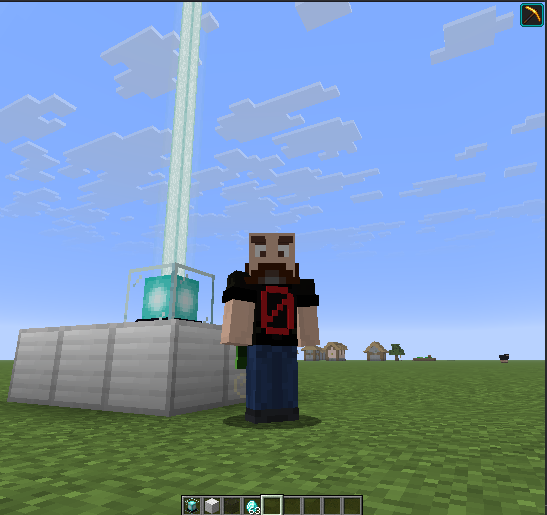
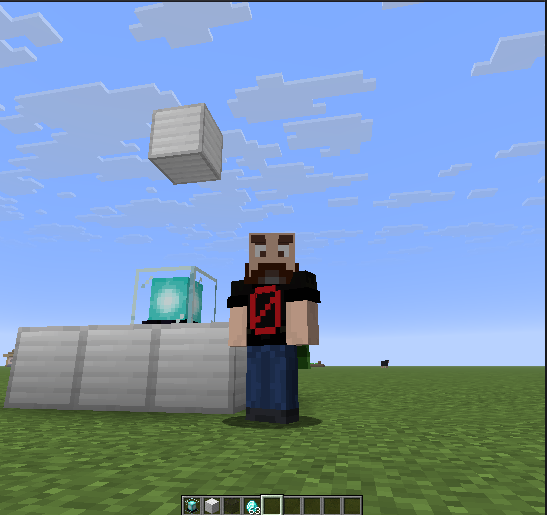
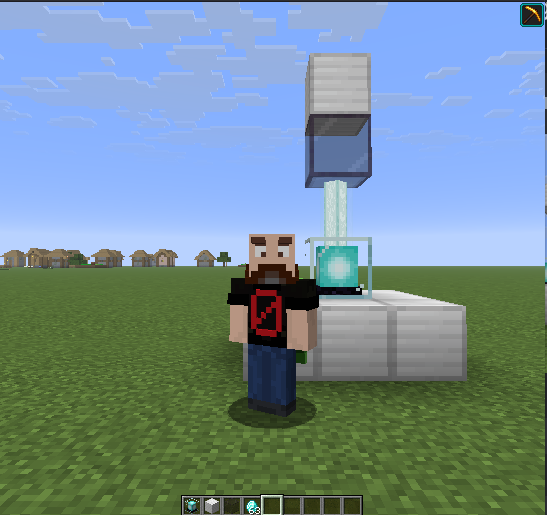
The Underground Beacon
Allows a beacon to be (and stay) active even if there is no clear path to the sky.
No more digging holes to make a beacon work underground.
Creating an Underground Beacon
To use a beacon underground/indoors without access to the sky, the player must place an Underground Beacon Block above it. The mod configures the Tinted Glass block by default (see Underground Beacon Blocks).
This block can be placed directly on top of the Beacon or higher, as long as there are no other blocks between them.
The exceptions are blocks that do not deactivate the beacon (e.g., stained glass blocks, used to change the beam color).
If the Underground Beacon Block is removed, the Beacon reverts to its normal behavior and will be deactivated if there is no clear path to the sky.
Beacon Beam on Underground Beacons
When a beacon is turned into an underground beacon, the mod changes how its beam is rendered for the players.
The beam renders only up to the tinted glass block, instead of all the way up to the max height (2048 in Vanilla).
Environment
The Underground Beacon mod can be installed in single-player or server (optional on client).
Single-Player
- Can be activated without a clear path to the sky by using a tinted glass block.
- The beam will be visible.
Server (Client is optional)
- Can be activated without a clear path to the sky by using a tinted glass block. The effect does not require the mod on the client.
For players with the mod on their client:
- The beam will be visible.
For players without the mod on their client:
- The beam will not be visible.
Client (not in the Server)
When the mod is present on a client but not on the server, using the tinted glass block will not activate the effect. The beacon still needs a clear path to the sky, as the effect is always managed by the server.
But the rendering changes will be applied.
This means the beam will become visible and will be rendered as if the beacon was activated.
Underground Beacon Blocks
The Tinted Glass Block is the default Underground Beacon block, but you can add more blocks or change the default using a Data Pack.
Any block listed under the tag underground_beacon is a valid block for the mod.
You can replace the default block or add more blocks using a data pack.
Creating a Data Pack to Add or Replace the Underground Beacon blocksBelow is the step-by-step to create a data pack to add or change the blocks used by the mod.
Notes:
If you want to remove the Tinted Glass block and use other blocks instead, change "replace": false to "replace": true on step 7.
Here you will find a list with all Minecraft blocks so you can find their full identifiers (minecraft:block_name).
It is also possible to use modded blocks.
WARNING
It's NOT recommended to add blocks that do not block the beacon, like stained glass, as the mod will change their behavior.
The following example adds two Minecraft blocks that can be used by the player besides the default one: Glowstone and Sea Lanterns.
Step 1. Start by creating a folder on your computer with the name you want for your data pack (e.g., my_pack).
Step 2. Inside your pack folder (my_pack), create a (text) file with the name pack.mcmeta.
Step 3. Still inside this folder, add the following folder structure:
\data\underground_beacon\tags\block
Step 4. Inside the last folder (block), create a (text) file with the name underground_beacon.json.
Step 5. Your final folder structure, with the two files we created inside, will look like this:
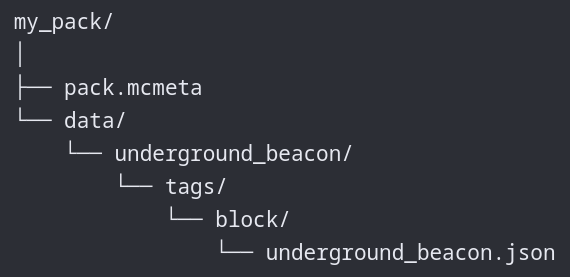
Step 6. In the pack.mcmeta file, add the following:
    {
      "pack": {
        "description": "Add (or replace) Underground Beacon Blocks",
        "min_format": 107.1,
        "max_format": 107.1
      }
    }
Step 7. In the underground_beacon.json file, add the following:
    {
        "replace": false,
        "values": [
            "minecraft:glowstone",
            "minecraft:sea_lantern"
        ]
    }
Step 8. Zip the root folder and drop the my_pack.zip file you just created into your world datapack folder.
Notes:
- When the data pack is used on a server with the mod, the client doesn't need the data pack.
- Using a data pack on a client connected to a server without it or with a different set of blocks defined will cause the effects discussed in the Environment section.
Complementary Shaders Community Server
This mod was made for the Complementary SMP, a server run by the Complementary Shaders Discord Community.
Join the community in the Complementary Shaders Discord and play Minecraft on our server. :)
Incompatibilities
Currently, no incompatibilities are known.
But any mod that changes the Beacon behavior may be incompatible.
If you encounter any problems when using Underground Beacon with other mods, open an issue or leave me a message on my Discord (links on the side bar).
Dependencies
- Fabric API
License
This project uses different licenses for its source code and visual/audio/design assets.
The source code is available under the MIT license.
Visual, audio, and other assets are all rights reserved.
- Edition: Minecraft Java
- File type: .jar
- Minecraft version listed: 26.2
- How to install: Install the matching mod loader (Forge, Fabric or NeoForge) for your Minecraft version. → Download the .jar. → Put it in the .minecraft/mods folder and launch that loader profile.
- Where to get it: Opens on Modrinth — not every file is mirrored on our own servers.
Install steps are the general flow for this file type — How to install Minecraft Java mods & modpacks walks through it step by step.
- Ships as underground-beacon-1.0.2+26.2.jar — drop this file into the mods folder
- Download size: 23 KB
- Download link checked 29 Sept 2026 — working
These come from our own check of the pack file, not from the source page.