CustomChat
Bedrock add-on listed for Minecraft 26.x (behavior + resource pack). Needs Beta APIs. File opened and checked on 18 Aug 2026; installs from the MC Bedrock Mods app on Android.
⬇ Download on CurseForgeThe author built this one for Minecraft 26.40. On other versions it may install and then do nothing.
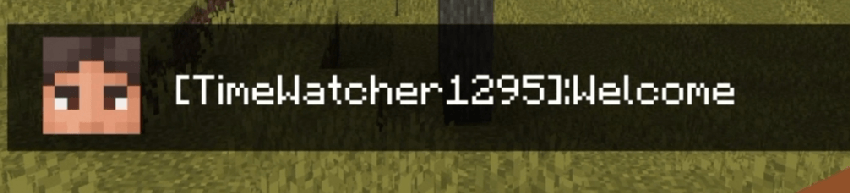
Have you ever thought about setting up pop-up chat in Minecraft? Here's how I describe it:
💬 Personalized chat for Minecraft Bedrock
👤 Custom player he
🎨 Customizable appearan
⚡ Easy setupceadupcead
<video controls="controls" width="700" height="350"> <source src="https://www.image2url.com/r2/default/videos/1786943154622-4d20895b-688f-4174-b3c5-b5525cece3ce.mp4" type="video/mp4"></video>
I think it looks pretty cool.
Now let's move on to installing and configuring the add-on:
- First, make sure you're signed in to your Microsoft account. If not, we'll do it a little differently.
- Download the add-on
- In any file manager, rename the add-on by adding
- In any pixel art app, draw yourself an icon or use an image of a head from a skin. Then save this photo under your Minecraft username.
- After that, move the photo along the path:
RP/textures/ui/heads/your_nick.png - Make sure the texture name is in lowercase and without spaces, otherwise the texture won't display in chat and will appear black and pink. An example is below:
-
RP/ui/chat_hud.json - Look inside, you will see a lot of incomprehensible code, but that's okay.
- Find the "chat_portrait" section there, and within it, a subsection with controls.
- Replace any of the icons in this list, change the texture, and alias. More details below:
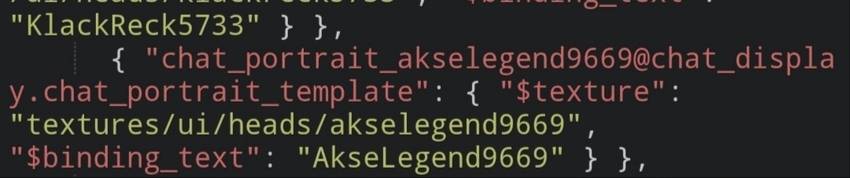
If you're still confused, simply copy the text below and replace just one item from this huge list. If you don't want to replace it, you can add it to the end of the list.
{ "chat_portrait_your_nick@chat_display.chat_portrait_template": {"$texture": "textures/ui/heads/your_nick", "$binding_text": "Your Nick"}}12. CONGRATULATIONS!! If you've made it this far, you've done everything correctly, and everything should be working properly!
Enjoy the game!
My social networks:
- DISCORD: discord.gg/QgTcf7DzPz
- ТикТок: www.tiktok.com/@demiurge_w0rk7
- YouTube: youtube.com/@demiurge_w0rk
- Telegram-канал: t.me/@demiurge_w0rk
You are prohibited from:
- Change something and then publish it under your own name.
2. Use in your business activities.
You can:
1. Play with this add-on in single player mode or in multiplayer (if you set everything up)
- Please pass it on to other people, but only if they include a link to this add-on.
- Edition: Minecraft Bedrock
- File type: .mcpack or .mcaddon
- Minecraft version listed: 26.40
- How to install: Download the .mcpack or .mcaddon file. → Open it — Minecraft imports it. → In your world: Behavior Packs → Available → Activate, then the same under Resource Packs.
- Where to get it: Opens on CurseForge — not every file is mirrored on our own servers.
Install steps are the general flow for this file type — How to install Minecraft Bedrock addons & mods walks through it step by step.
- Pack type: .mcaddon — behaviour and resource pack in one file
- Manifest requires Minecraft 1.26.40 or newer
- Needs Beta APIs switched on in the world settings
- Complete pack — everything it depends on is inside the file
- Download size: 20 KB
- Download link checked 29 Sept 2026 — working
These come from our own check of the pack file, not from the source page.