
BubbleChat MC
Java mod listed for Minecraft 1.20–26.x. Downloads from the MC Java Mods app on Android.
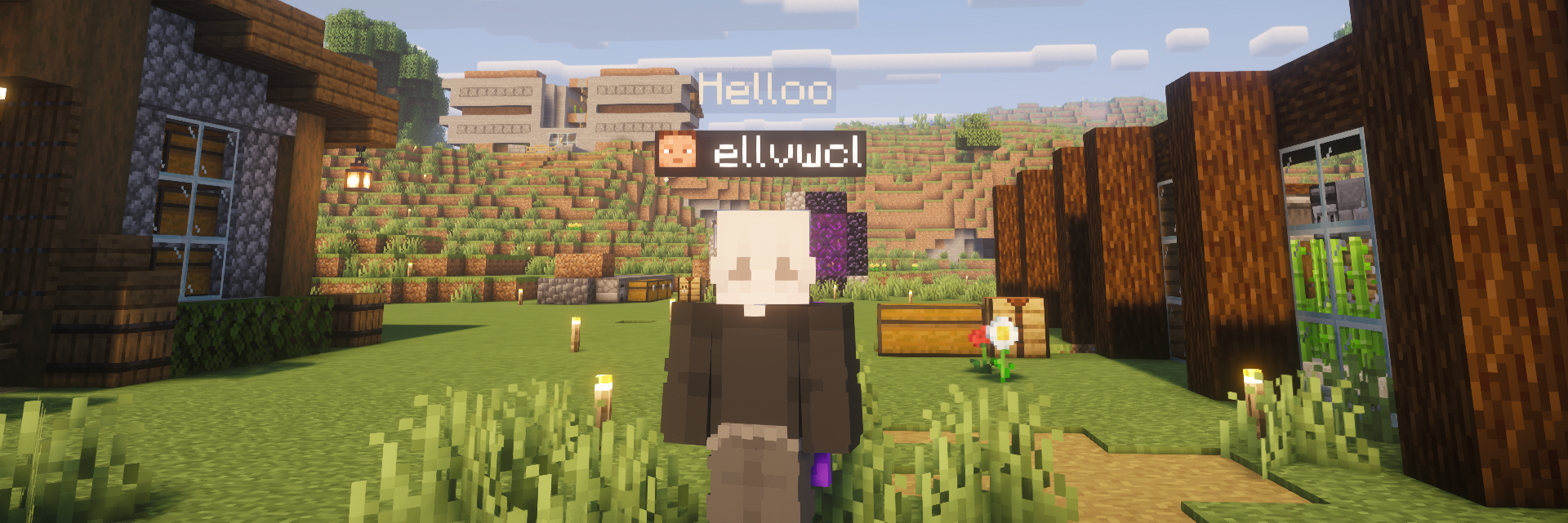
Displays a floating chat bubble above a player's head when they type, with full config control over height, color, duration, and the option to toggle…
⬇ Download on Modrinth
ChatBubblePlugin
Displays a floating chat bubble above a player's head whenever they type a message — a lightweight, native alternative to hologram-based chat plugins, built entirely on Paper's own Display entity API.

What it does
When a player sends a chat message, the plugin can show it two ways at once, or just one:
- Above their head — a
TextDisplaybubble spawns above the player, automatically follows them while they move, and disappears on its own after a short delay. - In the normal chat box — the regular chat message, exactly like vanilla.
Both are independent and fully toggleable. Turn off the normal chat box and keep only bubbles, keep both, or turn off bubbles and keep vanilla chat — it's entirely up to the server owner, and players can also opt out of their own bubble individually.
Features
- 🗨️ Floating chat bubble above the head, following the player in real time
- ✅ Toggle normal chat and bubble chat independently, globally, via command or config
- 🙋 Per-player opt-out with
/bubbletoggle— saved permanently, no database needed - 🎨 Configurable text color, background color, and background opacity
- 📏 Adjustable bubble height, so it never gets hidden behind nametags
- ⏱️ Configurable display duration and character limit
- 🔄 Reload settings on the fly with
/chatbubble reload— no restart required - 🧹 Automatic cleanup on player quit/death and plugin disable — no leftover entities
Commands
| Command | Permission | Description |
|---|---|---|
/chatbubble reload |
chatbubble.admin |
Reload config.yml |
/chatbubble bubble <on|off> |
chatbubble.admin |
Toggle bubble chat globally |
/chatbubble chat <on|off> |
chatbubble.admin |
Toggle normal chat globally |
/chatbubble height <number> |
chatbubble.admin |
Adjust bubble height above the head |
/chatbubble status |
chatbubble.admin |
View current settings |
/bubbletoggle |
chatbubble.toggle (default: all players) |
Toggle your own bubble on/off |
Configuration
All settings live in config.yml, generated on first run — no need to edit any code:
settings.normal-chat.enabled— show messages in the normal chat boxsettings.bubble-chat.enabled— show messages as a bubble above the headsettings.bubble-chat.height-offset— distance above the headsettings.bubble-chat.duration-seconds— how long a bubble stays visiblesettings.bubble-chat.max-characters— truncates long messagessettings.bubble-chat.text-color/background.color/background.opacity— appearancesettings.bubble-chat.scale— bubble text size
Requirements
- Paper (or a Paper fork) 1.26.1.2
- Java 21
Notes
The plugin uses Paper's native TextDisplay entities rather than ArmorStands, so it stays lightweight and compatible with modern client rendering. No external dependencies are required.
- Edition: Minecraft Java
- File type: .jar
- Minecraft versions listed: 1.20, 1.20.1, 1.20.2
- How to install: Install the matching mod loader (Forge, Fabric or NeoForge) for your Minecraft version. → Download the .jar. → Put it in the .minecraft/mods folder and launch that loader profile.
- Where to get it: Opens on Modrinth — not every file is mirrored on our own servers.
Install steps are the general flow for this file type — How to install Minecraft Java mods & modpacks walks through it step by step.
- Ships as ChatBubblePlugin 1.3.0.jar — drop this file into the mods folder
- Download size: 22 KB
- Download link checked 29 Sept 2026 — working
These come from our own check of the pack file, not from the source page.