Ghost Block Measure
Java mod listed for Minecraft 26.x. Downloads from the MC Java Mods app on Android.
This adds a measurement system to measure the distance in blocks from Point A to Point B, and also adds a ghost block system.
⬇ Download on Modrinth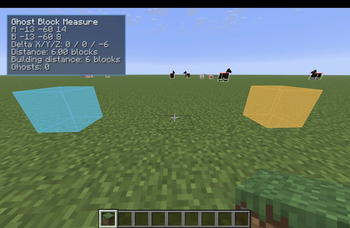
Ghost Block Measure
Ghost Block Measure is a client-side building utility mod that helps you plan builds before placing real blocks.
It lets you create ghost block markers in the world and set two measurement points, Point A and Point B, so you can quickly check distances, spacing, and layout while building. The ghost blocks are only visual previews. They do not place real blocks, consume items, affect collision, or change the world. This is useful when you want to line up walls, measure gaps, plan floors, mark corners, check symmetry, or test where blocks should go before committing to the build.
Features:
- Place visual ghost block markers
- Set Point A and Point B as ghost-style markers
- Measure the distance between two planned block positions
- View X/Y/Z delta between points
- View straight-line distance
- View building/Manhattan distance
- Compact HUD with measurement info
- Fully client-side
There is:
No server installation required No real block placement No inventory use No world changes
How It Works:
Look at a block face and press the keybind to add a ghost block or set a measurement point. The marker appears where a block would normally be placed, letting you plan around the actual placement position instead of just marking the block you are looking at. Point A and Point B can be used to measure the space between two planned positions. The HUD shows the selected coordinates, the difference on each axis, and the total distance.
Default Keybinds:
Set Point A: V Set Point B: B Add/Remove Ghost Block: G Clear Ghost Blocks: M Clear Measurement: N Toggle HUD: H All keybinds can be changed in: Options → Controls → Key Binds → Ghost Block Measure
Notes:
Ghost Block Measure is designed as a building and planning tool. It does not automate building, place blocks for you, or give free materials. It simply helps you visualize and measure before you build.
Made with implementation help from OpenAI Codex.
- Edition: Minecraft Java
- File type: .jar
- Minecraft version listed: 26.2
- How to install: Install the matching mod loader (Forge, Fabric or NeoForge) for your Minecraft version. → Download the .jar. → Put it in the .minecraft/mods folder and launch that loader profile.
- Where to get it: Opens on Modrinth — not every file is mirrored on our own servers.
Install steps are the general flow for this file type — How to install Minecraft Java mods & modpacks walks through it step by step.
- Ships as GhostBlockMeasure-V3.jar — drop this file into the mods folder
- Download size: 15 KB
- Download link checked 29 Sept 2026 — working
These come from our own check of the pack file, not from the source page.