
Simple Block Randomizer
Java mod listed for Minecraft 26.x. Downloads from the MC Java Mods app on Android.
Randomizes which enabled hotbar slot is used on every block placement. Pick your slots once, then just click - no more scrolling between block variants…
⬇ Download on Modrinth
Block Randomizer
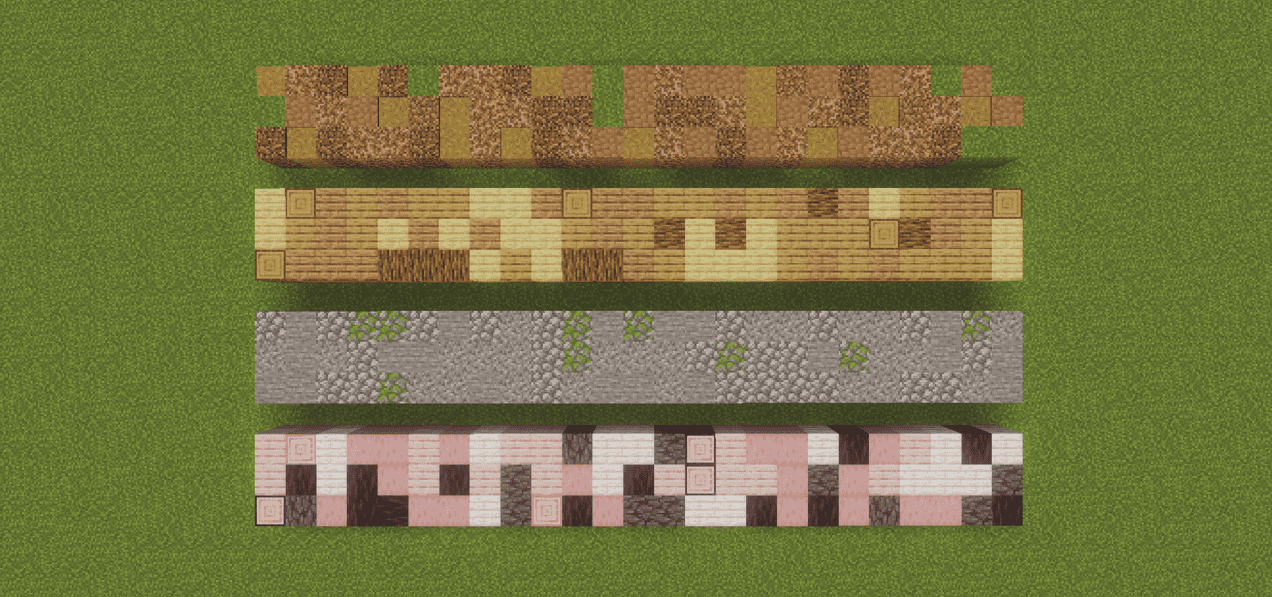
Building a stone wall out of four different variants usually means scrolling your hotbar between every single click. Block Randomizer does the scrolling for you: enable the slots you want to build with, and every placement picks one of them at random.
Client-side only. Works on any server, no server install needed.
Features
- Random block placement - every placement uses a uniformly random enabled hotbar slot. Truly random, so the same block can come up twice in a row.
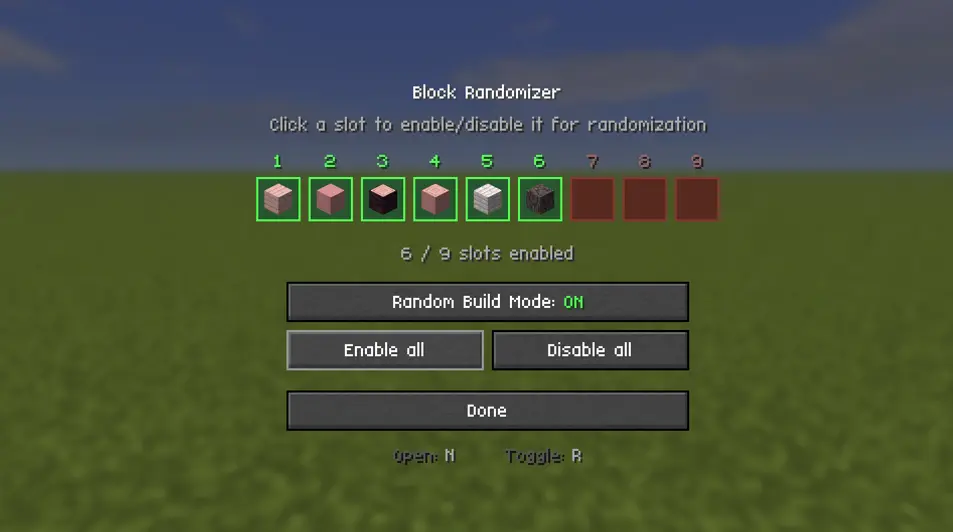
- Pick your slots visually - a settings screen shows your live hotbar as nine cells. Click a cell to enable or disable that slot
- Enable all / Disable all buttons for quick setup.
- Toggle on the fly with a single key, without opening any menu.
- Mod Menu support - open the settings straight from the mod list. The screen also shows your current keybinds, so there is no need to hunt through Controls.
- HUD indicator - a small marker in the top-left shows the mode is on and how many slots are in the pool.
- Settings persist across restarts.
- No server install. It only changes which slot you have selected before a completely normal vanilla placement.
How to use
- Put the blocks you want to mix into your hotbar.
- Press N to open the settings screen.
- Click the slots that should take part. Green = enabled, red = disabled.
- Press R (or the button on the screen) to turn Random Build Mode on.
- Build. Every click places a random one of your enabled slots.
Default keybinds
| Key | Action |
|---|---|
N |
Open the randomizer settings screen |
R |
Toggle Random Build Mode on / off |
Both are rebindable under Options → Controls → Block Randomizer.
Requirements
- Fabric Loader 0.19.3 or newer
Multiplayer
Safe on servers. The mod only swaps your own selected hotbar slot right before a normal vanilla placement - it never places blocks you do not have, and it does not bypass any placement rules. No server-side installation.
Made by Sebi. Licensed under MIT.
- Edition: Minecraft Java
- File type: .jar
- Minecraft version listed: 26.2
- How to install: Install the matching mod loader (Forge, Fabric or NeoForge) for your Minecraft version. → Download the .jar. → Put it in the .minecraft/mods folder and launch that loader profile.
- Where to get it: Opens on Modrinth — not every file is mirrored on our own servers.
Install steps are the general flow for this file type — How to install Minecraft Java mods & modpacks walks through it step by step.
- Ships as blockrandomizer-1.0.1.jar — drop this file into the mods folder
- Download size: 84 KB
- Download link checked 29 Sept 2026 — working
These come from our own check of the pack file, not from the source page.