
Komorebi japanese resourcepack
Java resource pack listed for Minecraft 1.18–26.x. Downloads from the MC Java Mods app on Android.
A Japanese-style 128x resource pack inspired by bamboo, tatami, cherry blossoms, and traditional architecture. Transforms your world into a feudal…
⬇ Download on Modrinth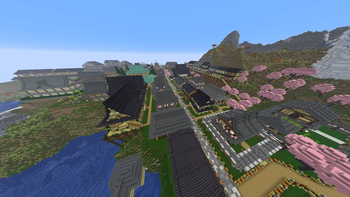
Komorebi — Japanese Resource Pack
Komorebi (木漏れ日) — the Japanese word for the interplay of light and leaves — brings the beauty of feudal Japan into your Minecraft world.
This 64x resource pack carefully retextures over 140 blocks and items to create an authentic Japanese aesthetic, from the sweeping curves of kawara roof tiles to the soft weave of tatami mats. Whether you're building a mountain temple, a bustling castle town, or a quiet zen garden, Komorebi gives every block the detail it deserves.
✨ Features
- 64x64 hand-crafted textures for maximum detail
- Kawara (瓦) roof tiles with realistic arch shading
- Tatami mats, shoji screens, and urushi lacquer wood
- Sakura (cherry blossom) and momiji (autumn maple) leaves
- Karesansui (枯山水) dry garden gravel with wave patterns
- Animated water surface in deep, calm Japanese pond tones
- Bamboo, polished hardwood, and washi paper textures
- Full coverage: planks, logs, stripped logs, stone, deepslate, copper, wool, concrete, and more
🎮 Compatibility
| Version | Support |
|---|---|
| Java Edition 1.21.x | ✅ |
| Java Edition 1.20.x | ✅ |
| Java Edition 1.19.x | ✅ |
| Java Edition 1.18.2 | ✅ |
📦 Installation
- Download the
.zipfile - Place it in your
.minecraft/resourcepacks/folder — do not unzip - Launch Minecraft and go to Options → Resource Packs
- Enable Komorebi and enjoy
🌸 Recommended Pairings
Works beautifully alongside Japanese-style building maps and structure packs. Pairs well with OptiFine or Iris Shaders for enhanced lighting and atmosphere.
「光と影の間に、日本がある。」 Between light and shadow, Japan exists.
- Edition: Minecraft Java
- File type: .zip (resource pack)
- Minecraft versions listed: 1.18, 1.18.1, 1.18.2
- How to install: Download the .zip resource pack — do not unzip it. → Put it in .minecraft/resourcepacks. → Enable it in Options → Resource Packs.
- Where to get it: Opens on Modrinth — not every file is mirrored on our own servers.
Install steps are the general flow for this file type — How to install Minecraft Java resource packs walks through it step by step.
- Downloads as japanese_64px_v7.zip
- Download size: 800 KB
- Download link checked 19 Oct 2026 — working
These come from our own check of the pack file, not from the source page.