
ResourcepacksJava
Nightly - Night vision for Minecraft [Optifine]
Minecraft Java resource pack. Download on the author's site.
Nightly v1.1 Night vision for Minecraft. Supports: [ <1.8 || 1.9 || 1.10 || 1.11 || 1.12 || 1.13 || 1.14 || 1.15 || 1.16 || 1.17 || 1.18 || 1.19 ] Please…
⬇ Download Nightly
v1.1
Night vision for Minecraft.

Supports:
[ <1.8 || 1.9 || 1.10 || 1.11 || 1.12 || 1.13 || 1.14 || 1.15 || 1.16 || 1.17 || 1.18 || 1.19 ]
Please, read the FAQ at the end of page.
v1.1
Night vision for Minecraft.
Supports:
[ <1.8 || 1.9 || 1.10 || 1.11 || 1.12 || 1.13 || 1.14 || 1.15 || 1.16 || 1.17 || 1.18 || 1.19 ]
Please, read the FAQ at the end of page.
This simple texture pack will make the darkness vanish, almost like night vision! Very useful for PC monitors with low gamma or multiplayer servers with very dark maps or lobbies.
Here's a comparison (before - after) with the arcade lobby of Hypixel server:

In Hypixel, there's a game called "Blocking Dead" (similar gameplay as Left 4 Dead game), and the map here is very, very, VERY dark, even with the brightness at 100% (well, on my PC monitor, I can hardly see anything, maybe for others this is not a problem):
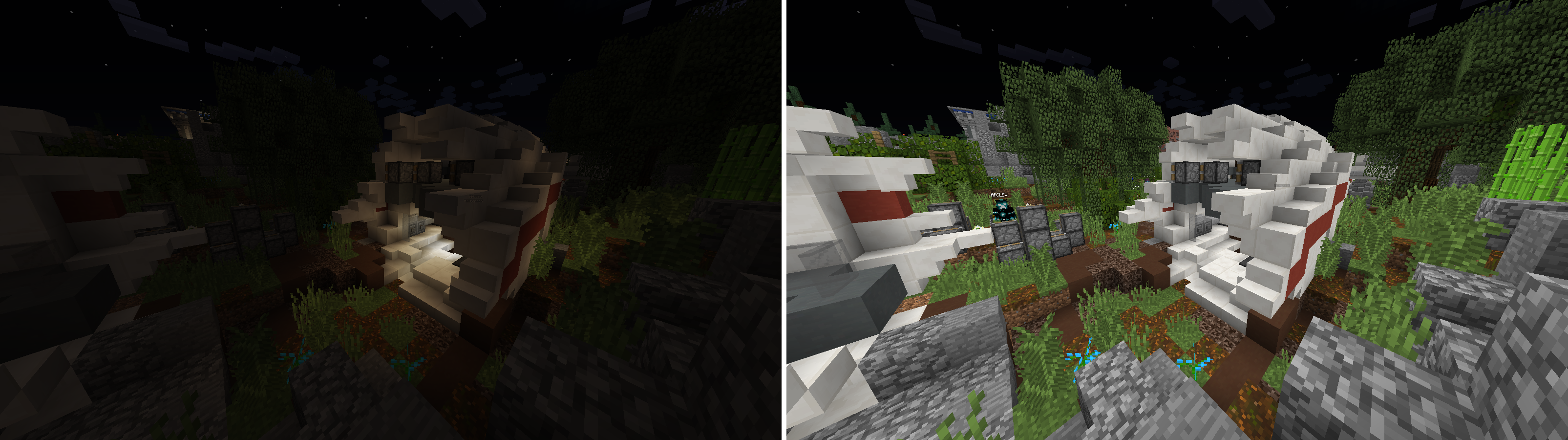
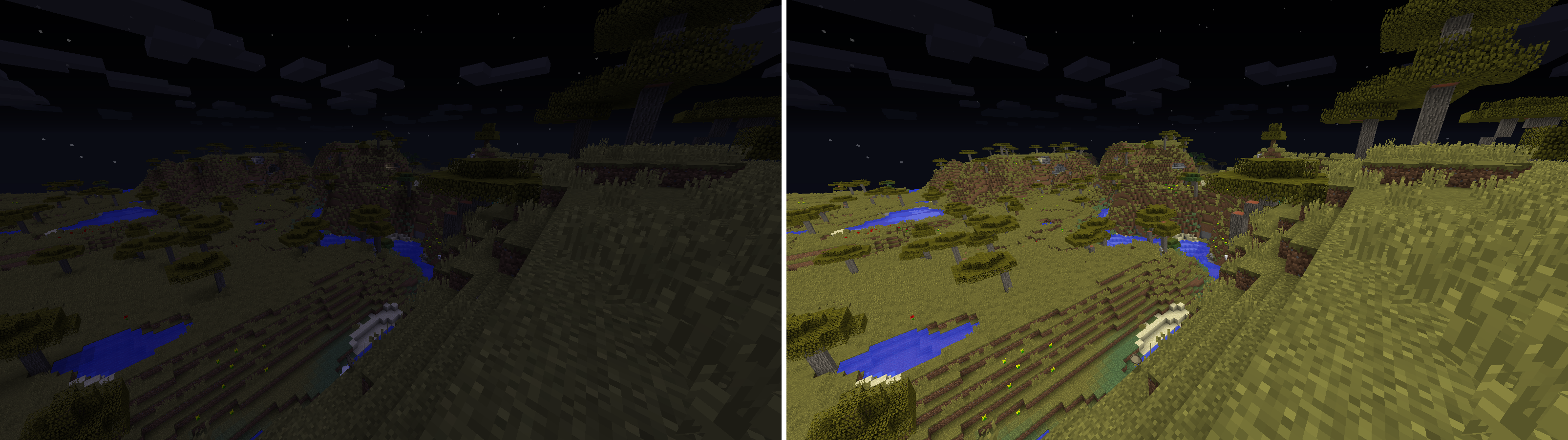
With the texture pack, the problem is gone. And a preview in a vanilla world at night:
Requirements
- OptiFine (https://optifine.net/).
- This pack has been tested on Minecraft 1.8 and 1.14, but I think this texture pack will work in any version of Minecraft as long as OptiFine is installed.
Installation
Just drag and drop "Nightly.zip" in your .minecraft/resourcepacks folder.

Don't worry if it says that is incompatible, it works anyways.
Make sure to move the pack to the top of the list!
FAQ (Read this!)
"You're sure this pack will work in any version of Minecraft?"Theoretically, yes. If a problem ocurrs, you can tell me in the comments.
"It works for Minecraft: Windows 10 Edition?"No. Only for Minecraft: Java Edition WITH OPTIFINE.
"If the OptiFine version is 1.14.4 (or older), will this still work?"Yes, it will work. Furthermore, this pack is universal, it will work in ANY version with OptiFine.
"How does it work?"OptiFine has the ability to change the colormap and lightmap of the world. This is the "color filter" that changes in the day cycle in the game (when is day, is bright, when is night, is dark and somewhat blue). This texture pack change this to a solid color filter that affects night light and shadows to be able to stay bright at all times.
"I can be banned in a server by using this?"Nope. Hypixel refers night vision as a "brightness and gamma adjustment mod", wich is allowed (see https://hypixel.net/rules/#rule-2-section-5). Mineplex says the same thing (see the end of the page https://www.mineplex.com/rules/#wwwMpTabs-3).
"I'm still not sure..."Don't worry, this texture pack IS NOT A MOD, and this not affect the general gameplay of Minecraft. But you can always search for a "server rules page" if you want to know.
"It doesn't work"Make sure that Video Settings > Quality Settings > Custom Colors is ON.

License
This texture pack is FREE to use in ANY FORM, do whatever you want with it.
Quick facts
- Edition: Minecraft Java
- File type: .zip (resource pack)
- How to install: Download the .zip resource pack — do not unzip it. → Put it in .minecraft/resourcepacks. → Enable it in Options → Resource Packs.
- Where to get it: Opens on the file's original source — not every file is mirrored on our own servers.
Install steps are the general flow for this file type — How to install Minecraft Java resource packs walks through it step by step.
Nightly - Night vision for Minecraft [Optifine] is a free Minecraft Java resourcepack. Downloaded 140,200 times. Download it and open it directly in the game.