
Softy
Java resource pack listed for Minecraft 1.19–26.x. Downloads from the MC Java Mods app on Android.
⬇ Download on Modrinth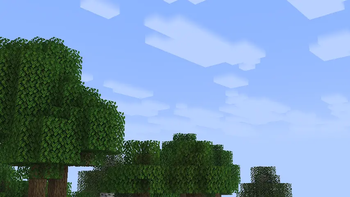


Softy
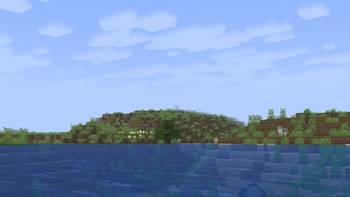
Softy is a lightweight Minecraft resource pack that gives the game's vanilla clouds a softer, smoother, and more natural appearance. By replacing the default cloud texture with fluffy, dreamy formations, Softy creates a calmer atmosphere while preserving the familiar vanilla aesthetic.
Designed to blend seamlessly into Minecraft, the pack enhances the sky without changing the game's overall art style. Whether you're exploring landscapes, building large projects, or simply enjoying the scenery, Softy makes every world feel a little more peaceful.
Features
- Soft, fluffy cloud textures inspired by a clean vanilla style.
- Maintains Minecraft's original look and feel.
- Creates a more relaxing and atmospheric sky.
- Lightweight with no impact on gameplay or performance.
- Compatible with vanilla Minecraft and most resource packs.
- Works alongside most shader packs for an enhanced visual experience.
Compatibility
- Vanilla Minecraft
- Most resource packs
- Most shader packs
- Multiplayer-friendly (client-side only)
Installation
- Download the Softy resource pack.
- Move the
.zipfile into your Minecraftresourcepacksfolder. - Open Minecraft and enable Softy from the Resource Packs menu.
- Enjoy a softer, more immersive Minecraft sky.
Credits
Created by GamesofDev.
If you enjoy Softy, consider leaving a review or sharing it with others to support future updates.
- Edition: Minecraft Java
- File type: .zip (resource pack)
- Minecraft versions listed: 1.19, 1.19.1, 1.19.2
- How to install: Download the .zip resource pack — do not unzip it. → Put it in .minecraft/resourcepacks. → Enable it in Options → Resource Packs.
- Where to get it: Opens on Modrinth — not every file is mirrored on our own servers.
Install steps are the general flow for this file type — How to install Minecraft Java resource packs walks through it step by step.
- Downloads as Softy.zip
- Download size: 33 KB
- Download link checked 21 Oct 2026 — working
These come from our own check of the pack file, not from the source page.