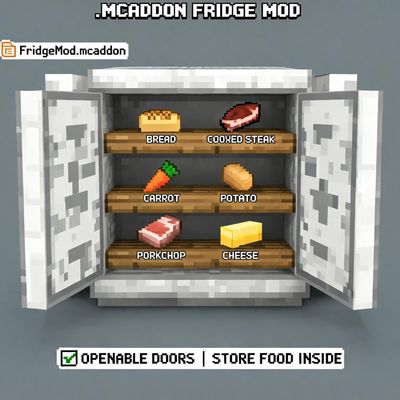
Fridge container
Fridge. Free Minecraft Bedrock addon for 26.40.
⬇ Download on CurseForgeThe author built this one for Minecraft 26.40. On other versions it may install and then do nothing.
🧊 FRIDGE MOD — Minecraft Bedrock Edition (.mcaddon)
Add a fully functional refrigerator to your Minecraft Bedrock world!
Place the fridge, tap it (or right-click on PC) and a custom storage menu opens right in front of you. Store food, materials, or any item you want — everything is saved permanently, even after closing the world.
✨ FEATURES
• Tap-to-open custom storage menu (works on mobile, PC and console)
• 27-slot persistent inventory — items survive world reloads
• One-click actions: deposit held item, deposit all, withdraw item, withdraw all
• Craftable in Survival: 6 Iron Ingots + 2 Snow Blocks + 1 Chest + 1 Ice
• Custom pixel-art textures with a snowflake emblem
• Directional placement — the fridge faces the way you look
• Multiplayer friendly — anyone can use the same fridge
• English & Italian translations included
• Compatible with Minecraft Bedrock 1.21+
🛠️ HOW TO INSTALL
1. Download FridgeMod.mcaddon
2. Open the file — Minecraft will import it automatically
3. Create or edit a world → Settings → Experiments → enable "Beta APIs" and "Holiday Creator Features"
4. Activate both "Fridge Mod BP" and "Fridge Mod RP" in your world's Behavior & Resource packs
5. Get the fridge with: /give @s fridgemod:fridge — or craft it!
🎮 HOW TO USE
• Place the fridge block
• Tap it (mobile) / right-click (PC) / interact button (console)
• Use the menu to store and retrieve items
• Close the menu — your items stay safe inside
⚠️ REQUIREMENTS
• Minecraft Bedrock 1.21.0 or newer
• "Beta APIs" + "Holiday Creator Features" experiments enabled
Made with ❤️ for the Minecraft Bedrock community.
- Pack type: .mcaddon — behaviour and resource pack in one file
- Manifest requires Minecraft 1.21.114 or newer
- Complete pack — everything it depends on is inside the file
- Download size: 42 KB
- Download link checked 20 Aug 2026 — working
These come from our own check of the pack file, not from the source page.