HomeJavaModsAR1 Text Formatting
AR1 Text Formatting
ModsJava

AR1 Text Formatting

Mod that allows using standard Minecraft formatting codes "§" in absolutely every text field: chat, books, signs, item names, GUIs, action bars, titles…

⬇ Download on Modrinth
AR1 Text Formatting — screenshot 1

AR1 Text Formatting

AR1 Text Formatting is a lightweight Fabric mod that allows using standard Minecraft formatting codes (§) in absolutely every text field: chat, books, signs, item names, GUIs, action bars, titles, and more. No more restrictions – customize your text freely.


Key Features

  • Full § Support – the formatting symbol is allowed in all text inputs.
  • All Standard Colors & Styles – 16 colors (§0§f), bold (§l), italic (§o), obfuscated (§k), and reset (§r).
  • Works Everywhere – chat, books (writable and written), signs, anvil‑renamed items, GUI elements, action bar, titles, and even some modded screens that use vanilla rendering.
  • No Configuration Needed – install and it works instantly.
  • Lightweight & Fast – does not affect game performance.

How to Use

In any text field, type the § symbol followed by a formatting code. Below are all available codes and examples:

Code Name
§0 Black
§1 Dark Blue
§2 Dark Green
§3 Dark Aqua
§4 Dark Red
§5 Dark Purple
§6 Gold
§7 Gray
§8 Dark Gray
§9 Blue
§a Green
§b Aqua
§c Red
§d Light Purple
§e Yellow
§f White

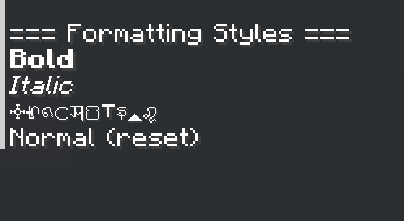
Formatting Styles

Code Style
§l Bold
§o Italic
§k Obfuscated
§r Reset

Formatting Styles

Code Style Example Result
§l Bold §lBold text Bold text
§o Italic §oItalic text Italic text
§k Obfuscated §kRandom s4@jun#"sf$&f0@/
§r Reset §rNormal Resets all styles

Combining Colors and Styles

You can combine multiple codes:

Example Result
§c§lRed Bold Red bold text
§9§oBlue Italic Blue italic text
§6§l§oGold Bold Italic Gold bold italic text
§a§kGreen Obfuscated Green s4@jun#"sf$&f0@/ text
§rReset §6after Normal text then gold
  1. Enjoy colorful and stylish text anywhere!

Note: The § symbol may require a special key combination (e.g., Alt+6 or Ctrl+Shift+6) depending on your keyboard layout. This mod removes the built‑in restriction, so once typed, it will work.

  • However, I recommend simply copying this symbol to the clipboard and pinning it there, that way, it will be easier to use. To open the clipboard in Windows, press [WIN+V].

Developed by ar1emq – a member of THEMIDNIGHTCORE

AR1 Text Formatting is a free Minecraft Java mod. Compatible with Minecraft 26.2. Downloaded 5 times (via Modrinth). Download it and open it directly in the game.

Explore more