FlexSpecMod
Java mod listed for Minecraft 1.20–1.21. Download on the author's site.
⬇ Download on CurseForge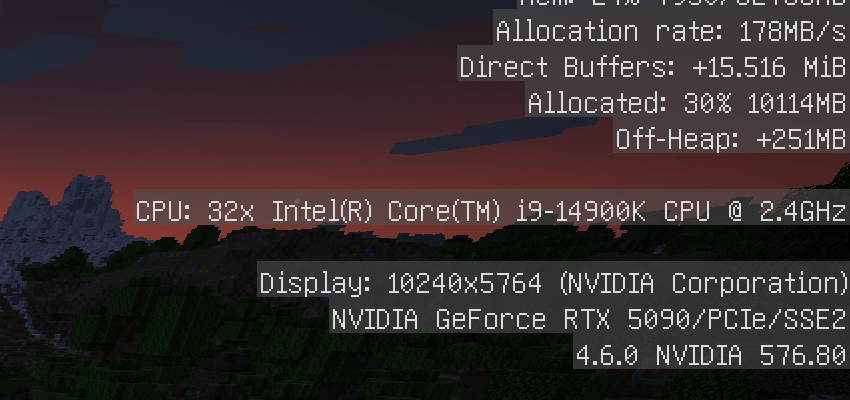
FlexSpecMod
Flex Spec Mod lets you fake your system specs shown in Minecraft's F3 debug screen.
Want to show off an imaginary RTX 5090 or a 32-core CPU? How about a 1000+ FPS screenshot? Now you can.
This mod doesn't affect actual performance — it's entirely cosmetic and client-side only.
Perfect for screenshots, videos, or just flexing with friends.
Features
- Fake FPS with custom framerate multipliers
- Override displayed memory and allocated RAM
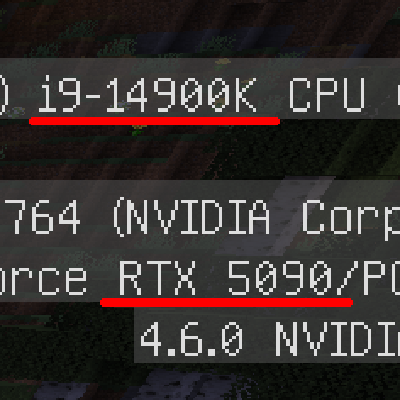
- Spoof your CPU name (e.g., "32x Intel(R) Core(TM) i9-14900K CPU @2.4GHz")
- Fake your GPU brand, model, and driver version (e.g., "NVIDIA GeForce RTX 5090")
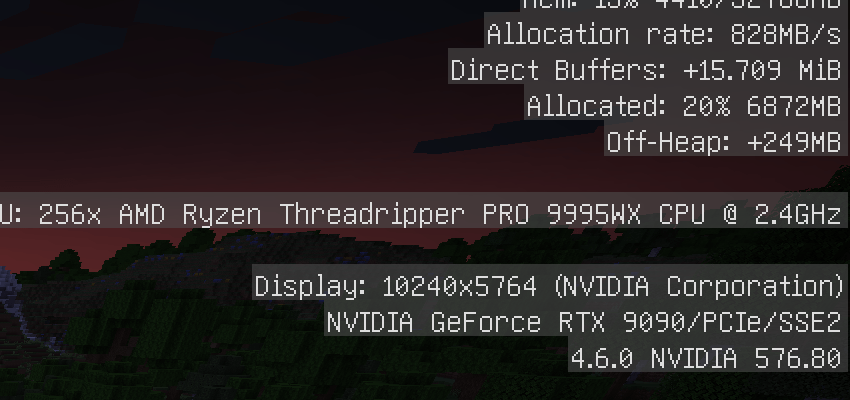
- Not limited to real hardware — you can invent future parts like "NVIDIA RTX 9090 Ti" or "Intel Core Ultra 9-9285K"
- Modify display resolution shown on screen (scaled or fixed pixel size)
Configuration
After launching the game once, the config file will be generated here:
[GameDirectory]/config/flexspecmod.json
You can edit:
- Framerate multiplier (e.g. `3.639`)
- Memory size in MB
- CPU and GPU info
- Display size (multiplier or fixed resolution)
Technical
- Requires Fabric, Fabric API
- Client-side only — no server required
- Compatible with most mods (e.g. sodium, indium and distant horizons)
- Edition: Minecraft Java
- File type: .jar
- Minecraft versions listed: 1.21.7, 1.21.8, 1.21.6
- How to install: Install the matching mod loader (Forge, Fabric or NeoForge) for your Minecraft version. → Download the .jar. → Put it in the .minecraft/mods folder and launch that loader profile.
- Where to get it: Opens on CurseForge — not every file is mirrored on our own servers.
Install steps are the general flow for this file type — How to install Minecraft Java mods & modpacks walks through it step by step.
FlexSpecMod is a free Minecraft Java mod. Compatible with Minecraft 1.21.7, 1.21.8, 1.21.6, 1.20.6 and newer. Downloaded 1,065 times (via CurseForge). Download it and open it directly in the game.