
Speech Bubbles
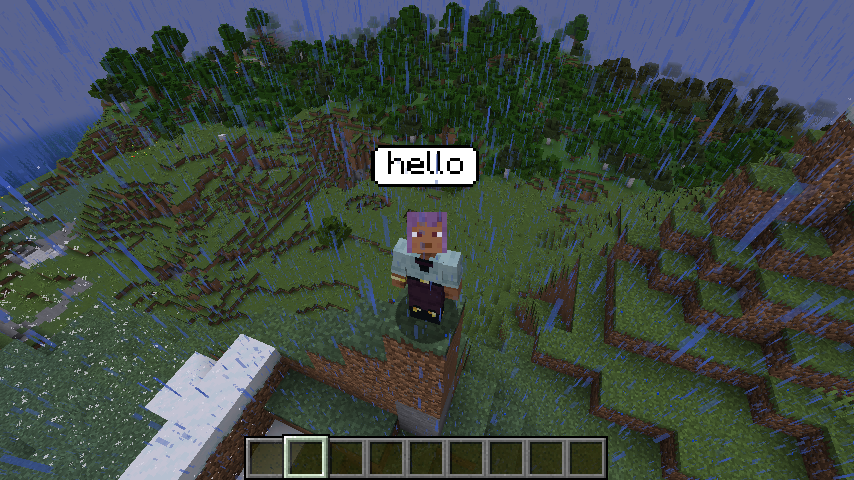
The Speech Bubbles mod captures real-time audio, converts it to text using a TTS model, and displays the dialogue above characters’ heads—masking actual…
⬇ Download on CurseForgeThe author built this one for Minecraft 1.20.1 on Forge. On other versions it may install and then do nothing.
📢 Speech Bubbles – Visual Voice for Minecraft
Speech Bubbles is a Minecraft mod that replaces spoken voice with on-screen text—bringing a new way to communicate in-game, especially in proximity-based multiplayer settings.
Instead of transmitting real voices like traditional proximity voice chat mods, Speech Bubbles listens to player speech in real-time using your microphone, transcribes it using an offline speech-to-text model, and then displays the text above your character’s head in a speech bubble. This provides a lightweight, privacy-friendly alternative to voice chat—perfect for players who prefer quiet gameplay or want to avoid voice recordings entirely.
🔧 Setup Instructions
To use this mod, you'll need to download and install a few dependencies:
Vosk Model
Download any compatible model from alphacephei.com/vosk/models.
Place the extracted model folder inside your Minecraft instance directory under: ./model/
DLLs and Natives
Download the libvosk.dll and other DLLs and dependencies from https://github.com/alphacep/vosk-api/releases/tag/v0.3.45 (download "vosk-win64-0.3.45.zip" for Windows) and place all files in the following location inside your Minecraft instance directory: ./natives/
🎙 Features
📡 Real-time microphone input
💬 Speech-to-text conversion using offline Vosk models
🧠 Displays transcribed text as floating speech bubbles
🔇 Masks actual voices, keeping gameplay quiet and non-intrusive
🧍♂️ Ideal for proximity chat-like experiences without needing voice transmission
🖥️ Fully client-side processing — no server load, no API calls, no rate limits
⚙️ User-selectable models — balance speed vs. accuracy based on your own system and preferences
Whether you're roleplaying, playing quietly in public servers, or just want a novel way to "talk," Speech Bubbles bridges the gap between realism and accessibility
- Edition: Minecraft Java
- File type: .jar
- Minecraft version listed: 1.20.1
- How to install: Install the matching mod loader (Forge, Fabric or NeoForge) for your Minecraft version. → Download the .jar. → Put it in the .minecraft/mods folder and launch that loader profile.
- Where to get it: Opens on CurseForge — not every file is mirrored on our own servers.
Install steps are the general flow for this file type — How to install Minecraft Java mods & modpacks walks through it step by step.
- Ships as speech_bubbles-1.0.0.jar — drop this file into the mods folder
- Download size: 36 KB
- Download link checked 12 Sept 2026 — working
These come from our own check of the pack file, not from the source page.