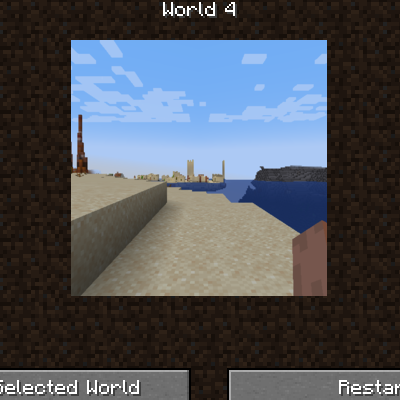
PS1 World Select Screen
Java mod listed for Minecraft 1.18. Downloads from the MC Java Mods app on Android.
⬇ Download on CurseForgeThe author built this one for Minecraft 1.18.2 on Forge. On other versions it may install and then do nothing.
This mod overhauls the World Selection screen to have a more retro feel, note that this has most functionality disabled including the ability to add or delete worlds, but can be temporarily restored by changing the config.
After selecting a world, there are 2 options, Play Selected World and Restart. Play Selected World functions as normal, but Restart will load a backup of the world stored in the /restarts folder (must place backups manually)
The mod includes functionality that refreshes the preview image after it's played.
Clientside only, will have no function on servers.
Note: this mod was made for PS1 Edition but can be used in any pack.
- Edition: Minecraft Java
- File type: .jar
- Minecraft version listed: 1.18.2
- How to install: Install the matching mod loader (Forge, Fabric or NeoForge) for your Minecraft version. → Download the .jar. → Put it in the .minecraft/mods folder and launch that loader profile.
- Where to get it: Opens on CurseForge — not every file is mirrored on our own servers.
Install steps are the general flow for this file type — How to install Minecraft Java mods & modpacks walks through it step by step.
- Ships as ps1worldselectscreen-1.18.2-11.jar — drop this file into the mods folder
- Download size: 37 KB
- Download link checked 2 Oct 2026 — working
These come from our own check of the pack file, not from the source page.