
Easy Server Optimizer (ESO)
Java mod listed for Minecraft 1.18–1.21. Downloads from the MC Java Mods app on Android.
I don't know my version or loader
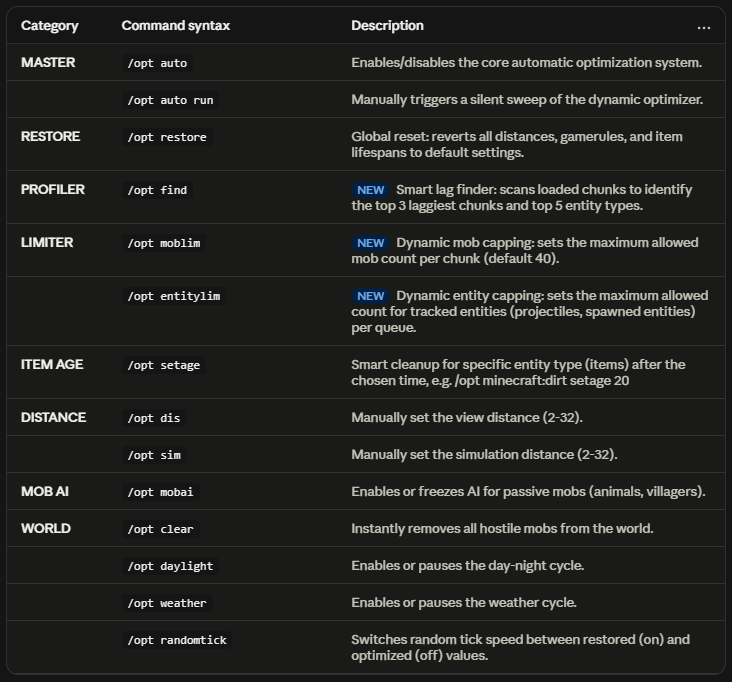
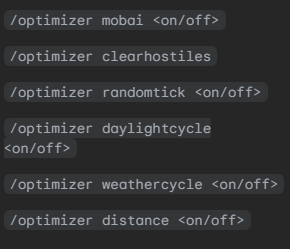
Easy Server Optimizer (ESO)
🛡️ Server-side Only: Required only on the server (dedicated server or the host of a multiplayer world). Clients joining someone else's server do not need to install it — but if you're the host (singleplayer, or "Open to LAN"), you're actually running the server yourself, so installing it there gives you the full optimization benefit.
Easy Server Optimizer (ESO) is an ultra-lightweight, zero-dependency (no library/architectury required) server-side optimization mod for Minecraft. It dynamically monitors server TPS and applies smart optimizations in real-time. Just install and forget!
Note on singleplayer/LAN: Since your singleplayer world already runs its own internal server, all core logic (item cleanup, world freeze, villager optimizer, adaptive TPS scaling) works the same as on a dedicated server. The only exceptions are /opt dis and /opt sim (view/sim distance), which don't apply in singleplayer — render distance is controlled by your client's Video Settings instead. When you use "Open to LAN," anyone who joins can also use /opt commands.
✨ Key Features
- Smart Entity & Mob Limiter: Auto-clears projectile spam (arrows, tridents, etc.) and caps mobs per chunk before they pile up and cause lag.
- Zero-Lag Item Cleanup: Custom cleanup timing per item type — dynamically modifies lifespans at spawn so items despawn naturally, no tick-spike deletion.
- Auto "Anti-Tick-Slip" (World Freeze): Saves game time when the server's empty; if empty for ≥5 minutes, rolls time back to the moment the last player logged out. Great for mods where mobs/difficulty scale over time — no free progression while nobody's online.
Full command list and details in the table above. 📋
📈 Adaptive TPS Optimization
The mod automatically adapts to server performance in real-time:
- 🟢 Good TPS → Normal gameplay, gentle scaling.
- 🟡 Minor TPS Drop → Scaled rendering & simulation distances.
- 🟠 Severe TPS Drop → Stronger optimization rules applied.
- 🔴 Extreme TPS Drop → Emergency safeguards activated (temporary weather/daylight cycle pause, safe entity freezing).
Note: Use /opt auto off, then other commands will work more accurately and won't be overwritten.
Manual commands are available (via /opt) but never required.
⚙️ Compatibility & Config
- Config Path:
config/optserver-server.toml(configure whitelisted items with custom lifespans). - Compatibility: Safe for heavy modpacks (200+ mods) and 24/7 dedicated servers. Since it operates on standard events without altering vanilla game logic, conflicts are extremely rare.
❤️ Feedback & Support
Thank you for choosing Easy Server Optimizer! Feel free to leave a comment with server feedback, suggestions, or issues. Your feedback helps us improve the mod!
- Edition: Minecraft Java
- File type: .jar
- Minecraft versions listed: 1.21.1, 1.20.1, 1.18.2
- How to install: Install the matching mod loader (Forge, Fabric or NeoForge) for your Minecraft version. → Download the .jar. → Put it in the .minecraft/mods folder and launch that loader profile.
- Where to get it: Opens on CurseForge — not every file is mirrored on our own servers.
Install steps are the general flow for this file type — How to install Minecraft Java mods & modpacks walks through it step by step.
- Ships as TickPauseServer 1.0.jar — drop this file into the mods folder
- Download size: 5 KB
- Download link checked 2 Oct 2026 — working
These come from our own check of the pack file, not from the source page.