MCCleaner
Java mod listed for Minecraft 1.20. Downloads from the MC Java Mods app on Android.
Automatically cleans up item entities and logs them in a convenient way, also introduces Personalizing to prevent an item from being cleaned or despawning…
⬇ Download on CurseForgeThe author built this one for Minecraft 1.20.1 on Forge. On other versions it may install and then do nothing.
What does the mod do?
- This mod periodically discards floor items at set (configurable) intervals and conveniently logs them, allowing the use of "/give" to retrieve them in case something important is deleted.
- It also introduces Personalizing:
- Combine an item with an Emerald Block (configurable) in an Anvil at the cost of 5 levels (configurable)
- Marks an item's tooltip with "Property of DisplayName" (lang file).
- Personalized items can be configured not to despawn naturally
- Additionally, some relevant commands are added:
-
- /mccleaner clean - Runs cleanup immediately and restarts the timer
- /mccleaner clean_all - Runs cleanup immediately, cleans up personalized items too, and restarts the timer
- /mccleaner reset - Resets the timer, skipping the next cleanup
-
- Cleanup can be customized to have a list of items not to:
- Clean unless they have existed for a minimum amount of time (minimumLife)
- Discard (blacklistItemsCleaning)
- Log (blacklistItemsLogging)
When it comes to logging, clients will be given warning messages at set times (configurable) as such:
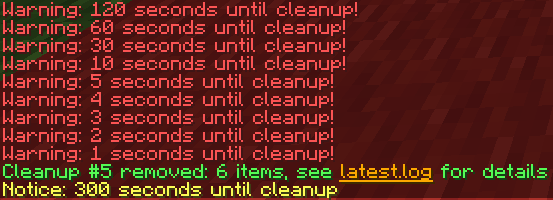
*Note that latest.log is a clickable link that will open the file if you have access to it.
While in the latest.log it will appear like this:
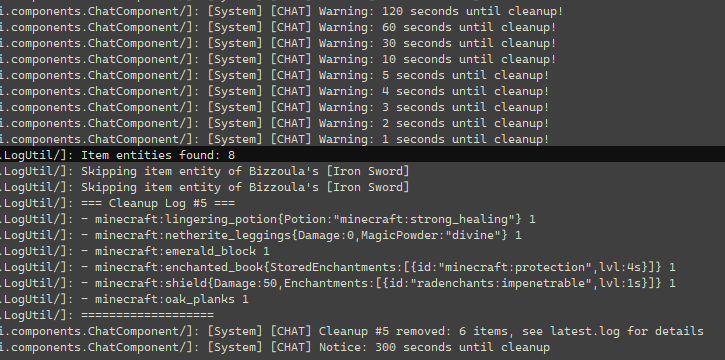
Each time a cleanup occurs, the log number in chat and the latest.log will increment, so that instead of referring to a time, players on servers can provide the log number instead.
The logging is also formatted in a way that you can simply copy and paste the info to use with the /give command
- Edition: Minecraft Java
- File type: .jar
- Minecraft version listed: 1.20.1
- How to install: Install the matching mod loader (Forge, Fabric or NeoForge) for your Minecraft version. → Download the .jar. → Put it in the .minecraft/mods folder and launch that loader profile.
- Where to get it: Opens on CurseForge — not every file is mirrored on our own servers.
Install steps are the general flow for this file type — How to install Minecraft Java mods & modpacks walks through it step by step.
- Ships as mccleaner-1.1b.jar — drop this file into the mods folder
- Download size: 16 KB
- Download link checked 2 Oct 2026 — working
These come from our own check of the pack file, not from the source page.