Redstone Enhancements
Java mod listed for Minecraft 1.20–1.21. Downloads from the MC Java Mods app on Android.
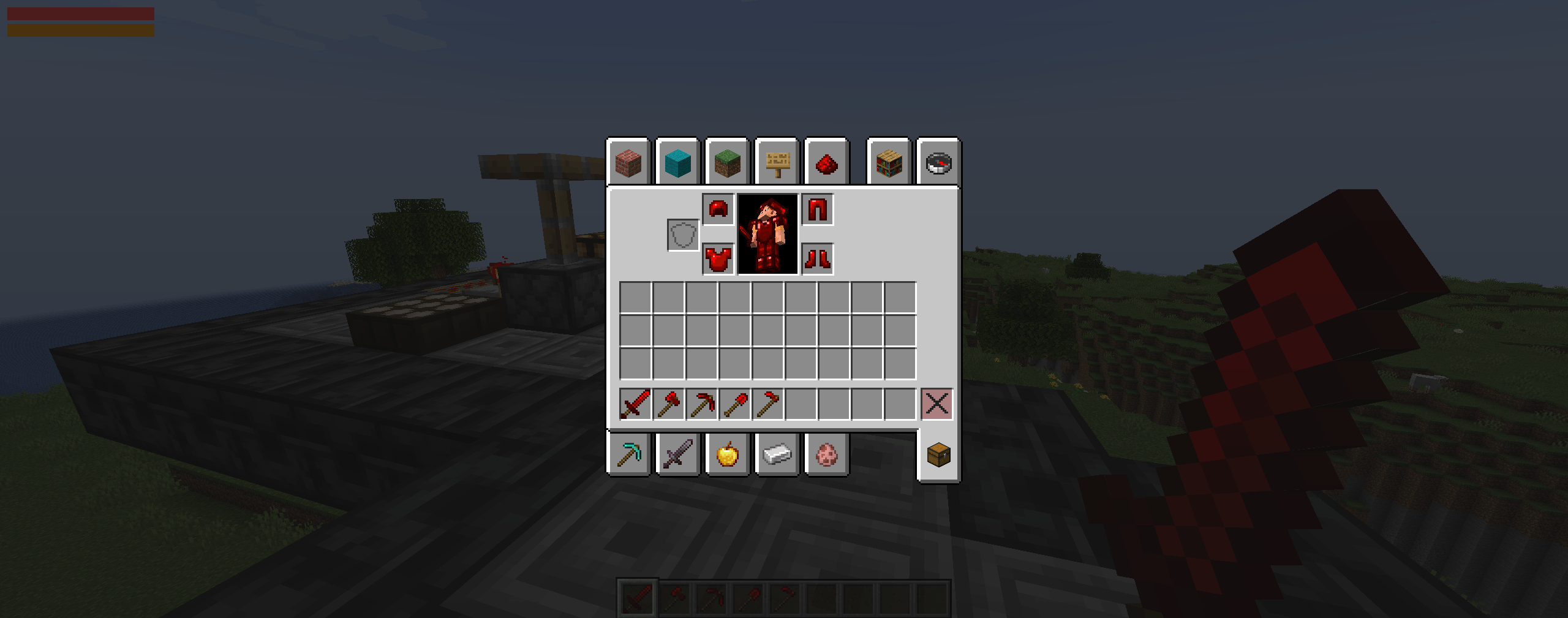
This mod adds new Redstone Crafting Items - Tools, Armour, and special abilities associated with them! This should have a Vanilla-style feel to it (on…
I don't know my version or loader
Join the Vanilla Enhancements official Minecraft Server!
mc.FireCrafting.net
Also, join the Discord to report issues, become part of the community, and receive updates about new and existing mods!
Welcome to Redstone Enhancements!
Redstone Enhancements transforms Redstone Dust into a complete set of rechargeable tools, weapons, and armour.
Every item retains normal durability for ordinary use while gaining a separate Charge meter for its special abilities. Build varied Redstone contraptions, recharge your equipment nearby, and unleash powerful mining, farming, combat, and defensive abilities!
Redstone Power Batteries let you extend your charging network throughout your builds and even through Nether Portals.
Durability and Charge
Durability and Charge are separate systems:
- Ordinary tool use consumes normal durability.
- Special abilities spend Charge; ordinary attacks and tool use still follow their normal durability rules.
- Every Redstone tool has its own stored Charge.
- Redstone Armour has a separate Armour Charge.
- Newly crafted equipment begins with 0 Charge.
- Each Charge meter can store up to 1,000 Charge.
- An ability can activate as soon as the item has enough Charge for that action; the meter does not need to be full.
| Ability | Charge Cost |
|---|---|
| Sword Chain Attack | 48 |
| Axe Tree Chop | 32 |
| Pickaxe 3×3 Mining | 32 |
| Shovel 3×3 Mining | 24 |
| Hoe Ability | 20 |
| Armour Pulse | 250 |
Redstone Tools
| Tool | Durability | Attack Damage | Attack Speed |
|---|---|---|---|
| Redstone Sword | 1,000 | 6 | 1.6 |
| Redstone Axe | 600 | 9 | 1.0 |
| Redstone Pickaxe | 600 | 4 | 1.2 |
| Redstone Shovel | 600 | 4.5 | 1.0 |
| Redstone Hoe | 600 | 1 | 4.0 |
Redstone Sword
The Redstone Sword has a rechargeable Sword Chain Attack.
When enabled, attacking a living target while the sword has at least 48 Charge sends an electrical chain through as many as three additional valid targets within ten blocks of the original target.
Each chained target receives 6 damage, or three hearts.
The Chain Attack will not strike:
- Players
- Villagers
- Tamed animals
- Horses
- Allays
- The attacking player
Press Crouch while holding the Redstone Sword to toggle Sword Chain ON or OFF. The setting is saved separately for each player and persists between sessions.
Sword Chain is enabled by default.
Redstone Axe
When the Redstone Axe has at least 32 Charge, breaking a naturally generated or sapling-grown tree chops its vertical log column in one action.
- It can break the original log and as many as 16 additional logs above it.
- The tree must contain connected, naturally generated leaves.
- Stripped logs do not activate the ability.
- Player-placed leaves do not qualify a log structure as a natural tree.
- Pumpkins, Melons, and other ordinary axe targets continue to break normally.
Redstone Pickaxe
When the Redstone Pickaxe has at least 32 Charge, breaking a pickaxe-compatible block mines a 3×3 area centered on that block.
Press your configured Crouch control while holding the Pickaxe to switch between:
- Horizontal: a flat 3×3 area, useful for mining floors.
- Vertical: an upright 3×3 area oriented to the direction you are facing, useful for mining walls.
Only blocks that are normally valid Pickaxe targets are included.
Redstone Shovel
When the Redstone Shovel has at least 24 Charge, breaking a shovel-compatible block mines a 3×3 area centered on that block.
Press your configured Crouch control while holding the Shovel to switch between Horizontal and Vertical mining, just like the Pickaxe.
This works with normal Shovel targets such as Dirt, Sand, Gravel, and similar blocks.
Each Pickaxe and Shovel remembers its selected orientation and defaults to Horizontal. Entering Crouch switches modes once; keeping Crouch held does not repeatedly switch them.
Redstone Hoe
The Redstone Hoe has several abilities that each consume 20 Charge:
- Breaking a Hoe-compatible block mines a 3×3 horizontal area.
- Right-clicking Dirt, Grass, or a Dirt Path tills a 3×3 area into Farmland wherever the space above is clear.
- Right-clicking crops harvests every mature crop in the surrounding 3×3 area.
- Harvested crops are immediately replanted at their youngest growth stage.
Redstone Armour
Redstone Armour provides the same armour points as Iron Armour, with considerably more durability.
| Armour Piece | Durability | Armour Points |
|---|---|---|
| Redstone Helmet | 418 | 2 |
| Redstone Chestplate | 608 | 6 |
| Redstone Leggings | 570 | 5 |
| Redstone Boots | 494 | 2 |
Armour Pulse
Wearing all four pieces unlocks Armour Pulse, a powerful radial attack that damages and knocks back nearby valid mobs.
- Press Alt + Shift while wearing the complete set to toggle Armour Pulse ON or OFF.
- The setting is saved separately for each player and persists between sessions.
- Armour Pulse is disabled by default.
- Hold your configured Crouch control for one second to activate it.
- At least 250 Armour Charge is required.
- A pulse consumes 250 Armour Charge.
- Its damage and radius scale with the amount of Charge stored when it activates.
- It fires only when at least one valid target is nearby.
- Only one pulse can fire during each continuous Crouch hold. Release and hold Crouch again to activate another.
Armour Pulse will not damage:
- The wearer
- Other players
- Villagers
- Tamed animals
- Horses
- Allays
Generating Charge
Supported Redstone components are detected within a 16-block spherical radius. The range is the same vertically as it is horizontally.
Each unique supported component type and state contributes 0.5 Charge per second, up to a maximum total recharge rate of 40 Charge per second.
Multiple identical components in the same state do not stack. For example, ten lit Redstone Torches provide the same contribution as one lit Redstone Torch. However, powered and unpowered states can count separately when that component supports both states.
You can recharge a held Redstone tool, a complete set of Redstone Armour, or both. Armour takes priority when there is not enough power to charge both; the held tool receives the remaining charging allowance.
Supported Charge sources include:
- All Button types
- All Pressure Plate types
- Levers
- Redstone Torches and Wall Torches
- Redstone Dust
- Redstone Lamps
- Repeaters
- Comparators
- Observers
- Droppers
- Dispensers
- Hoppers
- Lecterns
- Pistons and Sticky Pistons
- Daylight Sensors
- Powered Rails
- Detector Rails
- Activator Rails
- Copper Bulbs, including their different variants and states
Redstone Power Batteries
Redstone Power Batteries extend a charging station's reach without requiring you to rebuild the entire station at every destination.
- Each battery stores up to 1,000 Charge.
- Each battery has an 8-block spherical relay radius—half the range of a charging station.
- Batteries can supply nearby players and extend the network to other batteries.
Battery Modes
Crouch + Right-click a placed battery to switch its mode:
| Mode | Light Colour | Charges From |
|---|---|---|
| Initial Battery | Green | Real charging components within 16 blocks |
| Extending Battery | Blue | An upstream battery connected to the network |
Newly placed batteries start empty in Extending mode. Changing the mode empties the battery's stored Charge.
An Initial Battery gathers power from nearby charging components. Extending Batteries ignore those components and receive power only through the battery network.
Building a Battery Network
- Place a battery within range of your charging station.
- Crouch + Right-click it to select Initial Battery mode.
- Place an Extending Battery within 8 blocks of it.
- Continue adding Extending Batteries within 8 blocks of the preceding battery.
You can connect multiple Initial Batteries to the same station to supply separate lines or branches.
How Charge Moves
Batteries transfer real stored power. They are not permanently charged range extenders.
- Power flows one way, outward from the Initial Battery through the connected network.
- A battery must be full before it transfers power to another battery.
- Transferring power drains the supplying battery. Once it drops below full, further downstream transfers pause until it refills, allowing power to trickle along the line.
- Your equipment uses the closest connected physical battery within range, even if that battery is partially charged or empty. It does not skip that battery in favour of a more distant full one.
- Charging equipment directly drains that nearest battery. If demand matches or exceeds its incoming power, it can remain nearly empty until your equipment finishes charging.
- The full-charge requirement applies to battery-to-battery transfers. A partially charged battery can still supply player equipment, with Armour taking priority over the held tool.
Extending Through Nether Portals
To carry the network between the Overworld and the Nether, attach a battery directly against an Obsidian frame block bordering an active portal opening on both corresponding portals.
- The sending side must belong to a powered battery network.
- The receiving battery should be in Extending Battery mode.
- Both batteries must be physically attached to their active portal frames.
- Continue the line using nearby Extending Batteries in the destination dimension.
The network retains its connections across unloaded chunks and dimensions without requiring chunk loaders.
Moving or Removing Batteries
Breaking or picking up a battery does not preserve its Charge. Placing it again starts with an empty battery.
Removing a battery immediately breaks that connection. Downstream sections that have no alternative path back to an Initial Battery lose their charging connection.
Charge HUD
The client HUD displays the current charging information:
- The orange meter shows the Charge stored in your held Redstone tool.
- The red meter shows Armour Charge while wearing the complete set.
- A third green bar shows a placed battery's Charge when you look directly at it, without extra percentage or charge-amount text.
- Disabled or unavailable abilities display a gray meter.
- The Sources line shows nearby direct charging sources and their recharge rate.
- The Battery Relay line shows the source strength extended to you through the battery network and its indicated recharge rate.
If you are in range of a battery but not a charging station, only the Battery Relay line appears; empty nearby-source lines are hidden.
Charging information is contextual: it appears while holding Redstone equipment or a battery, wearing the complete Redstone Armour set, or looking directly at a placed battery. It does not remain permanently on-screen without those conditions.
Crafting Recipes
Tool and armour recipe legend:
- R = Redstone Dust
- S = Stick
- · = Empty slot
Tool Recipes
| Recipe Row | Sword | Pickaxe | Axe | Shovel | Hoe |
|---|---|---|---|---|---|
| Top | · R · | R R R | R R · | · R · | R R · |
| Middle | · R · | · S · | R S · | · S · | · S · |
| Bottom | · S · | · S · | · S · | · S · | · S · |
The Axe and Hoe recipes can also be mirrored.
Armour Recipes
| Recipe Row | Helmet | Chestplate | Leggings | Boots |
|---|---|---|---|---|
| Top | R R R | R · R | R R R | · · · |
| Middle | R · R | R R R | R · R | R · R |
| Bottom | · · · | R R R | R · R | R · R |
Collecting Redstone Dust unlocks the Redstone equipment recipes.
Redstone Power Battery Recipe
Craft a battery using 8 Blocks of Redstone surrounding a Glowstone Block.
- B = Block of Redstone
- G = Glowstone Block
| Recipe Row | Ingredients |
|---|---|
| Top | B B B |
| Middle | B G B |
| Bottom | B B B |
Collect Redstone Dust and Glowstone Dust, in either order, to unlock the battery recipe and the “More… power?!” advancement.
Use the in-game Recipe Book for every recipe. The battery's recipe icon cycles through green and blue charging and draining animations.
Installation
Redstone Enhancements must be installed on both the client and the server.
It currently requires:
- Minecraft 26.2
- Fabric Loader
- Fabric API
- Edition: Minecraft Java
- File type: .jar
- Minecraft versions listed: 1.21.5, 1.20.2, 1.20.5
- How to install: Install the matching mod loader (Forge, Fabric or NeoForge) for your Minecraft version. → Download the .jar. → Put it in the .minecraft/mods folder and launch that loader profile.
- Where to get it: Opens on CurseForge — not every file is mirrored on our own servers.
Install steps are the general flow for this file type — How to install Minecraft Java mods & modpacks walks through it step by step.
- Ships as Redstone Enhancements-1.0.4.jar — drop this file into the mods folder
- Download size: 68 KB
- Download link checked 2 Oct 2026 — working
These come from our own check of the pack file, not from the source page.