
Enhanced Player Finder
Java mod listed for Minecraft 1.20–1.21. Downloads from the MC Java Mods app on Android.
A Minecraft Mod for Fabric that allows users to find the co-ordinates of other players on your server (or world!) using a command
I don't know my version or loader
Player Finder
On Curseforge, the project is "Enhanced Player Finder", but will use the "Player Finder" title everywhere else
Player Finder is a Minecraft Mod for Fabric that allows users to find the co-ordinates of other players on your server
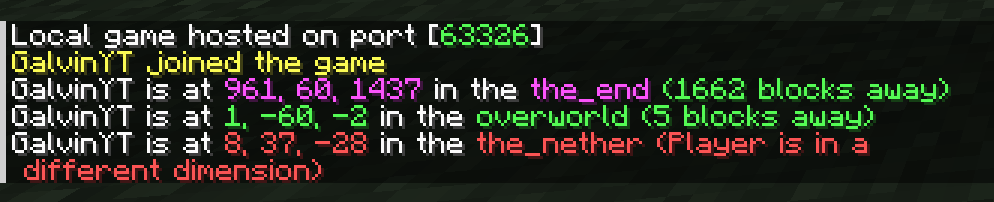
Note: The "the" in the dimensions have been removed since this screenshot was taken
Usage
Use the /findplayer command and enter the player's name. There is also a dropdown of players, so you don't have to type it in full and can use autocomplete!

Compatible Versions
| Mod Version | Game Version(s) | Mod Version Title |
|---|---|---|
| 1.0.1 | 1.20 - 1.20.3 | player-finder-1.0.1+1.20-1.20.3 |
| 1.0.1 | 1.20.4 - 1.20.6 | player-finder-1.0.1+1.20.4-1.20.6 |
| 1.0.1 | 1.21 - 1.21.3 | player-finder-1.0.1+1.21 |
| 1.0.0 | 1.21 - 1.21.3 | player-finder-1.0.0+1.21 |
Important Note
This mod is a server-side mod! You are not required to install this mod on the client-side, unless you are using the "Open to LAN" feature to create a server on your world.
Also: This mod requires the Fabric API and Fabric Loader 0.16.0 or higher to be installed.
PS: You cannot use this mod on servers that don't use this mod. The commands are created server-side
Changelog
1.0.1
- Added colours to the co-ordinates depending on the dimension
- Updated dimensions to remove "the" in the name
- Added the distance in blocks to the player
- Updated links in the mod metadata
- Edition: Minecraft Java
- File type: .jar
- Minecraft versions listed: 1.20.5, 1.20.6, 1.20.4
- How to install: Install the matching mod loader (Forge, Fabric or NeoForge) for your Minecraft version. → Download the .jar. → Put it in the .minecraft/mods folder and launch that loader profile.
- Where to get it: Opens on CurseForge — not every file is mirrored on our own servers.
Install steps are the general flow for this file type — How to install Minecraft Java mods & modpacks walks through it step by step.
- Ships as player-finder-1.0.1+1.20.4-1.20.6.jar — drop this file into the mods folder
- Download size: 28 KB
- Download link checked 2 Oct 2026 — working
These come from our own check of the pack file, not from the source page.