
Respec Skill
Java mod listed for Minecraft 1.21. Downloads from the MC Java Mods app on Android.
Server-side skill reset and prestige for Pufferfish Skills. Reset skill points, ascend skill trees, configurable.
I don't know my version or loader
Respec Skill Mod
Reset and reallocate your skills used in Pufferfish's Skills easily!
Server-side mod. Players type /respec to open a clickable menu of every Puffish skill category on the server; each costs a configurable item. Categories are auto-discovered, so no setup is needed to support new skill trees.

Commands
| Command | Permission | Description |
|---|---|---|
/respec |
All players | Opens the chat menu listing every Puffish category with a clickable [Reset] button. |
/respec <namespace:category> |
All players | Respecs the given category directly. Used by the menu's [Reset] button. |
/respec prestige |
All players | Lists configured prestige paths. Ineligible paths show greyed out. |
/respec prestige <from_category> |
All players | Ascends from the given category into its configured target. |
/respec reload |
Level 3 (op) | Reloads config/respec-skill.properties from disk. |
How It Works
1. Run /respec
Players see a chat menu listing every Puffish skill category loaded on the server, with the cost shown next to a clickable [Reset] button.
2. Click [Reset] (or run /respec <namespace:category>)
The mod checks:
- Player has enough total skill points in that category (
min_level_to_respec) - Player is past the cooldown (if configured)
- Player has enough of the cost item in their inventory
If all pass, the item is consumed, the category is erased, and a fraction of the previous XP is returned (xp_reduction_factor).
Configuration
Edit config/respec-skill.properties. Reload in-game with /respec reload (requires permission level 3).
# Minimum total skill points a player must have in a category before they can respec it.
min_level_to_respec = 20

# Fraction of category XP returned after respec (0.0 = lose all, 1.0 = lose none).
xp_reduction_factor = 0.2

# Cooldown in seconds between respecs (0 = no cooldown). Per player, in-memory only; resets on server restart.
cooldown_seconds = 0

# Default cost applied to every category that doesn't have an override below.
# Format:  <item_id>, <count>
default_cost = minecraft:emerald, 16

# Optional: per-category cost overrides. Categories without an override use default_cost.
# cost.puffish_skills:combat = minecraft:diamond, 4
# cost.puffish_skills:mining = minecraft:emerald, 32
You do not need to list each category. Every Puffish category loaded on the server is auto-discovered and appears in /respec automatically.
Prestige (optional)
A one-way irreversible ascension from one skill category into another. Configure paths in the same file:
# Format:  prestige.<n> = <from_category>, <to_category>, <min_points_in_from>, <xp_carryover_factor>, <cost_item>, <cost_count>
prestige.1 = puffish_skills:combat, puffish_skills:advanced_combat, 50, 0.4, minecraft:netherite_ingot, 1
prestige.2 = puffish_skills:mining, puffish_skills:master_mining,   75, 0.6, minecraft:netherite_ingot, 2
On a successful prestige, the source category is erased, the target category gains currentXp × xp_carryover_factor, and the cost is consumed. If any prestige paths are configured, /respec shows a clickable link to the prestige menu at the bottom of its output. See the Commands section above for the command syntax.
For Servers/Modpacks
Pure server-side; clients do not need the mod. Feel free to include in modpacks. Credit appreciated but not required.
1.x Legacy
The 1.x versions used a different mechanic: a craftable Respec Scroll right-clicked onto a Skill Altar (a lodestone placed on a configured base block). 2.0 removed all of that in favor of the /respec command described above.
If you are on 1.x and need that documentation, see below. Upgrading to 2.x will require regenerating the config (respec-skill.toml → respec-skill.properties).
1.x docs
Features
- Skill Respec System: Reset individual skill categories and get back XP to reallocate.
- Prestige System: Transition from one skill tree to another at high levels.
- Configurable: Set minimum levels and XP retention rates.
How it worked
Craft a Respec Scroll with this recipe:
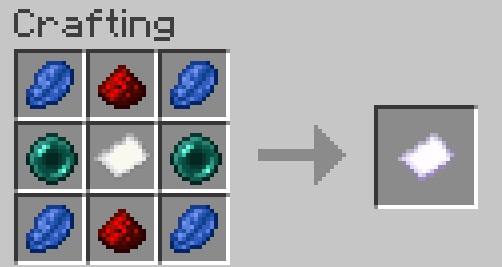
Build a Skill Altar by placing a configured skill block with a lodestone on top. Example setup for the Default Skill Tree:
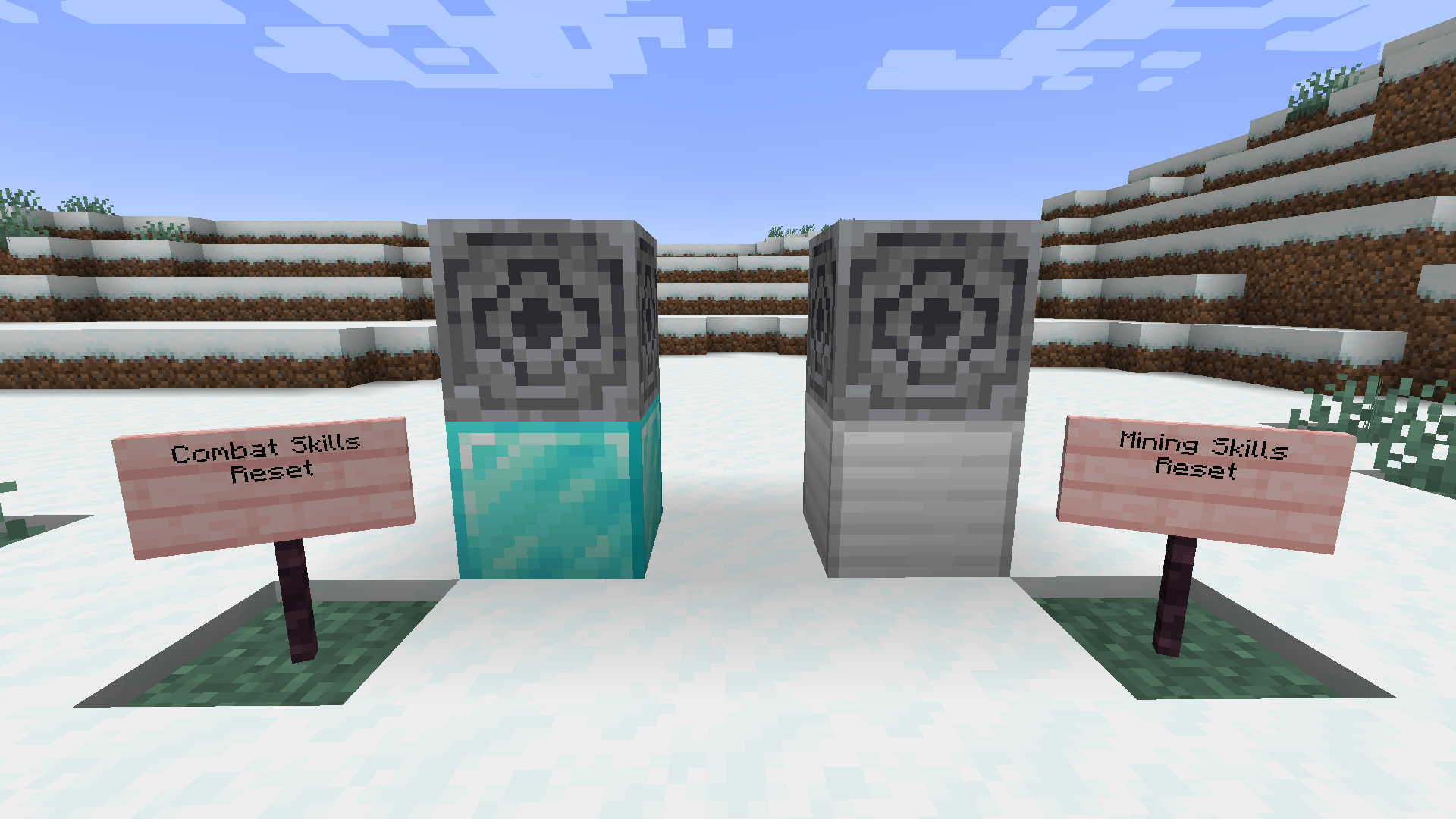
Right-click the lodestone with the scroll to reset that category's points.
Prestige: at high levels, transition into advanced trees via configured
from → tomappings.
1.x config (TOML)
# Respec Skill Mod Configuration
config_version = 2

min_level_to_respec = 20
xp_reduction_factor = 0.2

[skill_altar_map]
"minecraft:diamond_block" = "combat"
"minecraft:iron_block" = "mining"

[prestige_mappings]
# "combat" = "advanced_combat,true,50,0.4"
# "mining" = "master_mining,true,75,0.6"
Client-side note (1.x only): to see the Respec Scroll in the creative inventory or in REI, the mod also had to be installed client-side. 2.x is fully server-side.
- Edition: Minecraft Java
- File type: .jar
- Minecraft versions listed: 1.21.5, 1.21.7, 1.21.6
- How to install: Install the matching mod loader (Forge, Fabric or NeoForge) for your Minecraft version. → Download the .jar. → Put it in the .minecraft/mods folder and launch that loader profile.
- Where to get it: Opens on CurseForge — not every file is mirrored on our own servers.
Install steps are the general flow for this file type — How to install Minecraft Java mods & modpacks walks through it step by step.
- Ships as respec-skill-2.0.0.jar — drop this file into the mods folder
- Download size: 22 KB
- Download link checked 2 Oct 2026 — working
These come from our own check of the pack file, not from the source page.