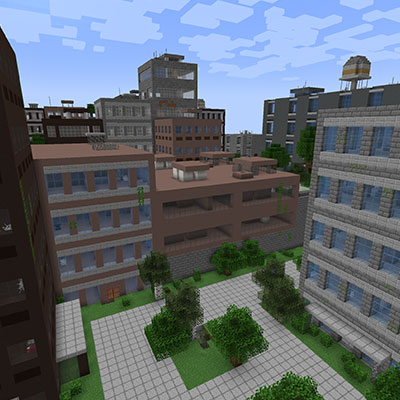
The Lost Cities Autoloader
Java mod listed for Minecraft 1.18–1.21. Downloads from the MC Java Mods app on Android.
Automatically applies Lost Cities profiles to new worlds without requiring manual configuration in the world creation screen, regardless of the world type…
I don't know my version or loader
Normally to get Lost Cities content in a new world you have to go through a separate screen with many different settings. This mod is ideal for mod packs that want to have Lost Cities in the world by default without the player setting them up.
Requirements
- Minecraft 1.21.1
- NeoForge 21.1.186+
- The Lost Cities mod
How It Works
This mod automatically detects when The Lost Cities mod is present and applies configured profiles to all new worlds. Instead of having to manually select Lost Cities settings every time you create a new world, the autoloader reads configuration files and applies them automatically.
Configuration
Basic Setup
- Start Minecraft once with the mod installed
- Navigate to
/config/lost_cities_autoloader/directory - Create or copy a JSON configuration file (see example below)
- Change the config to specify the filename you want to autoload
Configuration Selection
The mod uses a specific configuration file based on the configFileName setting in the mod's config. By default, it looks for survival_cities.json.
Configuration Files
Create JSON files in the config/lost_cities_autoloader/ directory. The mod will load the file specified in its configuration.
Example: To use config/lost_cities_autoloader/ruins.json, set configFileName to "ruins" in the config.
Example:
{
    "profile": "tallbuildings",
    "description": "Massive cities",
    "settings": {
        "cityChance": 0.15,
        "cityMinRadius": 200,
        "cityMaxRadius": 200,
        "generateLighting": true,
        "generateSpawners": false,
        "ruinChance": 0.0,
        "vineChance": 0.0
    }
}
Available Profiles
The profile field should match one of the built-in Lost Cities profiles:
default- Standard Lost Cities generationnodamage- Like default but no explosion damagefloating- Cities on floating islandsspace- Cities in floating glass bubblescavern- Cities in dark cavernsbiosphere- Jungles in glass bubbles on barren landscapeancient- Ancient jungle cities with vines and ruinswasteland- Wasteland with no wateratlantis- Drowned cities with raised water levelsafe- No spawners, lighting but no loottallbuildings- Very tall buildingsrarecities- Cities are rareonlycities- The entire world is a city
Custom Settings (Optional)
You can override specific settings by including a settings object. Common settings include:
cityChance- Probability of city generation (0.0 to 1.0)cityMinRadius- Minimum radius of a city in blocks (1 to 2000)cityMaxRadius- Maximum radius of a city in blocks (1 to 2000)generateLighting- Whether to add lighting to buildings (true/false)generateSpawners- Whether to add monster spawners (true/false)generateLoot- Whether to add loot chests (true/false)ruinChance- Probability of ruins/damage (0.0 to 1.0)vineChance- Probability of vines on buildings (0.0 to 1.0)
Mod Configuration
enableAutoloader- Enable/disable the autoloader functionality (default: true)configFileName- Name of the JSON configuration file to load (default: "survival_cities")
Dimension Configuration
lostCityDimension- Dimension where Lost Cities should generate (default: "minecraft:overworld")- Use
"minecraft:overworld"for overworld - Use
"minecraft:the_nether"for nether - Use
"minecraft:the_end"for end - Use custom dimension IDs like
"lostcities:lostcity"for mod dimensions
- Use
enableCustomSpawn- Enable custom player spawn dimension (default: false)playerSpawnDimension- Dimension where players spawn (default: "minecraft:overworld")
Note
No Effect on Existing Worlds
- The autoloader only affects newly created worlds
- Existing worlds keep their original generation settings
Dimension Requirements
- This is a fun little addition allowing you to start a world right in a specific dimension, such as Nether with cities.
- Target dimensions must exist (provided by mods or vanilla)
- Lost Cities must support the target dimension type
- Custom dimensions may require additional configuration
Thank you to the following Patrons for keeping my projects alive:
Whiro (Patron Ultimate)
Cabo Sneaker (Patron Plus)
If you would like to assist with development and get access to other cool features you can do so here: https://www.patreon.com/cw/Vodmordia
- I am always interrested in collaboration! I am a seasoned developer, but not a texture artist or modeler by any means. If you can create art and models and have an idea for a mod I may be interested in collaborating! Private message me or find me on discord: discord.gg/DQWYpZqj

- Edition: Minecraft Java
- File type: .jar
- Minecraft versions listed: 1.18.2, 1.21.1, 1.20.1
- How to install: Install the matching mod loader (Forge, Fabric or NeoForge) for your Minecraft version. → Download the .jar. → Put it in the .minecraft/mods folder and launch that loader profile.
- Where to get it: Opens on CurseForge — not every file is mirrored on our own servers.
Install steps are the general flow for this file type — How to install Minecraft Java mods & modpacks walks through it step by step.
- Ships as lostcitiesautoloader-1.0.1-1.21.1.jar — drop this file into the mods folder
- Download size: 32 KB
- Download link checked 2 Oct 2026 — working
These come from our own check of the pack file, not from the source page.