ModsJava
Piglin Join WTO
Java mod listed for Minecraft 1.21. Downloads from the MC Java Mods app on Android.
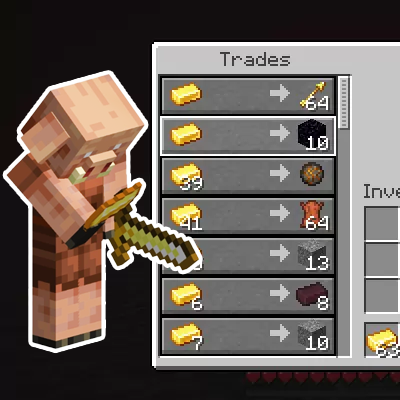
A mod that allows Piglins to trade like villagers. This mod only needs to be installed on the server and will not affect the behavior of vanilla Piglins.
I don't know my version or loader
Open the Minecraft launcher and look at the profile you play on — it names both, like fabric-loader-1.21.4. The version also shows in the bottom-right corner of the game's main menu.
No loader in the profile name? Then it's plain Minecraft, and these mods won't run — you need Fabric or NeoForge installed first.
Piglin Join WTO Mod (PJWTO)
A mod that allows Piglins to trade like villagers. This mod only needs to be installed on the server and will not affect the behavior of vanilla Piglins.
Features
- Server-side only: Only needs to be installed on the server; no client installation required
- Vanilla compatibility: Does not affect vanilla Piglin behavior of picking up gold ingots for trading or player interactions with held gold ingots
- Intelligent trading system: Generates trades based on Piglin loot tables; rarer items require more gold ingots
- Custom trades: Supports adding custom trade items via configuration file
- Experience rewards: Trades grant experience points, with rarer items giving more experience
Usage
- Right-click adult Piglins with an empty hand: Opens the trading interface when right-clicking an adult Piglin with an empty hand
- Gold ingot trading: Use gold ingots to purchase items from Piglin loot tables
- Vanilla behavior preserved: Right-clicking Piglins while holding gold ingots still triggers vanilla trading logic
Trading Rules
Loot table-based trades
- Gold ingot requirements are calculated based on the item's weight in Piglin loot tables
- Items with lower weights require more gold ingots
- Trades are sorted by the number of gold ingots required, from least to most
Gold ingot requirements by weight
- Weight 1 (rarest): Requires 15 gold ingots
- Books, iron boots, fire resistance potions, splash potions of fire resistance
- Weight 2 (rare): Requires 13 gold ingots
- Iron nuggets, ender pearls
- Weight 4 (uncommon): Requires 9 gold ingots
- String, nether quartz
- Weight 8 (common): Requires 1 gold ingot
- Obsidian, crying obsidian, fire charges, leather, soul sand, nether bricks, glowstone dust, gravel, blackstone
Custom Trades
The mod generates a piglin_trades.json file in the configuration directory, which you can edit to add custom trades.
Configuration file example
{
  "_comment": "Piglin trading configuration. Define custom trades here.",
  "custom_trades": [
    {
      "result_item": "minecraft:diamond",
      "result_count": 1,
      "cost_a_item": "minecraft:gold_ingot",
      "cost_a_count": 10,
      "cost_b_item": "",
      "cost_b_count": 0,
      "max_uses": 5,
      "experience": 10
    },
    {
      "result_item": "minecraft:enchanted_golden_apple",
      "result_count": 1,
      "cost_a_item": "minecraft:gold_ingot",
      "cost_a_count": 32,
      "cost_b_item": "minecraft:apple",
      "cost_b_count": 1,
      "max_uses": 1,
      "experience": 50
    }
  ]
}
Configuration parameter explanations
result_item: The ID of the resulting item from the traderesult_count: The quantity of the resulting itemcost_a_item: The ID of required trade item Acost_a_count: The quantity of required trade item Acost_b_item: The ID of required trade item B (can be empty)cost_b_count: The quantity of required trade item Bmax_uses: Maximum number of usesexperience: Experience points gained from the trade
Supported Platforms
- Minecraft Forge 1.21
- Minecraft Fabric 1.21
- Minecraft NeoForge 1.21
Installation
- Download the mod file for your platform
- Place the mod file in the server's
modsfolder - Start the server
- The configuration file will be automatically generated in the
configfolder
Notes
- This mod only needs to be installed on the server; no client installation is required
- Piglins must be adult and non-zombified to trade
- Players must have an empty hand to trigger the trading interface
- Vanilla Piglin behavior remains unchanged
Quick facts
- Edition: Minecraft Java
- File type: .jar
- Minecraft versions listed: 1.21, 1.21.5, 1.21.4
- How to install: Install the matching mod loader (Forge, Fabric or NeoForge) for your Minecraft version. → Download the .jar. → Put it in the .minecraft/mods folder and launch that loader profile.
- Where to get it: Opens on CurseForge — not every file is mirrored on our own servers.
Install steps are the general flow for this file type — How to install Minecraft Java mods & modpacks walks through it step by step.
File checked by MCModsHub
- Ships as pjwto-fabric-1.21-1.0.jar — drop this file into the mods folder
- Download size: 29 KB
- Download link checked 2 Oct 2026 — working
These come from our own check of the pack file, not from the source page.