
Client Chat Channels
Java mod listed for Minecraft 1.21. Downloads from the MC Java Mods app on Android.
I don't know my version or loader
Client Chat Channels
A client-side mod that adds chat channels to the game.
Channels
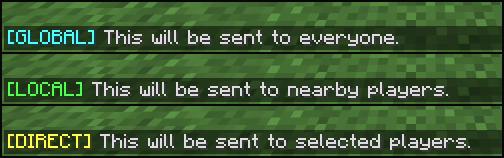
🌍 Global
Works like vanilla chat - all players on the server can see your messages (unless otherwise configured by the server).
🔊 Local
Messages are only sent to players within a specified distance from you.
✉️ Direct
Messages are sent exclusively to one or more specific players.
👥 Team
Messages are only sent to your teammates.
How It Works
When using a channel other than global, the mod automatically converts your chat messages into private messages using the /msg or /teammsg command and sends them only to the intended recipients.
Commands
You can use commands to switch between different channels:
- /channel global - Switches to the global channel.
- /channel local <radius> - Switches to the local channel. If the radius is omitted, the default radius will be used.
- /channel direct <recipients> - Switches to the direct channel. If recipients are omitted, the nearest player will be selected. Recipients should be space-separated.
- /channel team - Switches to the team channel.
- /channel status - Displays information about the currently selected channel.
Hotkeys
You can also use hotkeys to quickly switch between channels:
- Global: U
- Local: I
- Direct: O
- Team: K
- Show status: Not bound
Configuration
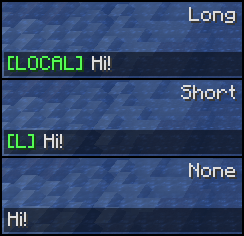
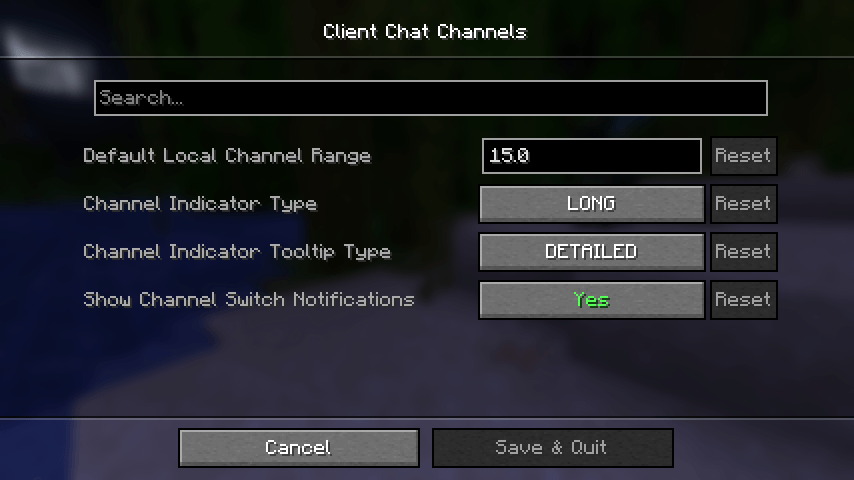
- Channel indicators and the default range of the local channel can be customized using Cloth Config.
- Hotkeys can be configured in Minecraft's key binding options.
Dependencies
NeoForge
Fabric
- Edition: Minecraft Java
- File type: .jar
- Minecraft versions listed: 1.21.11, 1.21.9, 1.21.10
- How to install: Install the matching mod loader (Forge, Fabric or NeoForge) for your Minecraft version. → Download the .jar. → Put it in the .minecraft/mods folder and launch that loader profile.
- Where to get it: Opens on CurseForge — not every file is mirrored on our own servers.
Install steps are the general flow for this file type — How to install Minecraft Java mods & modpacks walks through it step by step.
- Ships as clientchatchannels-neoforge-mc26.2-1.2.0+mc26.2.jar — drop this file into the mods folder
- Download size: 54 KB
- Download link checked 2 Oct 2026 — working
These come from our own check of the pack file, not from the source page.