Simple Mob Buff System
Java mod listed for Minecraft 1.21. Downloads from the MC Java Mods app on Android.
I don't know my version or loader
Simple Mob Buff System
This mod gives a chance for mobs to spawn with buffs and makes them drop additional rewards based on how strong they are.
While similar in concept to mods like Champions and Eldritch Mobs, it differs significantly in execution. Just as the mod name implies, it tries to be as simple and vanilla-friendly as possible while maintaining game balance, configurability and mod compatibility. This is achieved by building the system entirely using mechanics which already exist in the game.
The mod comes with a balanced configuration out of the box. All spawns are based on the game difficulty and the current local difficulty, all the buffs the mobs receive are status effects you know from vanilla, and there's no need to worry about getting mauled by ridiculously overpowered mobs or getting showered with overly generous loot - you can install and play without ever touching or even looking at the configuration.
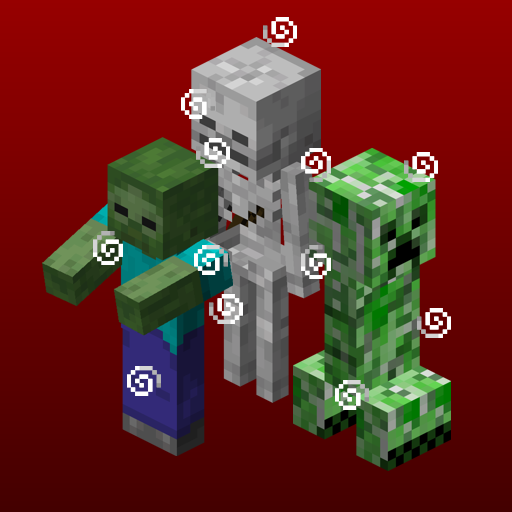
Buffed mobs will emit particle effects based on the buffs they have. This is the only way you can tell if a mob is buffed or not without other mods. I recommend Jade for getting information on mob health and the buffs it has and Particle Effects for unique particle textures for each effect.
The mod configuration is extensive and allows you to do pretty much whatever you want. Apply any effect to any mob, modded or vanilla. Want invisible creepers? Horses that move at the speed of light? Polar bears the size of a mountain? Not that I recommend any of those, but you sure can do it with this mod!
With that being said, if you want to know how to configure the mod and how it works, read on.
Editing the configuration
The mod uses Fzzy Config to provide a relatively simple to use and cohesive in-game configuration. You'll also need Mod Menu to actually access the configuration screen. Every option has a description and there are pointers and instructions on how to do stuff. There are also suggestions and auto-completion for fields where status effects, mobs or items are inputted.
How it works
Each mob has a set of buffs assigned to it, and any or all of those buffs can be applied to the mob once it spawns. Each buff in the set also has a max level assigned to it, and the mob can get any level of the buff from 1 to max. By default, mobs spawned via spawners are prevented from being buffed due to balance concerns (you can remove this restriction in the config).
When a mob is killed, it drops additional rewards based on its "buff level". The buff level is determined based on how strong the mob is - the amount of buffs it has and their levels, and the amount of enchanted equipment it's wearing. Zombie-type mobs will have a higher buff level if they're leaders.
The additional rewards are the following:
- Additional XP orbs based on how high the buff level is, each orb granting 3 XP points by default.
- If the buff level surpasses a percentage of the maximum possible buff level for the mob (default 66%), an enchanted book with a random quality depending on how much the buff level surpassed the threshold.
Most mobs will receive buffs from either the default melee buff set or the default ranged buff set depending on the type of weapon they spawn with, whereas certain mobs will receive buffs from buff sets unique to them. The two default sets can be modified in the mod configuration.
Custom rules can be defined to assign any buff to any mob, using any items as a condition. Any status effect, mob and item can be used in these rules, including ones added by other mods.
Buff application works the following way:
- When a mob spawns, the system first determines if it's going to try to apply any buffs to it in the first place. The chance for this ranges from a minimum chance (default 10%) at local difficulty 2 and below to a maximum chance (default 25%) at the highest possible local difficulty (6.75).
- If this check passes, the system tries to apply each buff applicable to the mob one by one. The chance for each buff to be applied ranges from a minimum chance (default 20%) at local difficulty 2 and below to a maximum chance (default 75%) at the highest possible local difficulty (6.75).
- The level of each buff is determined by the following formula:
specialDifficultyMultiplier * randomNumber * maxLevel ^ 2, limited from 1 tomaxLevel, wherespecialDifficultyMultiplieris a number from 0 to 1 based on the current local difficulty (0 at local difficulty 2 and below, 1 at local difficulty 4 and above)randomNumberis a randomly generated number from 0 to 1maxLevelis the maximum level of the buff
- Edition: Minecraft Java
- File type: .jar
- Minecraft versions listed: 1.21.1, 1.21.10, 1.21.11
- How to install: Install the matching mod loader (Forge, Fabric or NeoForge) for your Minecraft version. → Download the .jar. → Put it in the .minecraft/mods folder and launch that loader profile.
- Where to get it: Opens on CurseForge — not every file is mirrored on our own servers.
Install steps are the general flow for this file type — How to install Minecraft Java mods & modpacks walks through it step by step.
- Ships as smbs-1.1.1+26.1-neoforge.jar — drop this file into the mods folder
- Download size: 142 KB
- Download link checked 2 Oct 2026 — working
These come from our own check of the pack file, not from the source page.