
Just Enough Markers (JEM)
Java mod listed for Minecraft 1.21. Downloads from the MC Java Mods app on Android.
⬇ Download on CurseForgeThe author built this one for Minecraft 1.21.1 on NeoForge. On other versions it may install and then do nothing.

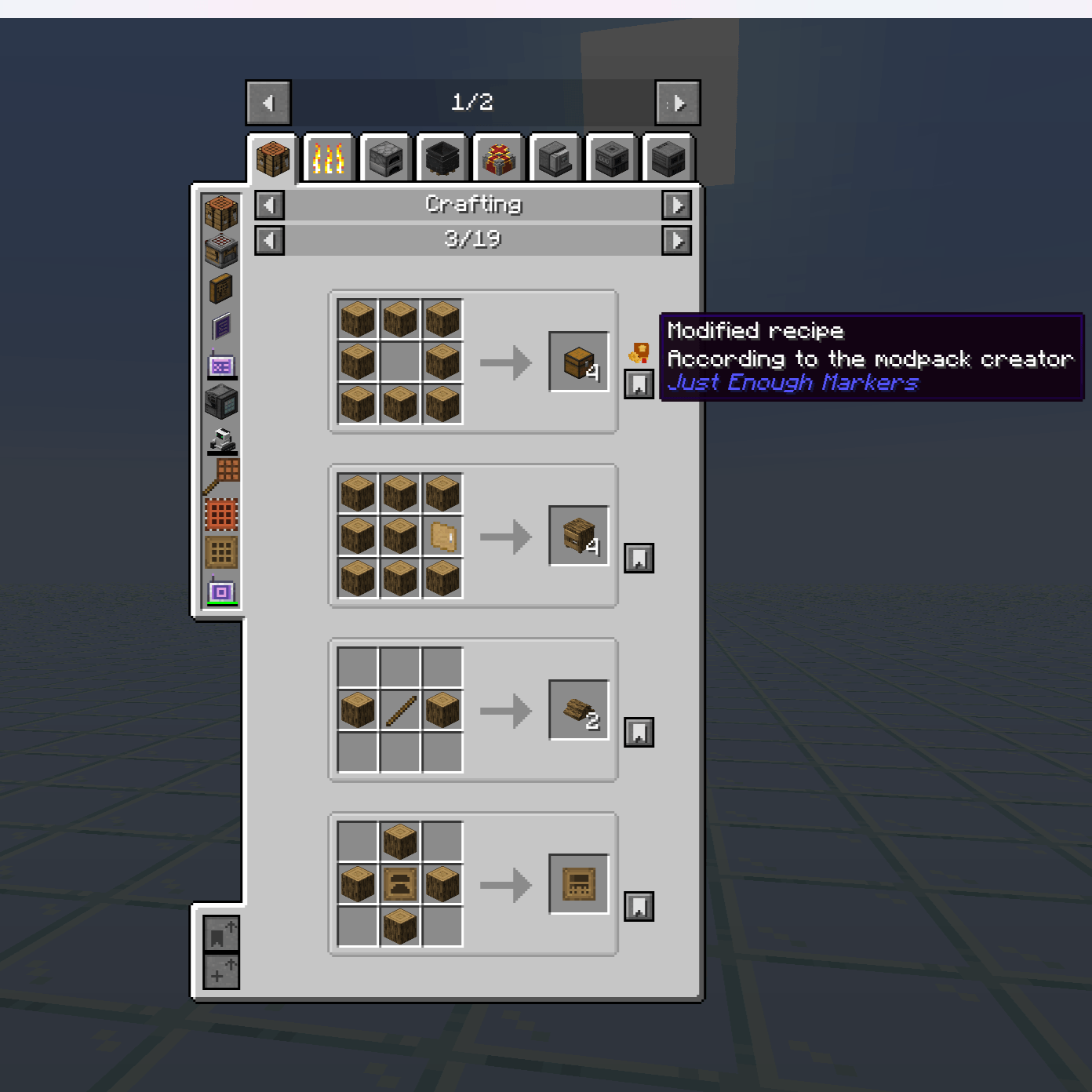
Just Enough Markers (JEM)
Enhance JEI with visual markers for modified recipes.
Just Enough Markers (JEM) is a lightweight NeoForge mod that helps modpack creators and technical players quickly identify recipe changes made by KubeJS or other modifications.
🌟 Key Features
- Highlight recipe changes: Added, removed, or altered recipes are clearly marked in JEI.
- Recipe filtering:
- Recipes with IDs matching your filter (
recipeIdFilter) are automatically highlighted. - Recipes without IDs can be highlighted based on their outputs (
outputFilter).
- Recipes with IDs matching your filter (
- Customizable markers:
- Per-category marker positions (
categories). - Adjustable X/Y offsets.
- Tooltips with configurable messages (2 lines by default).
- Per-category marker positions (
- Debug mode: Force all recipes to display markers, useful for testing and modpack development.
- Lightweight & client-side only: Does not alter recipes, only enhances JEI’s display.
⚙️ How It Works
- At startup, JEM checks recipes for their ID.
- If the ID contains the
recipeIdFilter, a marker is displayed. - Recipes without an ID are compared against the
outputFilterlist. - Markers can be positioned per recipe category with custom offsets.
- Tooltips show your configured text when hovering over a marker.
- Debug mode (
onlySpecificRecipeID) can override filters to display markers on all recipes.
⚙️ Configuration
Main config options (from JEMConfig.java):
| Option | Description | Default |
|---|---|---|
recipeIdFilter |
Text to match recipe IDs for highlighting | kubejs |
outputFilter |
List of item IDs used when recipe has no ID | [] |
tooltipLine1 |
First line of marker tooltip | Modified recipe |
tooltipLine2 |
Second line of tooltip | According to the modpack creator |
onlySpecificRecipeID |
Debug flag to show markers on all recipes | false |
defaultOffsetX |
Default X offset for markers | 19 |
defaultOffsetY |
Default Y offset for markers | -25 |
categories |
Custom marker positions per recipe category | Predefined examples included |
📦 Installation
- Install Minecraft 1.21.1 with NeoForge.
- Add JEI (required) and optionally KubeJS.
- Download the latest JEM
.jarfile. - Place it in your
modsfolder and launch Minecraft.
🎮 Usage
- Open JEI in-game.
- Recipes matching
recipeIdFilteror outputs inoutputFilterwill display markers. - Hover over markers to see tooltip information.
- Use debug mode to highlight all recipes during development or testing.
🛠 Support
Issues & suggestions: GitHub Issues
📄 License
All Rights Reserved
This mod may not be redistributed, copied, or modified without the author’s permission.
📌 Notes
- Requires NeoForge (Forge/Fabric not supported).
- Works best with the latest JEI & KubeJS versions.
- Intended primarily for modpack developers and technical players.
- Lightweight, client-side, and keeps JEI intact.
- Edition: Minecraft Java
- File type: .jar
- Minecraft version listed: 1.21.1
- How to install: Install the matching mod loader (Forge, Fabric or NeoForge) for your Minecraft version. → Download the .jar. → Put it in the .minecraft/mods folder and launch that loader profile.
- Where to get it: Opens on CurseForge — not every file is mirrored on our own servers.
Install steps are the general flow for this file type — How to install Minecraft Java mods & modpacks walks through it step by step.
- Ships as jem-0.0.3.jar — drop this file into the mods folder
- Download size: 1.3 MB
- Download link checked 2 Oct 2026 — working
These come from our own check of the pack file, not from the source page.