
PlayerTimeLimit JM
Java mod listed for Minecraft 1.20. Downloads from the MC Java Mods app on Android.
Server-side mod that enforces per-player daily playtime limits. Shows a bossbar countdown, warns at thresholds, and auto-kicks when time is up; resets…
⬇ Download on CurseForgeThe author built this one for Minecraft 1.20.1 on Forge. On other versions it may install and then do nothing.
-
TimeLimiter – Per-Player Daily Playtime Limit (Forge, Server-Side)
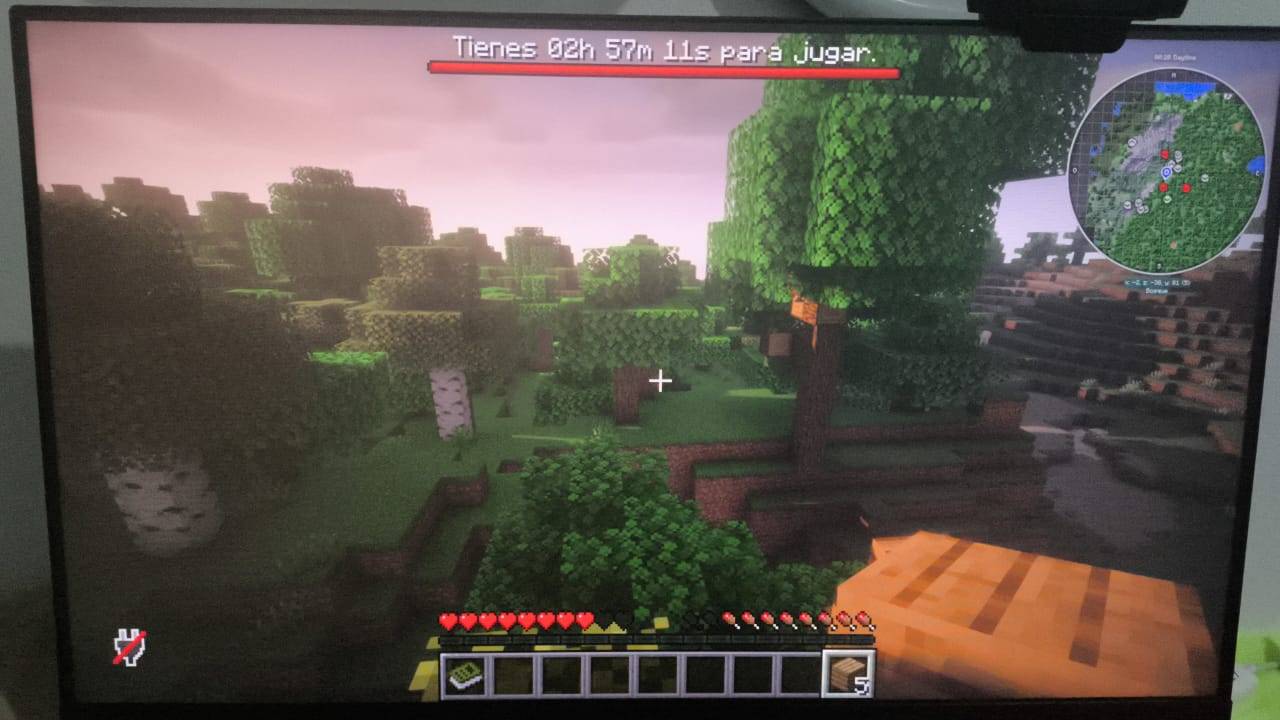
TimeLimiter lets you define how long each person can play on the server per day. The mod displays a bossbar with the remaining time, sends warnings as you approach the limit, and politely disconnects the player when their time runs out. The counter resets automatically each day at the configured time.
Main Features
-
Configurable daily limit (minutes): global value plus per-player overrides (by UUID or name).
-
Automatic reset by day/time and timezone: the counter resets at the specified time (e.g. 00:00 America/Mexico_City).
-
Bossbar with progress: shows remaining time in real time, with customizable colors.
-
Warning percentages: notifications at 80/90/100% usage (configurable).
-
Customizable messages: welcome, time added/removed, reset, and a formatted kick screen with colors and clickable links.
-
Login grace period: if a player has no time left, they can still see the world for a few seconds before being kicked.
-
Daily persistence: stores playtime in JSON files by date inside the world folder.
-
Server-side only: players don’t need to install anything on their client.
How it affects user experience
-
Healthy and predictable play: every player knows exactly how much time they have left thanks to the bossbar and warnings.
-
Simple administration: operators can assign limits per user without complex commands; data is saved per day and resets automatically.
-
Clear and respectful disconnection: when time runs out, players see a large, understandable message before being disconnected, avoiding confusion.
-
Timezone compatibility: ideal for international communities; the “new day” is based on your chosen timezone, not just the server clock.
Basic Configuration
The file
config/timelimiter.jsonis generated on first launch. Key options:-
dailyLimitMinutes: default daily minutes. -
perUserMinutes: map of{ "UUID_or_name": minutes }. -
reset.timeandreset.timezone: daily reset time and timezone. -
warnPercents: list of percentages for warnings. -
bossbar.colorandbossbar.timeColor: colors for the bar and time text. -
messages.*: customize all messages, including the multiline kick screen. -
graceOnLoginSeconds: grace seconds if joining with no time left.
Notes and Limitations
-
Tracks time while the player is connected (does not distinguish AFK).
-
Adds no commands and requires no special permissions.
-
Designed for Forge servers. Does not modify the world or add items/biomes.
Example Use Cases
-
Family or school servers that want healthy schedules.
-
Communities that want to fairly distribute playtime without daily micro-management.
-
- Edition: Minecraft Java
- File type: .jar
- Minecraft version listed: 1.20.1
- How to install: Install the matching mod loader (Forge, Fabric or NeoForge) for your Minecraft version. → Download the .jar. → Put it in the .minecraft/mods folder and launch that loader profile.
- Where to get it: Opens on CurseForge — not every file is mirrored on our own servers.
Install steps are the general flow for this file type — How to install Minecraft Java mods & modpacks walks through it step by step.
- Ships as timelimiter-1.0.5.jar — drop this file into the mods folder
- Download size: 15 KB
- Download link checked 23 Oct 2026 — working
These come from our own check of the pack file, not from the source page.