Enchantment Insights
Java mod listed for Minecraft 1.21. Downloads from the MC Java Mods app on Android.
I don't know my version or loader








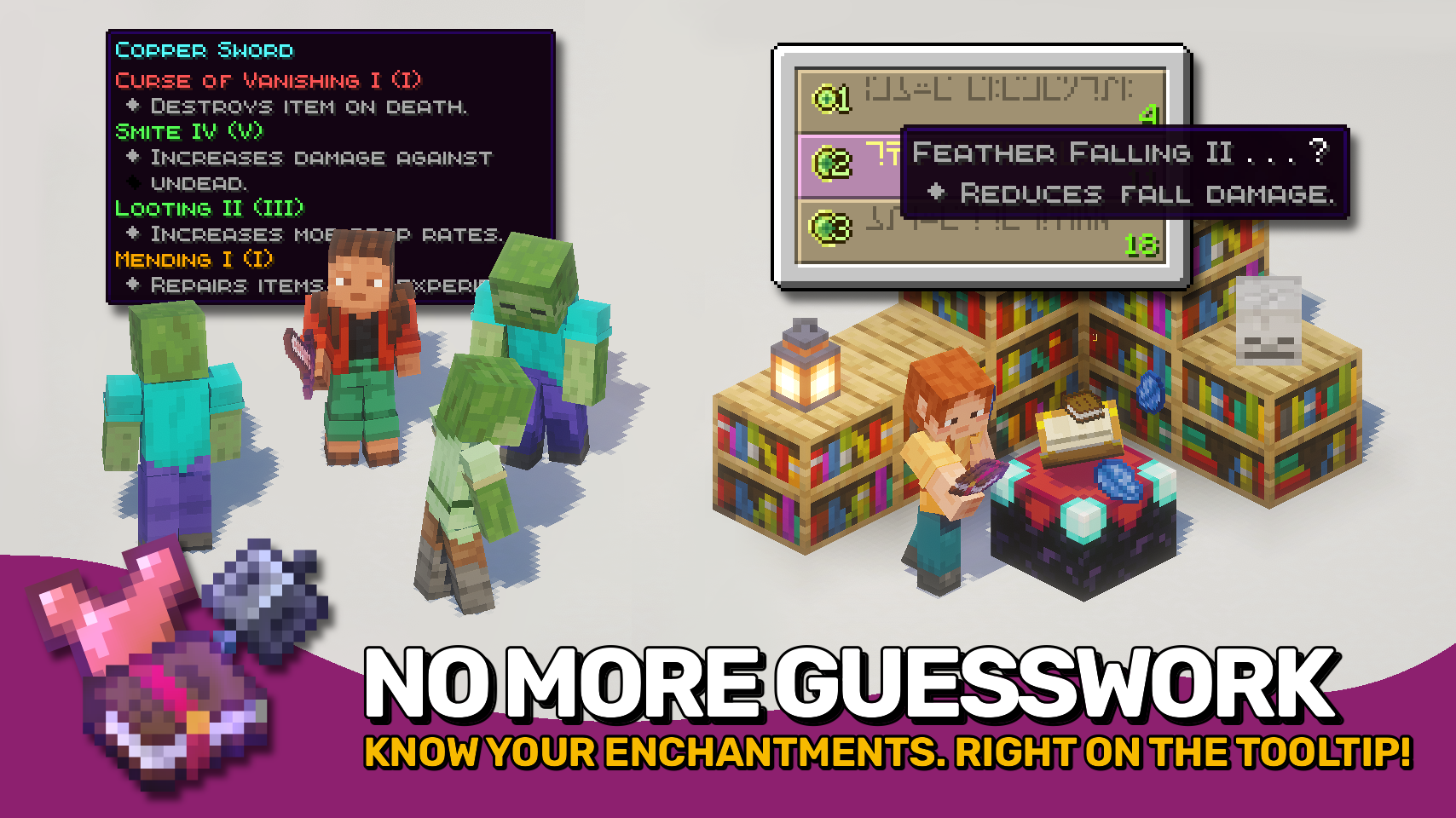
Enchantment Insights adds enchantment descriptions directly to your item tooltips, so you always know what each enchantment does. Enchantment entries look great too: dyed names, max levels, and fancy formatting with clean indentation make tooltips both clear and stylish. The enchanting table isn’t left behind either: its hints include the same descriptions, so you know exactly what you’re getting.
Looking for neat effect descriptions too? Check out the wonderful Effect Insights mod!

- ✨ Clear Descriptions: Every enchantment comes with an easy-to-understand explanation in item tooltips.
- 🧭 Extra Info: Optionally display compatible item tags, source mod, and enchantment ID.
- 🎨 Beautiful Formatting: Dyed names, colored bullet points, and neat indentation make tooltips look clean and polished.
- 🔢 Level Display: Shows both the current and max level for each enchantment.
- 💡 Helpful in Enchanting Table: Displays the same descriptions for enchantment hints while choosing enchantments.
- ⚙️ Configurable: Control when to show descriptions and which details to include. Even formatting is fully customizable.


⏩ INSTALLATION REQUIRED ON CLIENT
⏩ REQUIRES PUZZLES LIB TO BE INSTALLED (FABRIC & NEOFORGE)
⏩ REQUIRES FABRIC API TO BE INSTALLED (FABRIC)
⏩ REQUIRES FORGE CONFIG API PORT TO BE INSTALLED (FABRIC)

If available for a mod, configuration is possible directly from in-game using the mod menu (requires Mod Menu by Prospector to be installed on Fabric). Please note that on older Minecraft versions installing Forge Config Screens is also a requirement.
For manual configuration using an external text editor all files are found at .minecraft/config, named as MOD_ID-client.toml, MOD_ID-common.toml, or MOD_ID-server.toml, depending on the type of config. Not all types might exist for a mod, if any at all.

🌟 Huge thanks to Darkhax for the original Enchantment Descriptions mod. A great concept that’s been around for years and now shines again having been fully revamped for modern Minecraft.
🌟 Thanks to Stal for their stylish Clean Tooltips mod, which inspired the dyed enchantment names.
🌟 Thanks to gliscowo for Idwtialsimmoedm, which served as a foundation for the tooltip style.
 |
 |
|
 |
 |
|
 |
 |
|
 |
 |
|
 |
 |
|

- Edition: Minecraft Java
- File type: .jar
- Minecraft versions listed: 1.21.1, 1.21.11, 1.21.10
- How to install: Install the matching mod loader (Forge, Fabric or NeoForge) for your Minecraft version. → Download the .jar. → Put it in the .minecraft/mods folder and launch that loader profile.
- Where to get it: Opens on CurseForge — not every file is mirrored on our own servers.
Install steps are the general flow for this file type — How to install Minecraft Java mods & modpacks walks through it step by step.
- Ships as EnchantmentInsights-v21.1.4-mc1.21.1-Fabric.jar — drop this file into the mods folder
- Download size: 92 KB
- Download link checked 22 Oct 2026 — working
These come from our own check of the pack file, not from the source page.