
Journey Mode JM
Java mod listed for Minecraft 1.16–1.21. Downloads from the MC Java Mods app on Android.
I don't know my version or loader
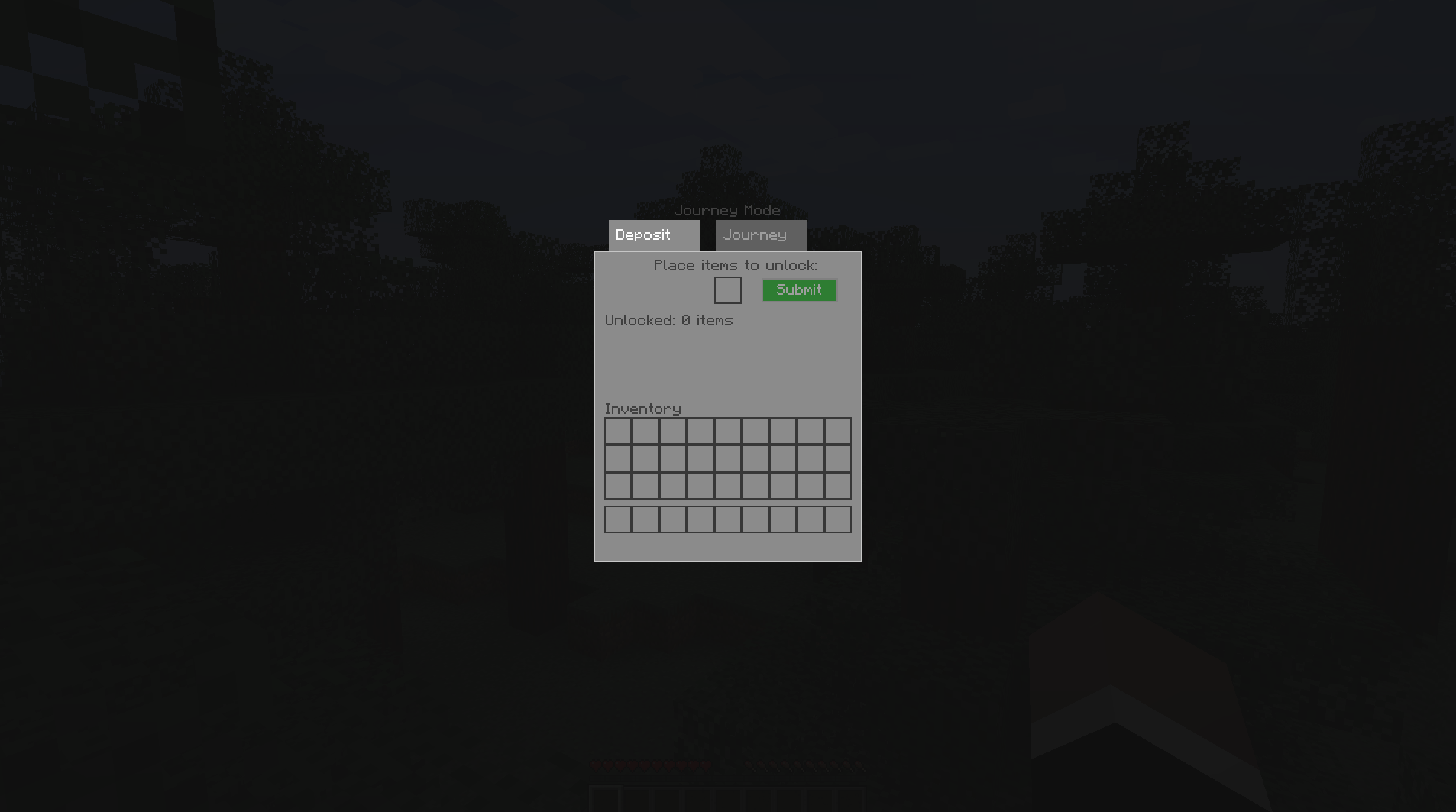
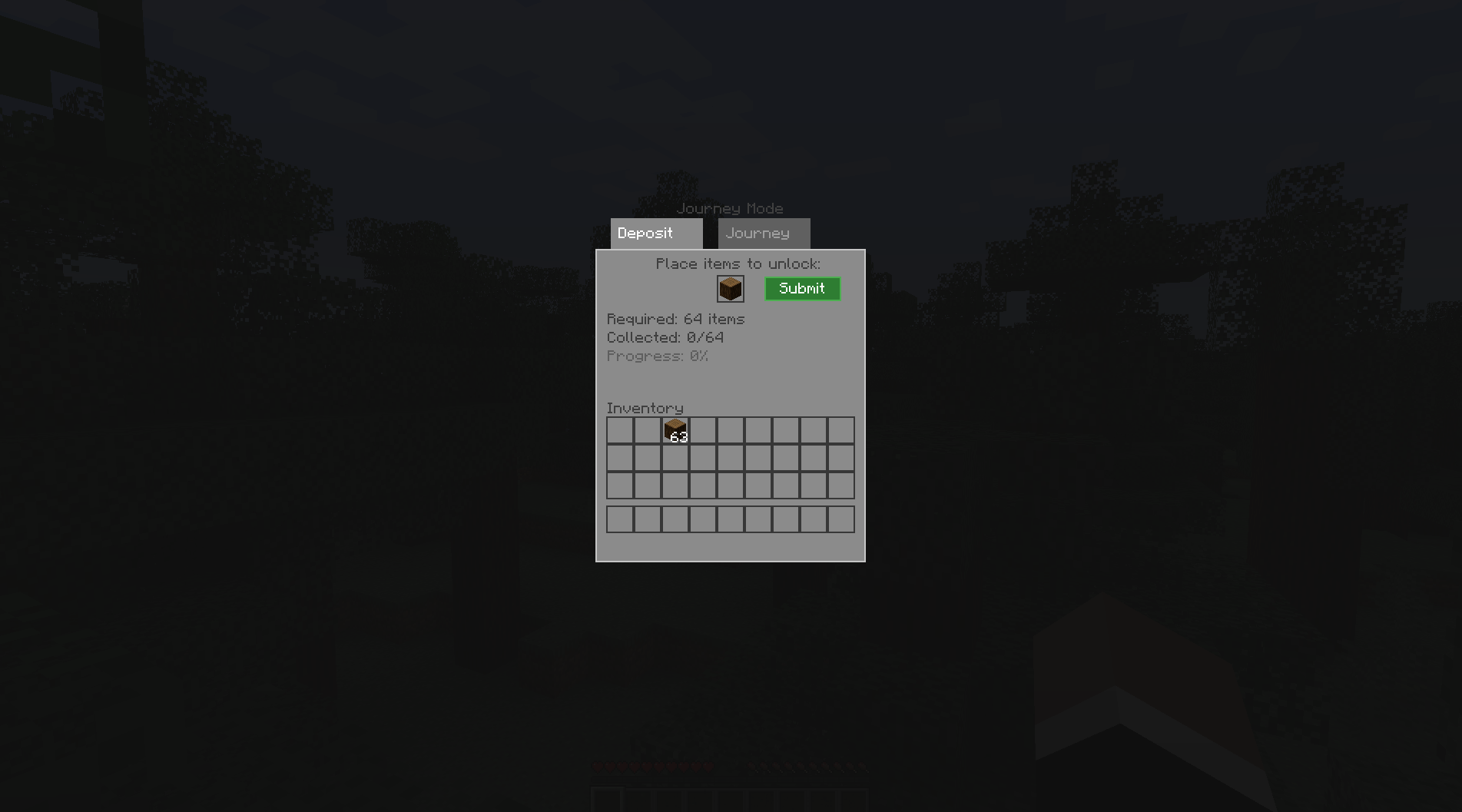
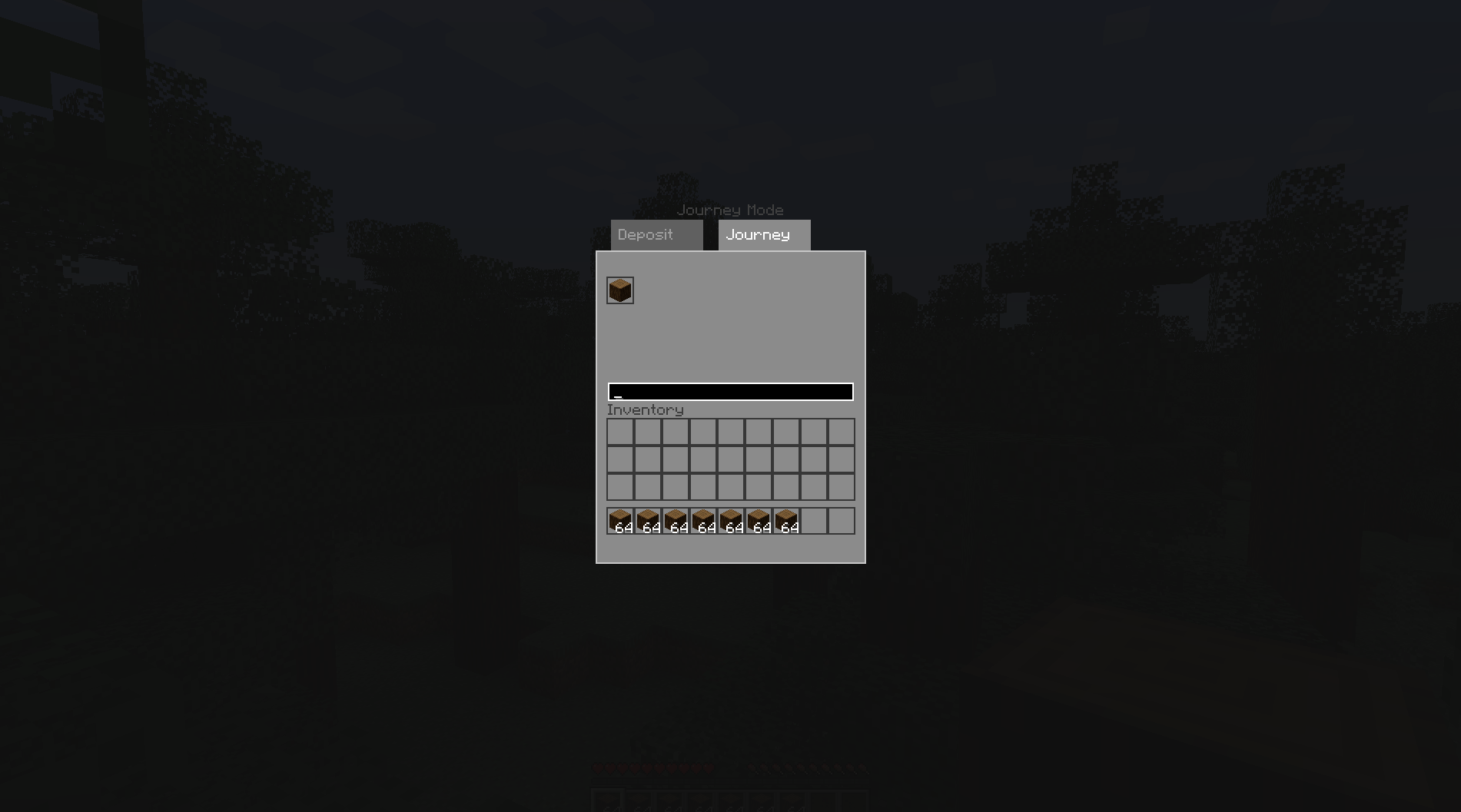
🎮 Journey Mode
The faithful Terraria Journey Mode experience for Minecraft. Sacrifice enough of any item to duplicate it forever — no machines, no energy costs, no end-game gates, no dependencies. Just deposit, unlock, and retrieve infinitely.






⚠️ Running 1.8.0? Please update to 1.8.1.
1.8.0 had a game-breaking bug on certain modpacks: with some mod combinations, putting an item into the Deposit slot froze the game outright, with no crash report and nothing in the log to explain it. Four of the nine 1.8.0 downloads also shipped an unlock sound that was meant to have been removed. Both are fixed in 1.8.1, along with a shift-click withdrawal bug and two UI overlaps — see the changelog. Updating is a drop-in replacement; your catalog, teams and config carry over untouched.
⚡ Why Journey Mode?
- 🧩 Works with every mod automatically. Any item with a recipe or registry entry is researchable — vanilla, Create, Mekanism, anything. No JEI or any other dependency required.
- 🗂️ Cross-world progression. Unlocks live in a central profile (
journeymode_unlocks.json), not the world save. Delete worlds, hop servers, rebuild your modpack — your catalog stays. - 🧪 Sub-type aware research (1.7.1+). Potions, enchanted books, goat horns, and suspicious stews are tracked as distinct entries. Research a Jump Potion, get Jump Potions back — not a generic uncraftable one.
- 📐 Zero-config smart thresholds. A recipe-tree calculator prices every item automatically by crafting depth — from 64 for raw materials down to 1 for complex crafts. Works on modded recipes out of the box.
- 🌍 Widest support of any Journey mod: Minecraft 1.12.2 → 1.21.x across Forge, Fabric, and NeoForge.
📦 How It Works
[ Deposit Item ] ──> [ Track Progress ] ──> [ Unlock Permanently ] ──> [ Retrieve Infinitely ]1. Deposit
Press J to open the Catalog. Place items in the Deposit slot — or shift-click stacks straight from your inventory — to count them toward research.
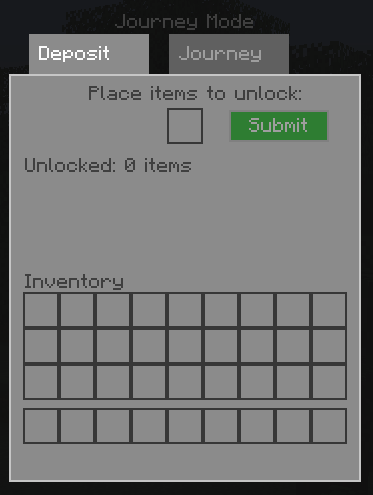 The deposit panel where your journey starts.
2. Track
The UI shows exactly how many more of the item you need.
 Requirement thresholds shown live as you deposit.
3. Retrieve Infinitely
Once unlocked, pull unlimited copies from the searchable Journey tab. Left-click for 1, Shift + Left-click for a full stack. Newly unlocked items sort to the front.
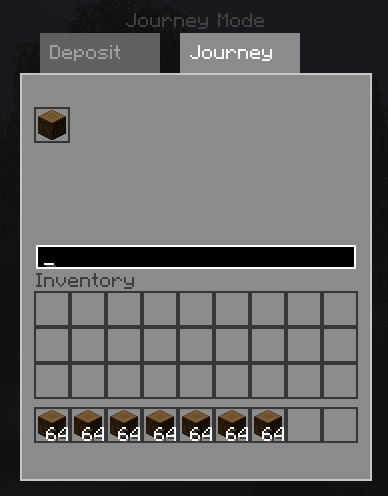 Your permanent, searchable item catalog.
🚀 Feature Highlights
- ✨ Smart Research Engine — deposit items, hit the threshold, unlock forever.
- 👥 Shared Team Catalogs (1.8.0+) —
/journeymode team create|join|leave|info|kick|transfer. Pool deposits and unlocks with your friends on a server; leaving keeps a snapshot of what the team unlocked. - 📥 Deposit All (1.8.0+) — one button deposits every already-researchable item in your main inventory; shift-click it to include your hotbar too.
- 🔍 Progress Tooltips (1.8.0+) — see "37/64 researched" or "Unlocked" right on the item tooltip, no need to open the catalog.
- 📊 Catalog Statistics (1.8.0+) — a dedicated Stats tab: total unlocked/researchable, % complete, per-mod breakdown, and your most recent unlock.
- 💎 Rarity-Aware Thresholds (1.8.0+) — Nether Stars, Heart of the Sea, Echo Shards and other recipe-less rarities are priced for their actual scarcity, not like cobblestone.
- 🔌 Regex, Tags & Datapacks (1.8.0+) —
blacklist.json/custom_thresholds.jsonsupport exact IDs, item tags (#c:ingots), and regex/wildcard patterns; modpack authors can also ship threshold-pack datapacks. Full dev API for other mods to hook in. - 🔄 Real-Time Config Sync (1.8.0+) — server-side blacklist/threshold changes push to every connected client instantly, no restarts.
- ⚡ Inventory Utilities — Shift-Click Dump discards already-unlocked junk from your inventory instantly; Drag-to-Delete lets you drop a stack onto its catalog icon to void it, Terraria-style.
- 🔍 Searchable Dual-Tab GUI — Deposit and Journey panels with live search and newest-first sorting.
- 🛡️ Server-authoritative & cheat-safe — every unlock and retrieval is validated server-side. Hacked clients can't spawn locked items.
- 🚄 Modpack-hardened (1.7.0+) — O(1) recipe indexing means zero FPS stutter opening the menu in massive packs, and broken third-party recipes are safely isolated instead of crashing your client.
- 💀 Death, dimension & respawn safe — progress can't be lost to gameplay events.
📐 Automatic Thresholds
Thresholds scale with how hard an item is to make — deeper crafts embed more value, so they cost fewer items:
| Item Type | Example | Default Threshold |
|---|---|---|
| Raw Materials (no recipe) | Iron Ore, Logs, Cobblestone | 64 (1 stack) |
| Simple Crafts (Depth 1) | Iron Ingot, Planks | 32 |
| Secondary Crafts (Depth 2) | Iron Block, Chest | 16 |
| Complex Crafts (Depth 3+) | Redstone Comparator | 1 |
| Tools, Weapons, Armor & Non-Stackables | Diamond Pickaxe, Elytra, Bucket | 1 |
💡 Every value can be overridden per-item in
custom_thresholds.json— handy for pricing rare uncraftables like Nether Stars or balancing a modpack.
💾 Global Profile
Your catalog is stored in one file at the root of your Minecraft installation (or server folder):
.minecraft/
├── config/Journey Mode/
│   ├── blacklist.json
│   └── custom_thresholds.json
├── journeymode_unlocks.json   <-- your permanent catalog
└── saves/- Portable — copy
journeymode_unlocks.jsonto a new PC to migrate, back it up, or share a researched library with friends. - Multiplayer-safe — entries are keyed by player UUID, so one server file cleanly tracks every player.
- Admin-friendly — edit the JSON offline to grant items, reset players, or inspect progress. Each entry tracks deposit counts, unlocked items, and unlock timestamps.
👥 Team catalogs work differently on purpose. Personal progress follows you everywhere (that's the point of the global profile above), but a team's shared catalog is tied to the specific world/server it was created on, stored in that world's save folder — so "Team Alpha" on one server never bleeds into a different server or your own singleplayer world.
⚙️ Configuration
Config files generate automatically under config/Journey Mode/ and hot-reload — no restart needed.
blacklist.json — block items from being researched:
{
  "blacklisted_items": [
    "minecraft:bedrock",
    "minecraft:barrier",
    "minecraft:command_block"
  ]
}
custom_thresholds.json — override the calculator per item:
{
  "thresholds": {
    "minecraft:nether_star": 3,
    "minecraft:enchanted_golden_apple": 3,
    "minecraft:netherite_ingot": 5
  },
  "default_override": null,
  "max_threshold_cap": 64
}
Since 1.8.0, both files accept three key forms — checked in this order: exact item id → item tag → regex/wildcard pattern:
{
  "thresholds": {
    "minecraft:nether_star": 3,
    "#c:ingots": 32,
    "gtceu:.*_circuit": 4
  }
}- Exact ID always wins (
"minecraft:nether_star": 3). - Tags (
"#c:ingots") price everything in that tag at once. (1.12.2 has no vanilla tag system — tag rules there map to OreDictionary entries instead.) - Regex/wildcard (
"gtceu:.*_circuit", or a plain glob like"create:*_casing") catches everything else. default_overridesets one fallback threshold for every item with no more specific rule — this is what/journeymode allwrites.max_threshold_capbounds what/journeymode thresholdand/journeymode allwill accept (default64).- Modpack authors can also ship datapack threshold packs at
data/<namespace>/journeymode/thresholds/*.json— no config editing required. (Not available on 1.12.2, which predates the modern data pack system.) - Other mods can register their own
ThresholdProvider/NormalizationRulevia a small, dependency-free developer API. - All config changes push live to connected clients — no restart, no reconnect.
📖 Commands & Controls
Everyone
| Command | Description |
|---|---|
/journeymode on |
Enable Journey Mode for yourself (GUI access & deposits) |
/journeymode off |
Disable Journey Mode |
/journeymode status |
Check your current toggle state |
/journeymode reset |
Permanently wipe your catalog and start over |
/journeymode tooltips on\|off |
Toggle the "N/threshold researched" tooltip on your own items |
/journeymode team create <name> |
Start a team. You're the owner. |
/journeymode team join <name> |
Join a team — your deposits and unlocks now pool with it |
/journeymode team leave |
Leave your team, keeping a snapshot of its unlocks |
/journeymode team info |
See your team's name, member count, and unlock count |
/journeymode team kick <player> |
Owner-only: remove a member (must be online) |
/journeymode team transfer <player> |
Owner-only: hand ownership to another member (must be online) |
Server Operators
| Command | Description |
|---|---|
/journeymode reloadconfig |
Re-read config files and re-push rules to every online client |
/journeymode all <count> confirm |
Set a fallback threshold for every item at once (per-item overrides still win) |
/journeymode all reset |
Remove the global fallback threshold |
/journeymode threshold <item> <count> |
Fix one item's threshold on the fly |
/journeymode threshold hand <count> |
Same, but targets the exact sub-type of the item in your hand (e.g. one specific potion) |
/journeymode threshold <item> remove |
Delete a per-item threshold override |
/journeymode grant <player> <item> |
Instantly unlock an item for a player — works even if they're offline |
/journeymode revoke <player> <item> |
Take an unlock away and reset that item's progress |
Keybind: J opens the Catalog (rebindable under Options → Controls → Key Binds → Journey Mode).
🚀 Installation
Grab the file matching your Minecraft version and loader. Fabric builds require Fabric API; Forge/NeoForge builds have no dependencies at all.
| Minecraft | Java | Loaders | Minimum Loader Version |
|---|---|---|---|
| 1.21.1 | 21 | NeoForge, Fabric | NeoForge 21.1.72+ · Fabric 0.19.2+ + Fabric API |
| 1.20.1 (LTS) | 17 | Forge, Fabric | Forge 47.4.10+ · Fabric 0.19.2+ + Fabric API |
| 1.19.2 | 17 | Forge, Fabric | Forge 41.1.0+ · Fabric 0.14.9+ + Fabric API |
| 1.16.5 | 8 | Forge, Fabric | Forge 36.2.39+ · Fabric 0.11.7+ + Fabric API |
| 1.12.2 | 8 | Forge | Forge 14.23.5.2860+ |
Install on both client and server for multiplayer. Singleplayer needs only the client.
🧱 On 1.12.2, metadata sub-types (stone variants, wool colors, dyes) are tracked and unlocked individually.
❓ FAQ
Does it work with modded items? Yes, automatically. The recipe calculator reads the game's RecipeManager, so modded recipes get depth-based thresholds like vanilla ones. Recipe-less modded items default to the raw-material threshold and can be tuned via custom_thresholds.json.
Can I use this in my modpack? Yes — go for it. A credit/link back is appreciated.
Is it balanced for survival servers? Journey Mode is deliberately a mode, not a survival balance add-on — there are no energy costs or crafting gates by design. Server owners can shape the experience with the blacklist, custom thresholds, and the per-player /journeymode on|off toggle.
Will my progress transfer between worlds/servers? Between your own worlds, yes — that's the point. On a multiplayer server, progress is stored in the server's profile file and tracked per player.
🗺️ Roadmap
Everything that used to be on this list — Shared Team Catalogs, Real-Time Config Sync, the Integration API (regex/tags/datapacks/dev hooks), the Global/Per-Item Threshold commands, Admin Grant/Revoke, Rarity-Aware Thresholds, Deposit All, Progress Tooltips, and Catalog Statistics — shipped in 1.8.0, and 1.8.1 is the fix release you want (see the warning at the top). See the changelog below.
What's next:
- 🎒 E-Menu Unlock Integration — a small fetch strip and deposit slot inside your vanilla inventory (
E) screen, additive to the existing Journey (J) catalog rather than replacing it.
Full changelog below and on GitHub Releases.
📋 Changelog
Version 1.8.1 (Critical Fixes — please update from 1.8.0)
Release Date: July 2026
⚠️ 1.8.0 shipped with a game-breaking bug on certain modpacks. With some mod combinations, simply putting an item into the Deposit slot would freeze the game outright — no crash report, no error in the log, nothing to go on. It also affected four of the nine 1.8.0 downloads with an unlock sound that was supposed to have been removed before release. Both are fixed here, along with everything else listed below. If you are on 1.8.0, update. Your catalog, teams and config carry over untouched — there is no migration step and nothing to re-research.
Bug-fix release: everything from 1.8.0 works the same, minus the defects below.
🧊 Fixed: game freeze when placing an item in the Deposit slot
On modpacks whose crafting graph contains a cycle, the Deposit tab re-walked a large slice of the recipe graph on every rendered frame, pinning the render thread at 100% indefinitely. There was no crash report, no log line and no error — just an apparent hang. One "un-craft this back into planks" style reverse recipe was enough to trigger it, since ordinary vanilla doors, boats and signs close the loop from the other side; plain sticks, logs and stairs could all set it off.
Three fixes, all nine versions: threshold results are now cached properly (including results resolved through a recipe cycle), the GUI only recalculates when the deposit slot's item actually changes, and the recipe walk itself is hard-bounded in both depth and total work so no recipe graph can stall it.
🔇 Fixed: unlock sound still playing
The 1.8.0 downloads for Forge 1.12.2, Forge 1.16.5, Forge 1.20.1 and NeoForge 1.21.1 were built just before the unlock sound was removed and still carried it. All nine 1.8.1 jars are rebuilt from current source — unlock feedback is the on-screen message only, as intended.
🩹 Other fixes
- Shift-click withdrew 64 of everything. Shift-clicking an item in the Journey tab is meant to give you a full stack — but "a full stack" is per item, and it was hardcoded to 64. Swords, which stack to 1, came out as 64 separate slots' worth; potions, which stack to 16, likewise. Withdrawals now use each item's own stack limit, enforced server-side as well as client-side. Packs that raise stack limits get their raised limit, as you'd expect.
- Team name overlapped the "Journey Mode" title. The badge and the title were drawn on the same line, so any team name long enough ran straight through the title. They now get a line each.
- Stats tab per-mod list overflowed the panel. It was capped at 6 rows with no clearance check, so on a modpack with more than a handful of namespaces the list ran through the "Latest:" line and on into the "Inventory" label below. The list now scrolls — mouse wheel, with a scrollbar when there's more to see — long mod ids are trimmed to fit, and every row position is measured against the element below it.
- Forge 1.19.2 was silently missing the unlock message and the team-name badge entirely — its sync handler had never been updated to the 1.8.0 payload. All nine versions now behave identically.
- Deposit All printed one chat line per unlocked item on top of the batched on-screen message; it's a single summary line now.
- Performance: the Journey tab's search, the Stats tab and progress tooltips no longer rebuild their entire view every frame — noticeable on large catalogs, with no change in behaviour.
- Robustness: the data sync packet can no longer exceed Minecraft's payload limit on a very large catalog (which would have disconnected the client on every join), and recipe-depth resolution can no longer overflow the stack on a pathological modded recipe graph.
Version 1.8.0 (Teams, Config Sync, Integration API & Quality-of-Life)
Release Date: July 2026
👥 Shared Team Catalogs
- Team Commands:
/journeymode team create|join|leave|info|kick|transfer. Both deposits and unlocks pool with your team; leaving snapshots the team's unlocks into your own personal catalog. - Per-World Team Storage: Team progress lives in the world/server save, not the global profile — teams never leak between unrelated servers or singleplayer worlds.
🔄 Real-Time Config Sync & Integration API
- Instant Config Sync: Blacklist and threshold rule changes push to every connected client immediately — no restarts, no reconnects.
- Regex, Tag & Datapack Rules:
blacklist.json/custom_thresholds.jsonaccept exact IDs, item tags (#c:ingots), and regex/wildcard patterns. Modpack authors can also ship threshold-pack datapacks without touching configs. - Developer API: A small, dependency-free API (
ThresholdProvider,NormalizationRule) lets other mods register custom thresholds and NBT/component normalization rules.
⚙️ New Commands
/journeymode all <count> confirm/all reset— set (or clear) a global fallback threshold for every item./journeymode threshold <item|hand> <count>/threshold <item> remove— fix an individual item's threshold on the fly, with ahandvariant for exact potion/enchanted-book sub-types./journeymode grant|revoke <player> <item|hand>— admin-grant or revoke unlocks, works on offline players./journeymode tooltips on|off— per-player toggle for the new progress tooltips./journeymode reloadconfig— re-read config files and re-sync all clients.
🎁 Quality-of-Life
- Deposit All: One button deposits every already-researchable item in your main inventory; shift-click to include your hotbar too.
- Progress Tooltips: See "37/64 researched" or "Unlocked" directly on item tooltips.
- Catalog Statistics: A new Stats tab — total unlocked/researchable, % complete, per-mod breakdown, and your most recent unlock.
- Rarity-Aware Thresholds: Recipe-less rare items (Nether Stars, Heart of the Sea, Echo Shards, etc.) now cost far less than common raw materials of the same stack size.
- Unlock Feedback: An on-screen message when you cross a research threshold.
🛠️ Fixes
- Modded Stack-Size Bug: Fixed thresholds for recipe-less items being inflated to absurd values (observed: 9,999) by mods that increase max stack sizes.
- Search Bar Keybind Leak: Typing "E" (or other letter keys bound to vanilla keybinds) while searching the catalog no longer closes the GUI mid-type.
- Deposit-All Button Overlap and garbled tooltip text on certain versions, both resolved.
Universal Fix: All of the above applied across all 9 target loader/version configurations.
Version 1.7.1 (Subtype-Aware Research)
Release Date: June 4, 2026
- Fixed Subtype Retrieval Bug: Resolved a bug where depositing potions, enchanted books, and other items with sub-properties (e.g. goat horns, suspicious stews) rendered them as default "Uncraftable Potions" or caused them to lose their visual effects and NBT tags/components when retrieved.
- Subtype-Aware Serialization: Implemented hybrid key serialization to distinguish between potion types, enchantments, and metadata-based subtypes, while keeping tools, weapons, and armor unlocking at the base item level.
- Universal Fix: Applied across all 9 target loader/version configurations.
Version 1.7.0 (Modpack Hardening & Concurrency)
Release Date: June 2026
🛡️ Mod Registry & Conflict Hardening
- Robust Error Isolation: Implemented comprehensive defensive exception mapping when querying ingredient and output registries. Any third-party recipe classes that throw exceptions during retrieval are caught safely and defaulted, entirely preventing client rendering screen crashes.
- Severe Performance Optimizations: Replaced the legacy linear scans over every registered mod recipe with a lazily-built O(1) indexing map. This shifts threshold calculation from slow recursive loops to instant lookups, completely eliminating FPS stutter when opening the Journey menu in massive modpacks.
🧵 Concurrency & Persistence Upgrades
- Centralized Data Safety: Synchronized player capability loading procedures to pair with global capability saves. This enforces mutual exclusion on all JSON profile read/write operations, eliminating file-corruption race conditions when multiple players log in and out concurrently on servers.
- Main-Thread Safety: Audited client/server network packets to ensure all asynchronous packet handling is correctly enqueued and processed on the main threads.
Version 1.6.0N-1.12.2 (1.12.2 Forge Port & Subtypes Progression)
Release Date: May 23, 2026
- Forge Native Support: Fully ported the mod to Minecraft 1.12.2 under standalone Forge (14.23.5.2860).
- Java 8 Compilation Target: Enforced strictly Java 8 compiler targets for full legacy compatibility, powered by RetroFuturaGradle compilation pipelines.
- Metadata-Based Subtypes Support: Engineered robust unique item key tracking (
getItemKey) combining the registry name and metadata (e.g.minecraft:stone:4for polished diorite) to separate progression and unlocks for stone types, wood types, colored wool, and dyes. Overloaded capabilities to accept bothItemandItemStacksignatures. - GUI Lighting and Visibility Polishing: Explicitly managed standard GUI item lighting (
RenderHelper.enableGUIStandardItemLighting()) to resolve dark items in the Journey catalog grid. OverrodeisEnabled()on container slots to cleanly hide/draw slots during tab switches. - Decoupled Gradle Workspace: Built inside decoupled
Forge_1_12_2/directory with independent configs.
Version 1.6.0N-1.20.1 (1.20.1 Multi-Loader LTS Port)
Release Date: May 20, 2026
- Forge & Fabric Native Support: Fully ported the mod to Minecraft 1.20.1 under standalone Forge (47.4.10) and Fabric (loader 0.19.2) configurations.
- Java 17 Compilation Target: Shifted compiler toolchains and build targets to Java 17 for full pre-1.20.5 runtime compatibility.
- Legacy Recipe Calculator Adaptation: Re-engineered
RecipeDepthCalculatoracross both platforms to directly query raw pre-1.20.2Recipe<?>types fromRecipeManager, resolving modernRecipeHolderclassloading conflicts. - Dimension-Safe Fabric Storage: Created a thread-safe
Map<UUID, JourneyDataAttachment>tracking capability to safeguard Fabric players from dimension-swap or respawn desyncs. - Clean Isolated Directories: Configured decoupled folders
Forge_1_20_1/andFabric_1_20_1/with independent buildscripts.
Version 1.6.0N (Core Reconstruction)
Release Date: May 19, 2026
- Reconstructed Core Engine: Revamped and rebuilt all loader projects back from the verified stable
1.4.0codebase, completely resolving previous experimental multi-module startup crashes and desync issues. - Global Unlocks Portability: Integrated and polished the global
journeymode_unlocks.jsonsave handler. In-game operations leverage modern attachments (NeoForge) and static tracking maps (Fabric) for lag-free in-memory lookups, while all progress dynamically saves to the central JSON file. - Fabric 1.21.1 Native Port: Fully implemented the Fabric version inside the
Fabric/directory with 100% feature-parity. - Enforced Gradle Mappings Isolation: Re-configured Gradle scripts to run official Mojang mappings (
mappings loom.officialMojangMappings()) natively alongside Fabric Loader0.19.2, ensuring perfect compile-time type-safety. - Safe Container Mixins: Ported screen mixins (
HandledScreenMixin.java) to inject cleanly on top ofAbstractContainerScreenin the Mojmap environment.
Version 1.5.0N (Dedicated Server Stability)
Release Date: May 19, 2026
- Physical Side-Safety Fixes: Nested
ClientKeyHandlerinside client-only classes, isolating server runs from graphics packages (preventing crashes on dedicated servers). - Cleanups & Optimizations: Removed unused classes, outdated reference files (such as obsolete key binding systems), and refined networking packet channels.
Version 1.4.1N (Dumping & Drag Grid Deletion)
Release Date: May 19, 2026
- Shift-Click Inventory Dump: Allows players to shift-click items inside their inventory while looking at the catalog grid to discard them if they have already been unlocked.
- Drag-to-Delete Grid Handler: Integrated inventory drag-slot listener to let players drag and drop items straight on their unlocked slots to delete them instantly.
Version 1.4.0 (First Stable Baseline Release)
Release Date: October 31, 2025
- Journey Mode Toggle System: Brigadier
/journeymode on|off|statustoggle handles client catalog restrictions dynamically. - Custom Threshold Overrides: Created customizable JSON configurations for
custom_thresholds.jsonandblacklist.json.
📄 Links
- Source: GitHub — Aryangpt007/Journey-Mode
- Bug reports & feature requests: Issue Tracker
- Also on: Modrinth · CurseForge
- License: MIT
Created by Agentvoo7 • Made with ❤️ for the Minecraft community.
- Edition: Minecraft Java
- File type: .jar
- Minecraft versions listed: 1.16.5, 1.19.2, 1.20.1
- How to install: Install the matching mod loader (Forge, Fabric or NeoForge) for your Minecraft version. → Download the .jar. → Put it in the .minecraft/mods folder and launch that loader profile.
- Where to get it: Opens on CurseForge — not every file is mirrored on our own servers.
Install steps are the general flow for this file type — How to install Minecraft Java mods & modpacks walks through it step by step.
- Ships as journeymode-1.5.0.jar — drop this file into the mods folder
- Download size: 59 KB
- Download link checked 2 Oct 2026 — working
These come from our own check of the pack file, not from the source page.