PolarisTrading
This mod adds a Market Block for trading between players. Players can set the items they want to sell and what they are willing to buy in return.
I don't know my version or loader
About This Mod
This mod adds a Market Block that enables trading between players.
Players can freely list items for sale and also post requests for items they want to purchase.
关于模组
本模组添加了可供玩家之间相互交易的市场方块。
玩家可以自由设定所出售的物品以及想要收购的物品。

如何使用该模组
玩家放置市场方块后使用市场工具右键点击市场方块进行编辑。
将想要收购的物品放入市场编辑区域的左边格子内。
将想要出售的物品放入市场编辑区域的右边格子内。
然后输入单次收购与单次出售物品的数量,点击设置后即可进行交易。
别忘记补充库存。


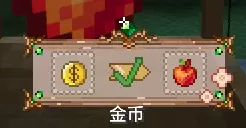
无限商店
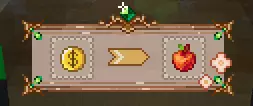
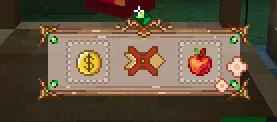
管理员可以使用无限商店工具对已经配置好的商店右键使其成为无限商店。
无限商店不需要补充货物也可以就行出售商品,但同时也不会获得货币。
只有拥有 OP 权限的玩家才能使用无限商店工具对商店进行设置。
附加内容
-
当市场方块被放置时,会绑定放置市场方块的玩家;
-
市场方块只能被绑定该方块的玩家设置或者拆除(创造模式也可以直接拆);
-
市场方块只能使用市场工具进行挖掘;
-
玩家空手蹲下右键可以查看该市场方块所属的玩家 ID。
- Edition: Minecraft Java
- File type: .jar
- Minecraft versions listed: 1.21.1, 1.20.1
- How to install: Install the matching mod loader (Forge, Fabric or NeoForge) for your Minecraft version. → Download the .jar. → Put it in the .minecraft/mods folder and launch that loader profile.
- Where to get it: Opens on CurseForge — not every file is mirrored on our own servers.
Install steps are the general flow for this file type — How to install Minecraft Java mods & modpacks walks through it step by step.
- Ships as polaristrading-1.5.jar — drop this file into the mods folder
- Download size: 160 KB
- Download link checked 12 Sept 2026 — working
These come from our own check of the pack file, not from the source page.