ServerManagement+
Java mod listed for Minecraft 1.20–1.21. Downloads from the MC Java Mods app on Android.
ServerManagement+ gives you simple access to a complete Economy System and need QOL features for Admins that will elevate your Gameplay Experience
I don't know my version or loader
ServerManagement+
The all-in-one server management solution for Minecraft
Supported: Minecraft 1.20.1 (Forge 47.4.0+ / Fabric API 0.92.8+) | Minecraft 1.21.1 (Forge 52.1.0+ / NeoForge 21.1.80+ / Fabric API 0.116.1+)
ServerManagement+ gives you a complete suite of tools to run your server — a full economy with bank accounts, a player marketplace, a casino, daily tasks, world management, and a sleek admin dashboard — all in one mod.
💬 Join Our Discord Community!
Got questions, ran into a weird bug, or have an idea for a killer new feature? We just opened our official community server! Join us to get direct support, track development updates closely, and hang out with fellow server admins.
🔗 Join the ServerManagement+ Discord Server
Release Status & Roadmap
Latest Release — Minecraft 1.20.1 v2.1.1-b1 & 1.21.1 v2.1.0-b1
The v2.1.1-b1 release is now live exclusively for Minecraft 1.20.1!
- 1.20.1 (v2.1.1-b1): Shipped for Forge and Fabric. The new v2.1.1-b1 update completely overhauls the mod's automatic update system! It now reliably checks both Modrinth and CurseForge for new versions and features an intelligent server-side script generator that gracefully restarts your server after an update. We've replaced the old, clunky update networking with a much cleaner and faster system. ⚠️ Important Notice: Because the entire updater was rewritten, you must manually download and install this v2.1.1-b1 update one last time! Once installed, the new automatic updater will take over for all future releases. Additionally, it features GUI scaling fixes across all screens and resolves startup crashes under certain conditions.
- 1.21.1 (v2.1.0-b1): Shipped for Forge, NeoForge, and Fabric. (The v2.1.1-b1 update for 1.21.1 is currently in development).
Both 1.20.1 and 1.21.1 versions feature complete feature parity including a full GUI polish pass across every screen, uniform pose-matrix scaling (fixing layouts at scale 2-4 / Auto), Player Manager rework, and a long list of critical fixes for Chat Isolation, Tab Isolation, /spectate, /teleportlobby, and the OP-2 console.
Next — Upcoming Ports & Updates
The v2.1.1-b1 update for Minecraft 1.21.1 is currently in development. Additionally, dedicated ports for Minecraft 1.21.4 and 1.21.11 are also in active development.
Features
Admin Dashboard
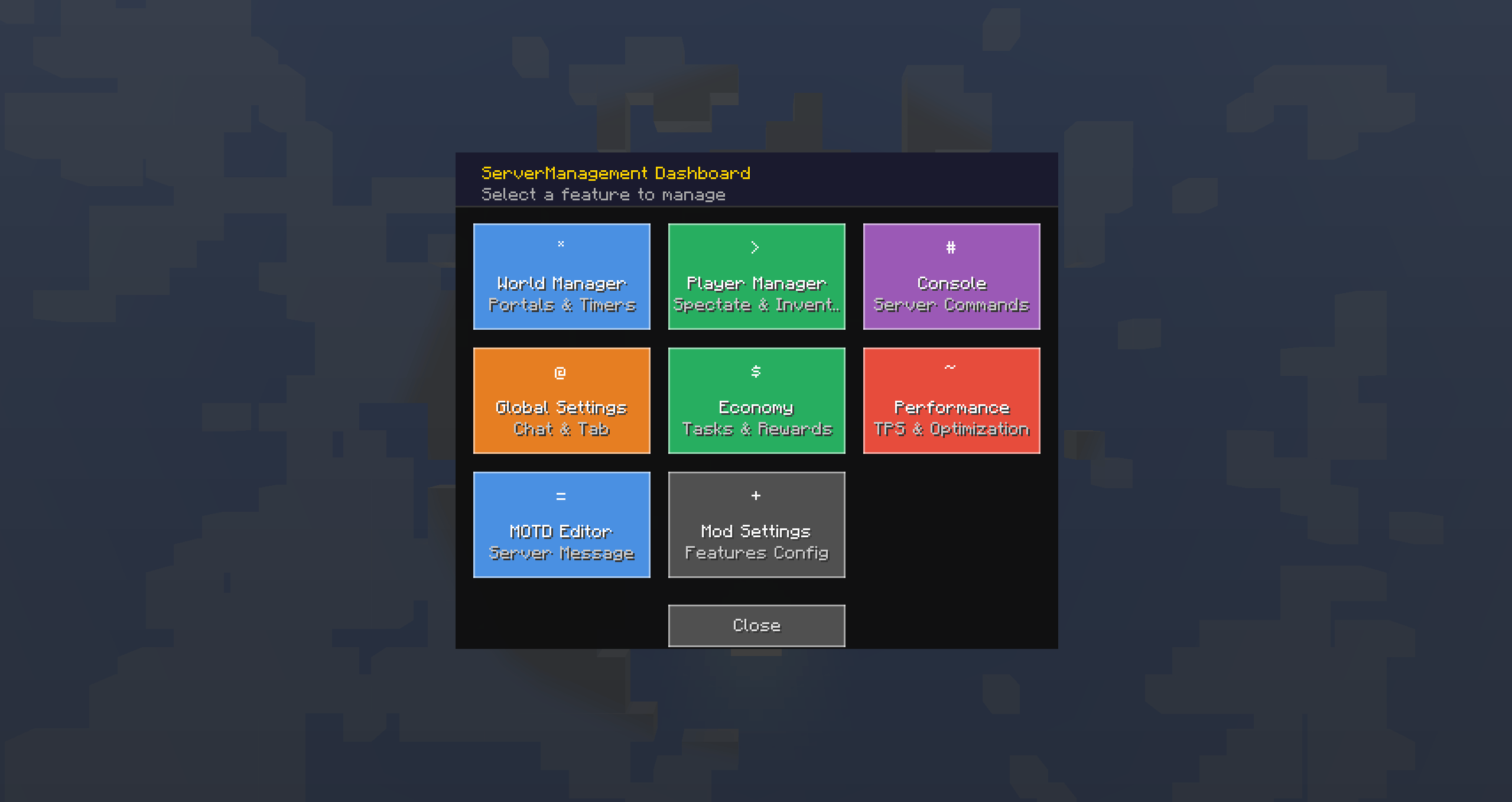
A modern dark-themed command center accessible with /sm. Six feature cards let you jump straight into World Manager, Player Manager, Console, Global Settings, Economy Management, or Mod Settings. Every screen has consistent navigation with back/close buttons and a polished header bar.
- Live Server Console — Run server commands directly from the GUI. Output is color-coded by log level (red for errors, yellow for warnings) and scrollable. Requires OP level 2.
- Global Settings — Toggle Chat Isolation (separate chat per dimension) and Tab Isolation (separate tab list per dimension) with iOS-style toggle switches.
- Mod Settings — Enable or disable individual features (World Manager, Player Manager, SlimeHead, Economy, Server Performance, MOTD) without restarting the server. Each toggle ships with a short description and alternating row backgrounds for clarity.
Economy System
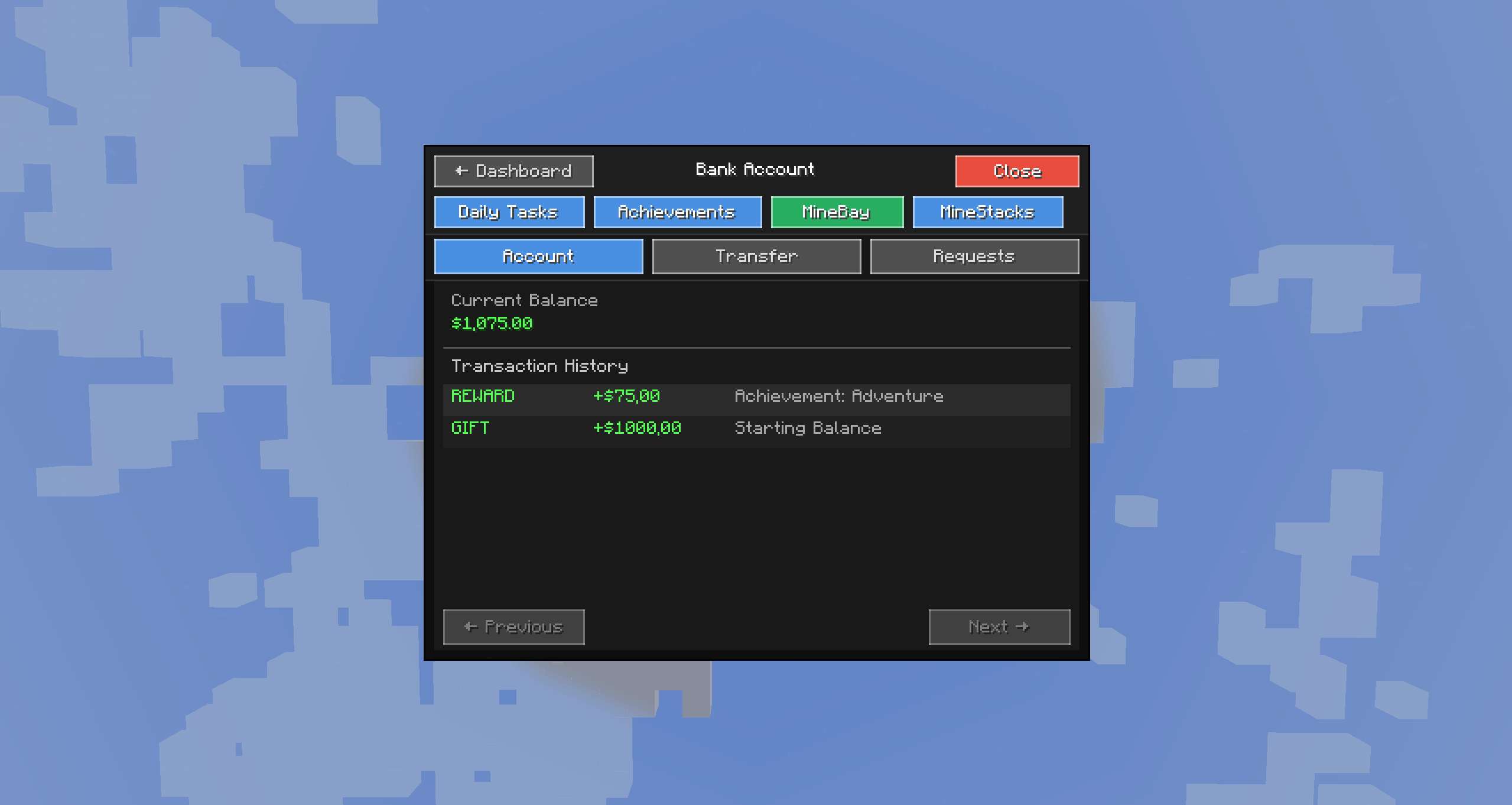
Every player gets a bank account on first join with a configurable starting balance (default: $1,000).
- Balance management — Check your balance, view transaction history, and track every dollar
- Player-to-player transfers — Send money directly or create money requests that the other player can accept or deny
- Transaction history — Full audit trail of all purchases, sales, transfers, task rewards, gambling, and free claims with type-specific icons
- Action bar notifications — Non-intrusive success/error messages displayed above the hotbar
- Admin tools — Set, give, or take money from any player via commands or the admin dashboard
- Economy Statistics — Real-time economy overview: total accounts, money in circulation, inflation rate, marketplace activity, gambling stats, and transaction volumes
- Encrypted storage — All economy data secured with AES-256-GCM encryption
MineBay Marketplace
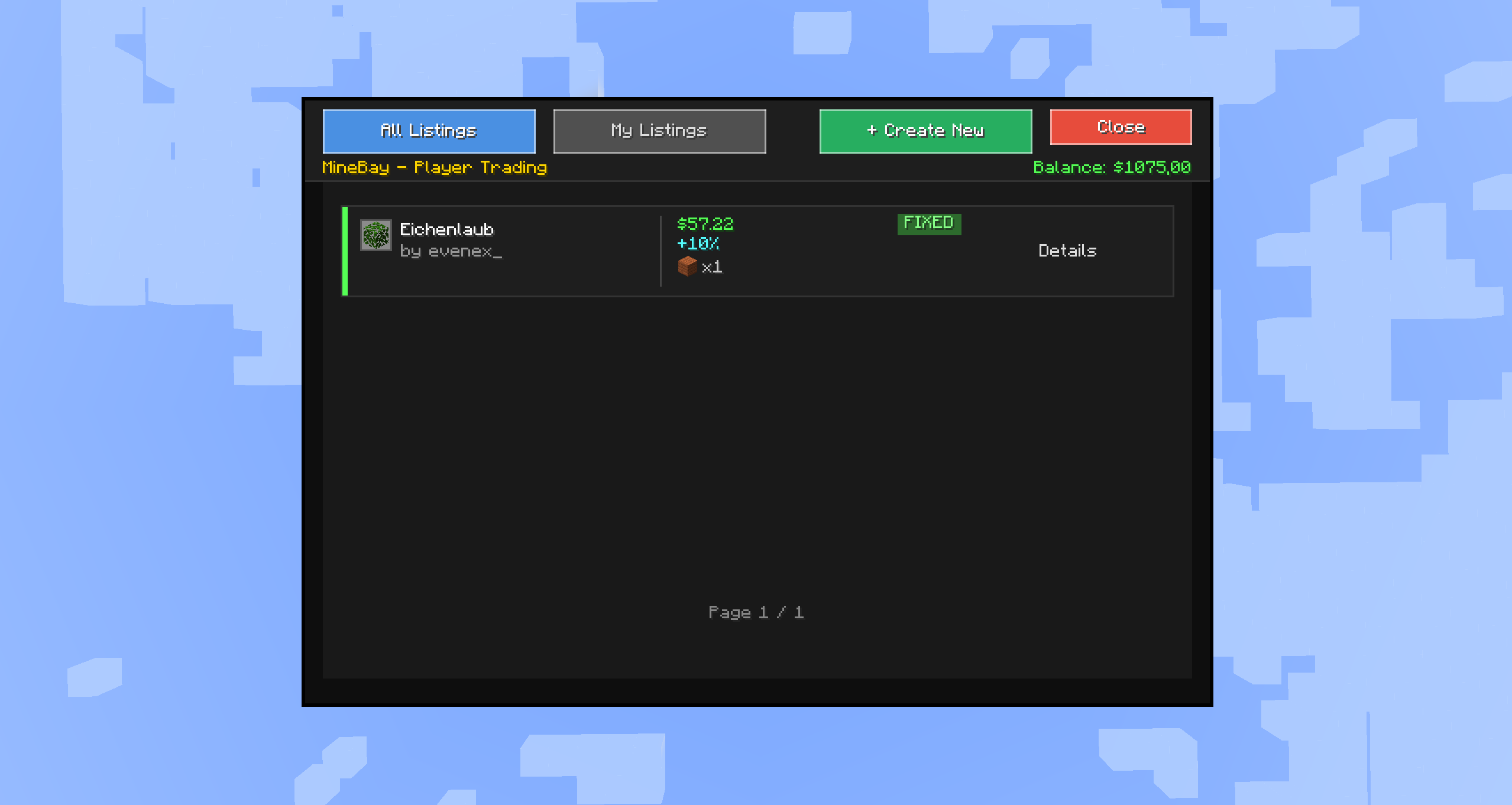
A fully-featured player marketplace where you can buy and sell items with other players.
- Create listings — Sell any item or stack from your inventory
- Flexible pricing — Accept money, up to 3 different item types, or both
- Dynamic market pricing — Supply/demand tracking with configurable inflation
- Counteroffers — Buyers can propose alternative prices; sellers review and accept/deny
- Overflow inventory — If your inventory is full when buying, items are safely stored for later pickup (works in both survival and creative mode)
- Item safety — Server-authoritative item handling with escrow rollback. Items are never lost or duplicated
- Draft system — Step-by-step listing creation with item picker and quantity controls
- Margin controls — Sellers can adjust prices from -50% to +200% of market value
MineStacks Casino
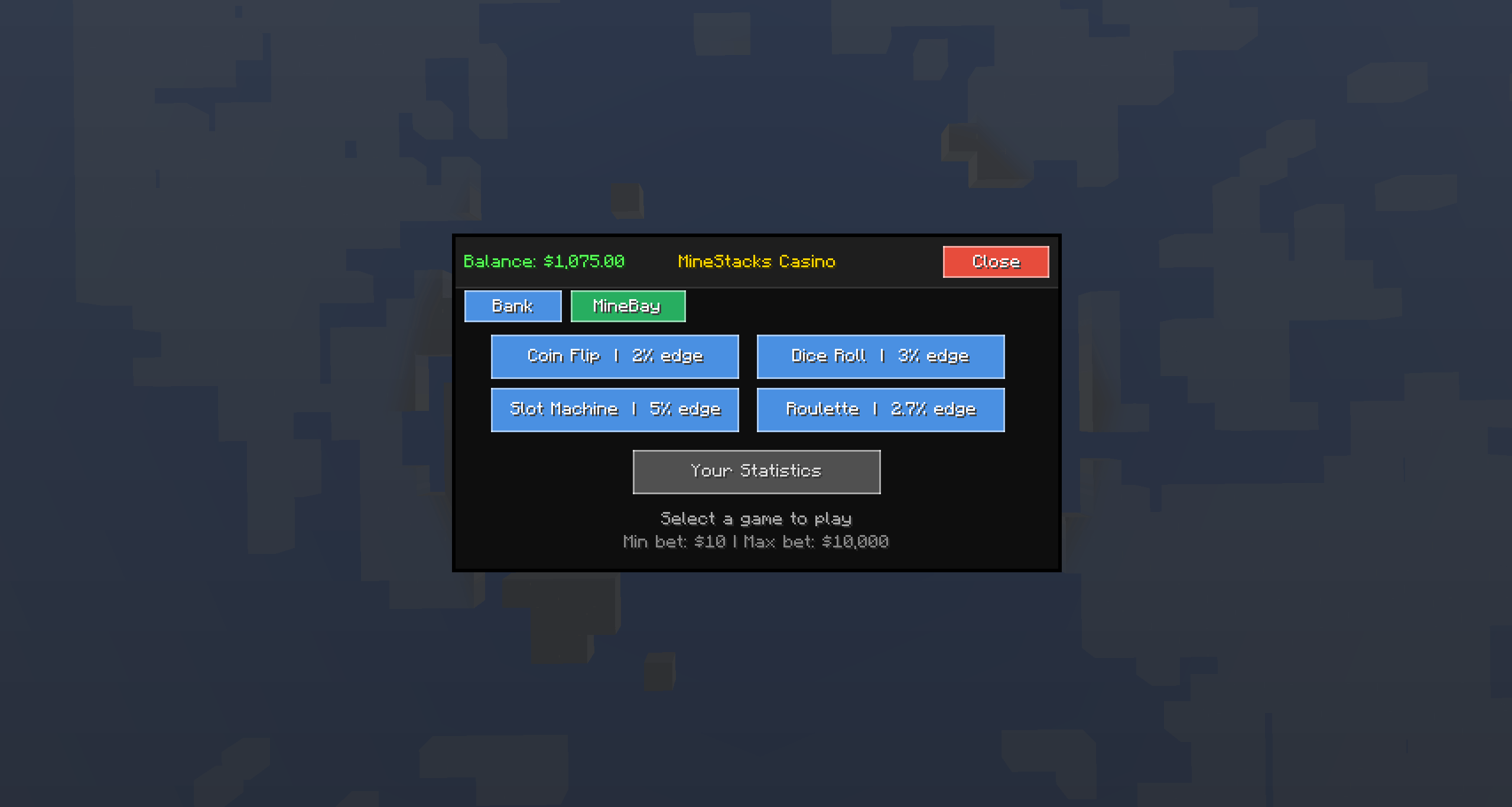
A full casino experience with four games, all using SecureRandom for provably fair results.
- Coin Flip — 2% house edge, 2x payout. Simple heads or tails
- Dice Roll — 3% house edge. Bet on High/Low (2x), Seven (5x), or Doubles (6x)
- Slot Machine — 5% house edge. Payouts from Cherry (2x) up to Jackpot (100x), with half payouts for two-of-a-kind
- Roulette — 2.7% house edge. Bet on Red/Black, Even/Odd, Low/High for 2x returns
Supports both money bets ($10–$10,000) and item bets (auto-valued). Includes spinning animations, particle effects on wins, screen shake, and sound effects. Your gambling stats are tracked.
Daily Tasks & Free Rewards
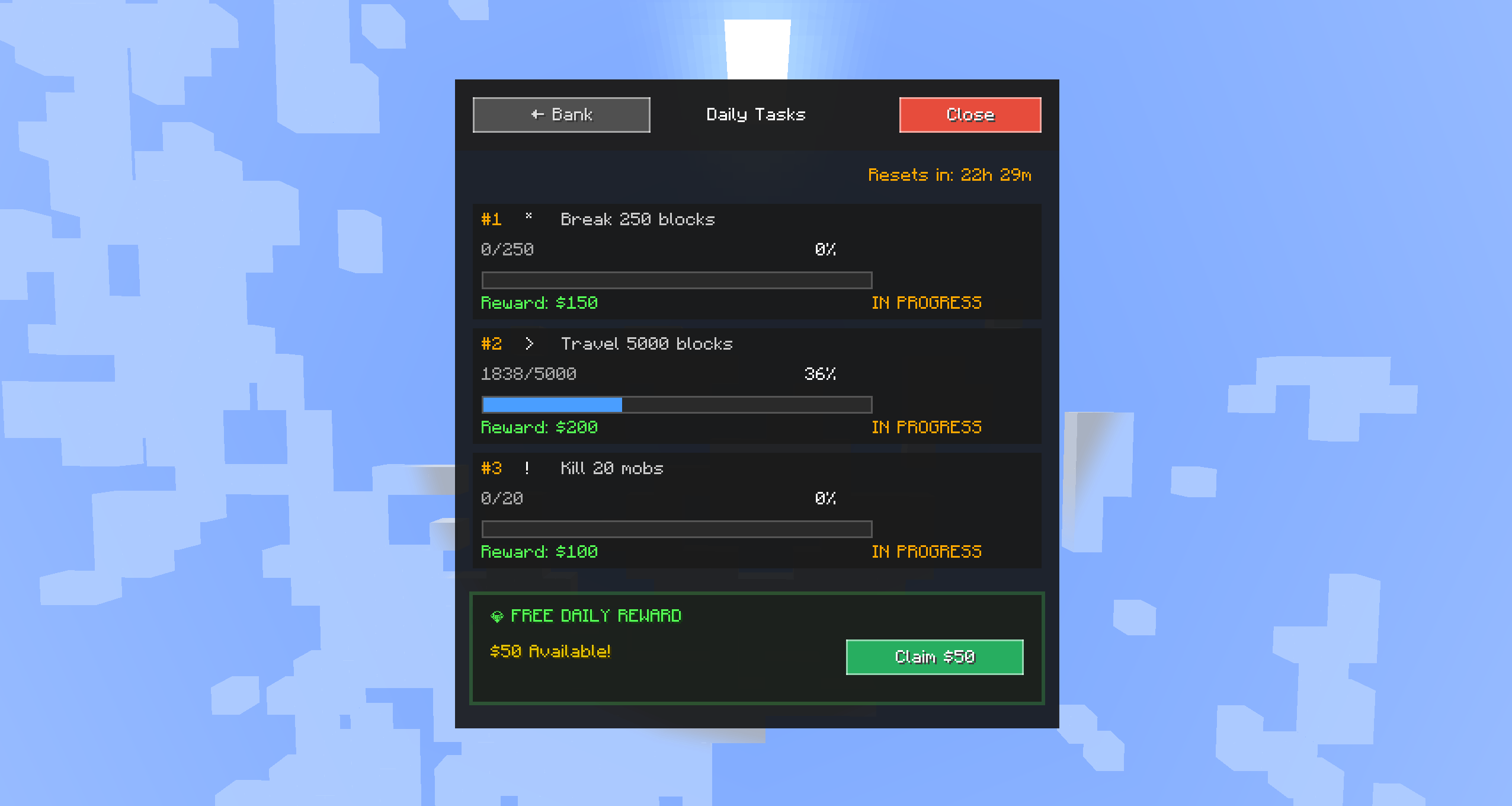
Three randomly assigned tasks per day, drawn from a configurable template pool.
Task Types:
| Type | Example |
|---|---|
| Break Blocks | Break 250 blocks |
| Kill Mobs | Kill 50 mobs |
| Travel Distance | Travel 5,000 blocks |
| Craft Items | Craft 100 items |
| Mine Ores | Mine 75 ores |
| Trade Villagers | Trade 25 times |
- Real-time progress tracking with progress bars in the GUI
- Instant notifications when a task is completed — click the chat message to claim
- Configurable rewards — money and/or item rewards per task template
- Free daily reward — Claim free money and an optional item every 24 hours (cooldown configurable)
- Admin template editor — Create, edit, enable/disable, and delete task templates from the GUI
World Management
Manage all server worlds from a visual interface.
- World list — See all dimensions with player counts
- Teleportation — Click to teleport between worlds (with cooldown)
- Portal control — Toggle Nether and End portals on or off
- Lobby spawn — Set a lobby spawn point and teleport players to it (precise position + rotation, not just block-aligned spawn)
- Chat isolation — Keep chat messages per-dimension (fully working on both 1.20.1 & 1.21.1)
- Tab isolation — Separate the tab list by dimension (fully working on both 1.20.1 & 1.21.1)
- Timer system — Auto-enable/disable portals on a schedule with live countdown in the GUI
Player Manager
Admin tools for managing online and offline players. Reworked with tabs, search, and pagination.
- Online tab — View all online players with location, dimension, and gamemode
- Banned tab — Ban / unban players (works for offline players via profile cache); optional IP ban
- Whitelist tab — Add / remove players and toggle whitelist enforcement on/off
- Spectate — Watch any player in real-time with full cross-dimension tracking, stealth mode (same dimension), and tab-list disguise so the spectator's name doesn't show as italic gray to others
- View inventory — Inspect a player's inventory read-only
- Kick — Kick online players with an optional reason
- Auto-sync — The server pushes ban/whitelist/toggle state to the client after every change
- Pressing E in a name field no longer closes the screen
SlimeHead
A fun cosmetic item — an unbreakable slime head block with a custom texture.
- Obtained via
/slimeheadcommand or a 5% drop chance from slimes - Protected from breaking by non-ops when placed
- Available in the Creative Tools & Utilities tab
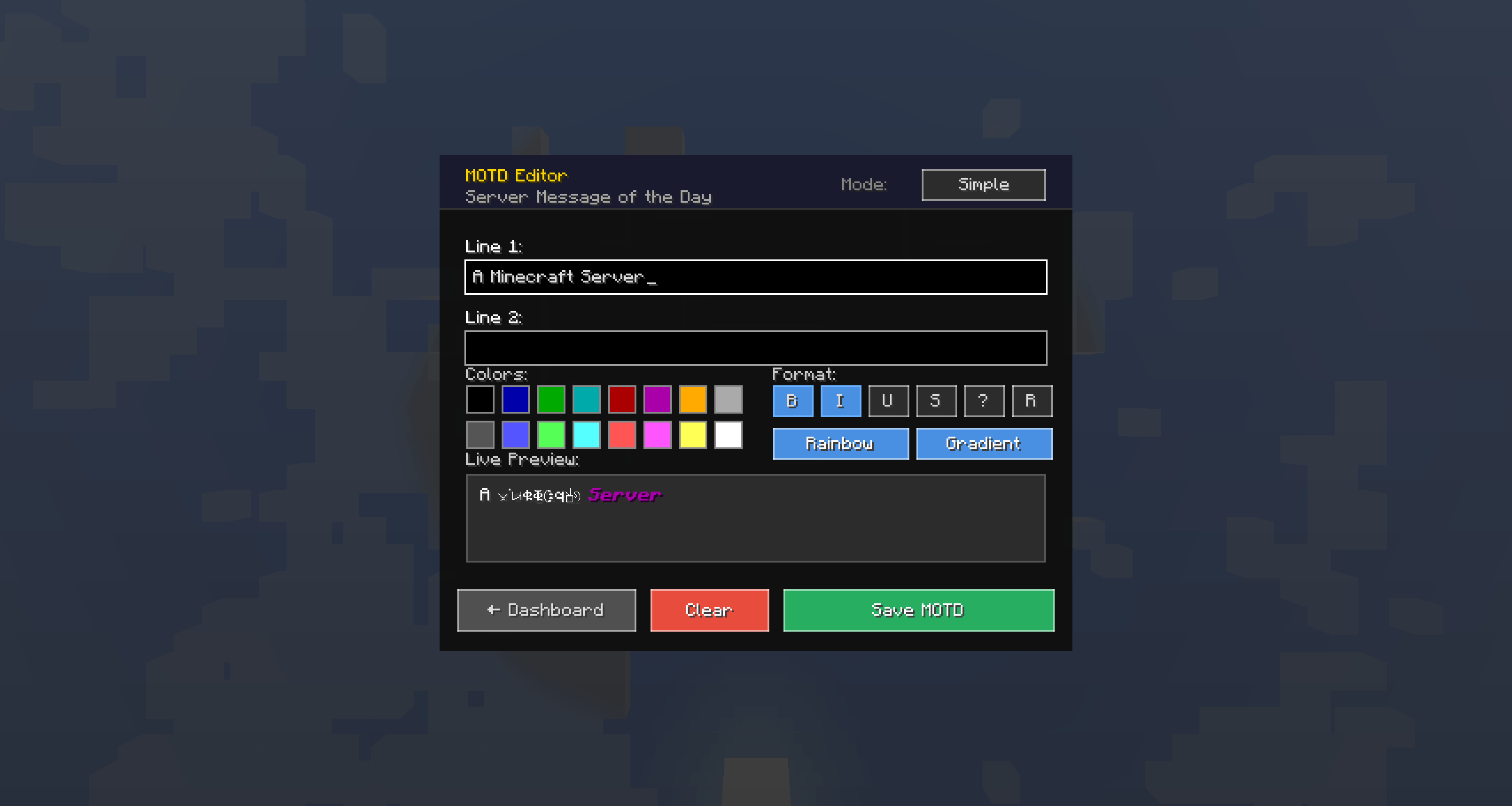
MOTD Editor
Customize your server's Message of the Day with a visual editor.
- Rich text formatting — Apply color codes and formatting (bold, italic, underline, strikethrough) with a live preview
- Multi-line support — Edit both lines of the server MOTD
- Admin-only — Accessible from the Dashboard, requires OP level 2
- Instant apply — Changes take effect immediately without server restart
- Toggleable — Enable/disable the custom MOTD via config
Server Performance Tools
Performance Settings panel with eight runtime toggles and a scrollable Stats tab — TPS, MSPT, memory usage, and entity counts at a glance.
- Item Merge Handler — Caps item-entity merging at 500 items per dimension per tick (no more O(n²) freezes from mob-farm dumps)
- Mob Spawn Limiter — Per-tick cap to smooth out spawn spikes
- Redstone Throttle — Limits rapid redstone updates per tick
- All toggles are runtime-adjustable; no restart required
Notification System
Clickable chat notifications keep players informed without being spammy.
- Login notifications — Admins see a dashboard link; players see free reward and task reminders
- Payment alerts — Notifications when you send or receive money
- Task completion — Instant notification with a clickable claim button when a task is done
- Reward claimed — Confirmation when rewards are collected
Help Integration
All ServerManagement+ commands are integrated into the vanilla /help command.
/help— Lists all available commands including ServerManagement+ ones with descriptions/help <command>— Detailed usage for any mod command (e.g.,/help bank)- Admin filtering — Admin commands tagged with [Admin] and hidden from non-ops
- Works alongside vanilla and other mods' commands
Automatic Mod Updates & Smart Restart
Automatic over-the-air mod updates for connected clients and easy server updates.
- Dual-Platform Updates — Automatically checks both Modrinth and CurseForge to find the latest updates.
- Graceful Server Shutdown — When updating the server, it safely saves your world and shuts down properly before hot-swapping the mod jar.
- Smart Restart Script — Scans your server for
run.bat/run.shand intelligently hooks into them so your server automatically reboots itself after applying an update. Admins can choose to automatically patch their run scripts from in-game! - Multi-version aware — OTA updates are blocked across different Minecraft versions (e.g., a 1.20.1 client won't receive a 1.21.1 update)
- Multi-loader aware — Forge clients won't be served NeoForge or Fabric JARs and vice versa
- Rate-limited — One transfer per player per session; aborts early if the client disconnects mid-transfer
How the Updater Works (For Manual Reviewers)
To ensure full transparency on how the mod handles updates without triggering false positive security flags:
- API Fetching: The mod only makes standard GET requests to the official
api.modrinth.comandapi.curseforge.comendpoints to check for version numbers. - Standalone Updater: To avoid file-lock issues on Windows, the mod extracts an embedded
updater.jarinto the server root. This jar runs in a separate, temporary JVM process whose only job is to wait for the main server to exit, copy the newly downloaded mod jar over the old one, and then delete itself. - Server-Side Script Modification: If an admin opts into the Smart Restart feature via the in-game GUI prompt, the mod will read their existing
run.batorrun.shscript, back it up torun.bat.bak, and inject a standard-Dservermanagement.smartstart=trueJVM argument. It does not execute arbitrary shell code or download external scripts. All script generation is done locally and requires explicit in-game admin consent. - Client-Side Consent: On the client side, if an update is detected, the mod intercepts the Main Menu with a dedicated UI overlay. The client will never automatically download or install anything without the user clicking "Update Now". Users are also explicitly provided with "Update Later" and "Skip This Version" options.
- Verify it Yourself: If you are a code reviewer or server admin and want to safely test this system in action, clone our open-source repository and down-bump the version to simulate an outdated mod. Because the mod's current version is statically validated, you will need to lower the version in
gradle.properties, as well as change the hardcoded"2.1.1-b01"version strings located inForgeUpdateHooks.javaandFabricUpdateHooks.javato"2.1.0". Compile the mod (gradlew build), launch a local test server, and explicitly opt-in to the Smart Restart feature via the in-game admin menu. You will observe that the mod securely downloads the update, extractsupdater.jar, backs up your run scripts to.bakfiles, and cleanly injects the-Dservermanagement.smartstart=trueflag without executing arbitrary shell code. Nothing is hidden.
Security
All sensitive data is encrypted at rest and authenticated in transit.
- AES-256-GCM encryption for economy data, daily tasks, money requests, and achievement tracking
- Unique server key auto-generated on first run, stored with restricted permissions
- HMAC-SHA256 packet authentication prevents replay and tampering
- Session management with per-player tokens and 30-minute timeout
- Atomic transactions with automatic escrow rollback — no partial operations, no data loss
- Item duplication prevention — Server-authoritative item validation in marketplace listings and offers; race-condition-safe slot clearing; synchronized balance operations
- Network buffer hardening — All packet string and integer fields enforce strict length / value limits at the decode layer to prevent memory exhaustion from oversized payloads
- NBT size limits — All NBT data loading uses 10MB NbtAccounter limits to prevent memory exhaustion from corrupted files
- Permission enforcement on every admin packet — including dimension teleport and console command execution
- Input validation — Player names validated against
[a-zA-Z0-9_]{1,16}regex at the network layer before any server-side processing - Log injection prevention — User-controlled strings are sanitized before logging to prevent log forging
- Thread-safe economy — Synchronized balance operations, atomic escrow with try-catch rollback, snapshot-based collection iteration, virtual-thread / daemon-thread save scheduler, and concurrent collections in shared managers
Commands
Player Commands
| Command | Description |
|---|---|
/bank |
Open Bank GUI |
/bank balance |
View your balance |
/bank pay <player> <amount> |
Send money to a player |
/bank request <player> <amount> |
Request money from a player |
/bank requests |
View pending money requests |
/bank accept <id> |
Accept a money request |
/bank deny <id> |
Deny a money request |
/bank stats |
View your bank statistics |
/bank dailies |
Open Daily Tasks GUI |
/bank dailies claim <1-3> |
Claim a completed daily task |
/bank dailies free |
Claim free daily reward |
/minebay |
Open MineBay marketplace |
/minestacks or /casino |
Open MineStacks Casino |
/teleportlobby |
Teleport to lobby |
Admin Commands
| Command | Permission | Description |
|---|---|---|
/sm or /servermanagement |
OP 2 | Open admin Dashboard |
/smconfig |
OP 2 | Open mod settings GUI |
/smconfig toggle <feature> |
OP 2 | Toggle a feature on/off |
/smconfig info |
OP 4 | Show config version info |
/smconfig validate |
OP 4 | Validate config integrity |
/smconfig reset confirm |
OP 4 | Reset config to defaults |
/worldmanager or /wm |
OP 2 | Open World Manager |
/playermanager or /pm |
OP 2 | Open Player Manager |
/spectate <player> |
OP 2 | Spectate a player |
/stopspectate |
OP 2 | Stop spectating |
/viewinv <player> |
OP 2 | View a player's inventory |
/netherportals <true|false> |
OP 2 | Toggle Nether portals |
/endportals <true|false> |
OP 2 | Toggle End portals |
/setlobby |
OP 2 | Set lobby spawn |
/clearlobby |
OP 2 | Remove lobby spawn |
/slimehead [player] |
OP 2 | Give a Slime Head |
/bank admin set <player> <amount> |
OP 2 | Set a player's balance |
/bank admin give <player> <amount> |
OP 2 | Give money to a player |
/bank admin take <player> <amount> |
OP 2 | Take money from a player |
/servermanagement resetdailies |
OP 2 | Force-reset all daily tasks |
/smmetrics |
OP 2 | View performance metrics |
/smmetrics reset |
OP 2 | Reset performance metrics |
Configuration
The config file is located at config/servermanagement-common.toml. Key settings:
| Setting | Default | Description |
|---|---|---|
| Starting Balance | $1,000 | Initial money for new players |
| Encrypted Storage | Enabled | AES-256-GCM data encryption |
| Transaction History Limit | 100 | Transactions stored per player |
| Tasks Per Day | 3 | Daily tasks assigned per player |
| Free Reward Amount | $50 | Daily free claim amount |
| Free Reward Cooldown | 24 hours | Time between free claims |
| Max Listings Per Player | 10 | MineBay listing cap |
| Max Price Items | 3 | Item types accepted per listing |
| Counteroffers | Enabled | Allow buyers to make offers |
| Teleport Cooldown | 5 seconds | Between world teleports |
All economy data, task templates, and player progress persist across server restarts with automatic backup and migration support.
Installation
Requirements
- Minecraft: 1.20.1 or 1.21.1 (1.21.4 port coming this summer)
- Forge: 47.4.0+ (MC 1.20.1) or 52.1.0+ (MC 1.21.1),
- NeoForge: 21.1.80+ (MC 1.21.1),
- Fabric API: 0.92.8+ (MC 1.20.1) or 0.116.1+ (MC 1.21.1) with Fabric Loader 0.19.2+ (MC 1.20.1) or 0.18.1+ (MC 1.21.1)
- Java: 17+ (MC 1.20.1) or 21+ (MC 1.21.1)
Setup
- Download the JAR for your Minecraft version and mod loader:
- MC 1.20.1 Forge:
ServerManagement-forge-1.20.1-2.1.0-mc1.20.1.jar - MC 1.20.1 Fabric:
ServerManagement+-fabric-1.20.1-2.1.0-mc1.20.1.jar - MC 1.21.1 Forge:
ServerManagement-forge-1.21.1-2.1.0-mc1.21.1.jar - MC 1.21.1 NeoForge:
ServerManagement-neoforge-1.21.1-2.1.0-mc1.21.1.jar - MC 1.21.1 Fabric:
ServerManagement+-fabric-1.21.1-2.1.0-mc1.21.1.jar
- MC 1.20.1 Forge:
- Place it in your server's
mods/folder - Start the server — config and data folders generate automatically
- Optionally install on clients for full GUI support (server-side only works too)
- Adjust settings in
config/servermanagement-common.tomland restart
First-Time Setup (Server Owners)
- Review config values (starting balance, rewards, cooldowns)
- Open the admin dashboard with
/smto explore features - Go to Economy Management to create daily task templates
- Set free reward amounts and items
- Test the economy flow with
/bank,/minebay, and/minestacks
Data Storage
All mod data is stored in world/data/servermanagement/:
| File | Contents | Format |
|---|---|---|
economy.json |
Bank accounts & balances | Encrypted JSON |
daily_tasks.json |
Player task progress | Encrypted JSON |
daily_task_templates.json |
Admin task templates | Encrypted JSON |
money_requests.json |
Pending transfers | Encrypted JSON |
achievement_rewards.json |
Achievement claims | Encrypted JSON |
world_manager.json |
World settings | Plain JSON |
minebay_listings.dat |
Marketplace listings | Compressed NBT |
playerdata/[UUID]/bank_inventory.dat |
Bank items | Compressed NBT |
playerdata/[UUID]/transactions.dat |
Transaction history | Compressed NBT |
Back up world/data/servermanagement/ and config/servermanagement/ before updates.
Troubleshooting
| Problem | Solution |
|---|---|
"Could not load economy data" |
Restore economy.json from backup, or delete it to reset |
MineBay listings not loading |
Check minebay_listings.dat — restore from backup if corrupted |
Daily tasks not resetting |
Verify server system clock; adjust resetHour in config |
GUI not opening |
Ensure the mod is installed on both client and server; reconnect |
Transaction failed |
Check chat error message — transactions auto-rollback, no data is lost |
License
MIT License — free to use, modify, and distribute.
ServerManagement+ — Minecraft 1.20.1 v2.1.1-b1 (Forge 47.4.0+ / Fabric API 0.92.8+) — Minecraft 1.21.1 v2.1.0-b1 (Forge 52.1.0+ / NeoForge 21.1.80+ / Fabric 0.116.1+) — Minecraft 1.21.4 port to follow this summer
The ServerManagement+ Team
- Edition: Minecraft Java
- File type: .jar
- Minecraft versions listed: 1.21.1, 1.20.1
- How to install: Install the matching mod loader (Forge, Fabric or NeoForge) for your Minecraft version. → Download the .jar. → Put it in the .minecraft/mods folder and launch that loader profile.
- Where to get it: Opens on CurseForge — not every file is mirrored on our own servers.
Install steps are the general flow for this file type — How to install Minecraft Java mods & modpacks walks through it step by step.
- Ships as servermanagementplus-2.1.0-01-1.21.1-forge-release.jar — drop this file into the mods folder
- Download size: 829 KB
- Download link checked 23 Oct 2026 — working
These come from our own check of the pack file, not from the source page.