
SVC Mute Addon
The author built this one for Minecraft 1.21.1 on NeoForge. On other versions it may install and then do nothing.
SVC Mute Addon
SVC Mute Addon is an addon for Simple Voice Chat that adds complete voice moderation tools for NeoForge 1.21.1 servers.
It allows server staff to mute players, mute groups, and even enable a full voice lockdown that blocks all voice chat except approved speakers.
This addon is ideal for server events, tournaments, roleplay sessions, community meetings, announcements, and any situation where you need people to stay quiet and let only certain players talk.
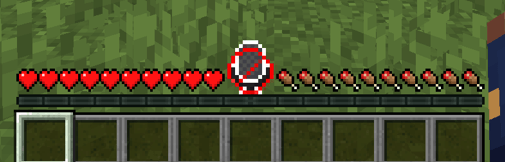
With server-controlled muting and a locked-microphone icon on clients, this addon ensures clear communication and prevents interruptions.
✨ Features
Player Muting
Mute or unmute any player instantly. Server-side enforcement ensures players cannot bypass it.
Group Muting (Simple Voice Chat Groups)
Silence entire groups with a single command.
Global Voice Lockdown
Disable everyone’s microphone except selected players. Perfect for events, meetings, and announcements.
Client Feedback (Locked Mic Icon)
Muted players see a locked microphone icon so they know they cannot speak.
Moderation Feedback
Muted players get a chat message announcing they have been muted or unmuted.
Simple Commands
/vcmod mute
/vcmod unmute
/vcmod mutegroup
/vcmod unmutegroup
/vcmod lockdown on|off
/vcmod list
🎤 Requirements
Minecraft 1.21.1
NeoForge 21.1.x
Simple Voice Chat 2.5.36+ (NeoForge version)
📦 Installation
Install Simple Voice Chat (NeoForge).
Drop the addon’s .jar into the /mods folder (server + clients).
Restart the server and connect with SVC enabled.
📌 Why Use This Addon?
Perfect for events with hosts or presenters
Keeps voice chat organized
Prevents trolls or disruptive players
Makes announcements clean and easy
Great for roleplay, streamer events, and moderated communities
- Edition: Minecraft Java
- File type: .jar
- Minecraft version listed: 1.21.1
- How to install: Install the matching mod loader (Forge, Fabric or NeoForge) for your Minecraft version. → Download the .jar. → Put it in the .minecraft/mods folder and launch that loader profile.
- Where to get it: Opens on CurseForge — not every file is mirrored on our own servers.
Install steps are the general flow for this file type — How to install Minecraft Java mods & modpacks walks through it step by step.
- Ships as svcmuteaddon-0.1.1.jar — drop this file into the mods folder
- Download size: 42 KB
- Download link checked 22 Aug 2026 — working
These come from our own check of the pack file, not from the source page.