Attribute achievement rewards
Java mod listed for Minecraft 1.16–1.21. Downloads from the MC Java Mods app on Android.
I don't know my version or loader

By completing game achievements, players will be rewarded with permanent attribute boosts upon completion.
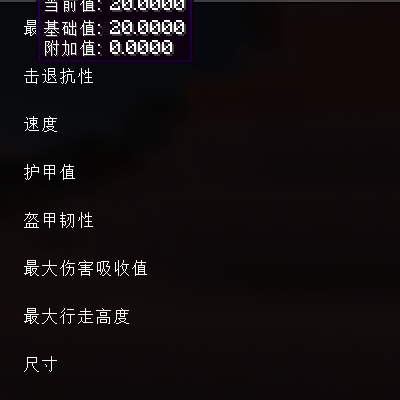
By default, pressing O opens the attribute panel, which displays your attribute values and acquired bonuses.
You can also find two configuration files under 1.21.1-NeoForge_21.1.215\config: playerattributemanagement_advancements.json:
```
"advancements": {
"minecraft:adventure/adventuring_time": {
"minecraft:generic.luck": 0.45,
"minecraft:generic.max_health": 1.6875,
"minecraft:generic.movement_speed": 0.0675
},
"minecraft:adventure/arbalistic": {
"minecraft:generic.attack_damage": 0.45,
"minecraft:generic.attack_speed": 0.1125
},
。。。。省略
```
As you can see above, the achievement IDs can be found at (https://minecraft.fandom.com/zh/wiki/进度). Theoretically, it supports achievements added by other mods. The configuration file is customizable; you can find the attribute IDs yourself, view gallery images, and adjust the values. Another configuration file controls whether the attribute panel is open and which attribute entries should be displayed; regular players don't need to worry about this other configuration file.
通过完成游戏的成就,在完成成就后会奖励该玩家永久的属性提升。
默认按O可以打开属性面板,上面会显示你的属性值和已经获取的加成值
你还可以在1.21.1-NeoForge_21.1.215\config下找到两个配置文件,playerattributemanagement_advancements.json:
```
"advancements": {
"minecraft:adventure/adventuring_time": {
"minecraft:generic.luck": 0.45,
"minecraft:generic.max_health": 1.6875,
"minecraft:generic.movement_speed": 0.0675
},
"minecraft:adventure/arbalistic": {
"minecraft:generic.attack_damage": 0.45,
"minecraft:generic.attack_speed": 0.1125
},
。。。。省略
```
可以看到上面是成就的id可以在(https://minecraft.fandom.com/zh/wiki/进度),中查询成就对应的命名空间,理论支持其他mod添加的成就,配置文件可自定义修改,其中的属性id可以自行查询,也可以查看画廊图片,数值完全可调整。令一个配置文件用于控制属性面板是否可以打开,那些属性条目需要显示,普通玩家无需在意另一个配置文件。
- Edition: Minecraft Java
- File type: .jar
- Minecraft versions listed: 1.16.5, 1.18.2, 1.19.2
- How to install: Install the matching mod loader (Forge, Fabric or NeoForge) for your Minecraft version. → Download the .jar. → Put it in the .minecraft/mods folder and launch that loader profile.
- Where to get it: Opens on CurseForge — not every file is mirrored on our own servers.
Install steps are the general flow for this file type — How to install Minecraft Java mods & modpacks walks through it step by step.
- Ships as playerattributemanagement-1.21.1-1.0.0.jar — drop this file into the mods folder
- Download size: 69 KB
- Download link checked 12 Nov 2026 — working
These come from our own check of the pack file, not from the source page.