Altar Config Compact
Java mod listed for Minecraft 1.20–1.21. Downloads from the MC Java Mods app on Android.
Altar Config Compact: Lets the Aether mod’s Altar repair third-party items by registering them via Bookling Gear. Lightweight; requires Aether and…
I don't know my version or loader
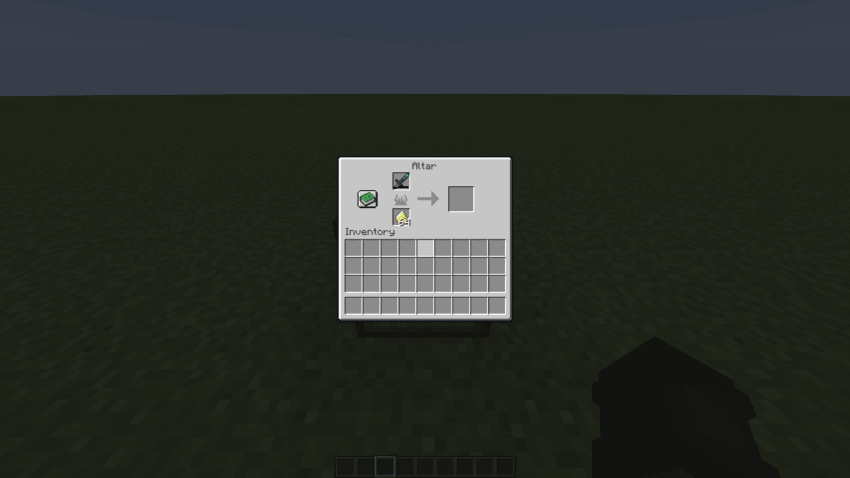
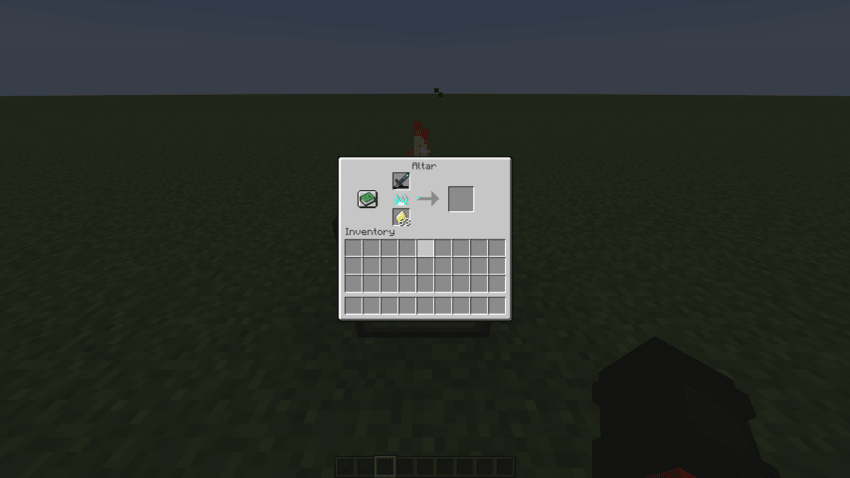
Altar Config Compact expands the Aether mod’s Altar by allowing it to repair third-party items. Using Bookling Gear, you can easily register custom tools, weapons, and equipment so they’re treated as valid repairable items by the Altar.
This mod doesn’t change core gameplay or rebalance anything it simply adds support for items that the Altar normally can’t recognize. Perfect for modpacks that integrate lots of gear from different mods and want a consistent repair system.
Lightweight, configurable, and designed for compatibility with the Aether.
Note: The mod does not automatically detect 3rd party items (aka mods that adds new gear), you'll have to add it yourself using bookling gear.
How to use, using a Deeper and Darker warden sword (for example this is not limited to Deeper and Darker):
deeperdarker:warden_sword/800
"deeperdarker:" Is the mod id.
"warden_sword" Is the name of the tool.
"/800" Is the amount of time it will take to repair the item, you can choose this.
You can find all this information via using F3+H and hovering over the the item you want to add.
Before:
After:
- Edition: Minecraft Java
- File type: .jar
- Minecraft versions listed: 1.21.1, 1.20.1
- How to install: Install the matching mod loader (Forge, Fabric or NeoForge) for your Minecraft version. → Download the .jar. → Put it in the .minecraft/mods folder and launch that loader profile.
- Where to get it: Opens on CurseForge — not every file is mirrored on our own servers.
Install steps are the general flow for this file type — How to install Minecraft Java mods & modpacks walks through it step by step.
- Ships as aetherconfigcompact-1.20.1-1.1.jar — drop this file into the mods folder
- Download size: 28 KB
- Download link checked 2 Oct 2026 — working
These come from our own check of the pack file, not from the source page.