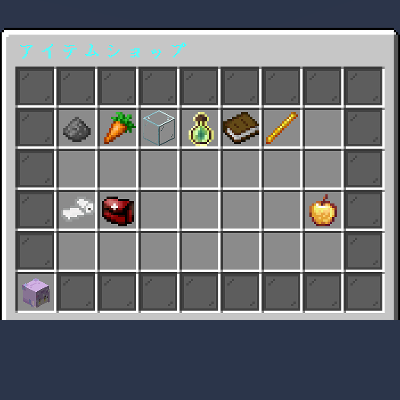
Plugin Stlye Shop
The author built this one for Minecraft 1.20.1 on Forge. On other versions it may install and then do nothing.
Plugin Style Shop
Server-like GUI Shops for Forge
Plugin Style Shop brings the polished user experience of Spigot/Bukkit server shops to the Minecraft Forge platform. It provides a secure, menu-based GUI where items act as buttons. Clicking an item triggers a transaction instantly without the risk of item theft or messy inventory management.
This mod is perfect for modpack creators, RPG servers, and map makers who need a robust economy system with advanced features like team-based inflation and NBT support.
Key Features
1. Advanced Dynamic Pricing
Create an economy that reacts to supply and demand. Prices can automatically increase (inflation) or decrease based on purchase history.
- Math Modes:
- Linear: Price increases by a fixed amount per purchase (e.g., +50 Gold).
- Exponential: Price multiplies per purchase (e.g., x1.1 per buy).
- Power: Price increases based on a power curve.
- Configurable Limits: Set minimum and maximum prices to prevent the economy from breaking.
2. Team System Integration
Fully integrated with Minecraft's vanilla Scoreboard Teams.
- Team Scoping: You can set price inflation to be shared among a team. If the "Red Team" buys a lot of swords, the price increases only for the Red Team.
- Team Color Items: Items can automatically change color (e.g., Wool, Concrete) to match the buyer's team color.
3. Flexible Currency & Rewards
- Currency: Use Scoreboard values (Points, Money) or physical Items.
- NBT Support: Supports strict NBT matching. You can require a specific "Golden Coin" with custom lore as currency, not just any gold nugget.
- Command Rewards: Sell permissions, potion effects, or teleports by executing commands upon purchase.
How to Use & Configuration
1. In-Game Setup
To create a shop, you simply need an entity with the specific tag pss_shop.
Basic Shop (Default):
Summon a villager that opens the default.json shop.
/summon villager ~ ~ ~ {Tags:["pss_shop"], NoAI:1b, CustomName:'"Shopkeeper"'}Multiple Shops:
To open a specific file (e.g., weapons.json), add a second tag in the format pss_shop:filename.
/summon villager ~ ~ ~ {Tags:["pss_shop", "pss_shop:weapons"], NoAI:1b}2. Configuration Files
Config files are located at: config/plugin_style_shop/shops/.
You can create as many JSON files as you need.
JSON Structure Example
Here is how to configure a dynamic price item in default.json:
{
  "title": "Server Market",
  "size": 27,
  "items": [
    {
      "slot": 13,
      "display": {
        "item": "minecraft:diamond_sword",
        "name": "§bInflation Sword",
        "lore": [
          "§7The more you buy,",
          "§7the more expensive it gets!",
          "§eCurrent Price: %price% Points"
        ]
      },
      "cost": {
        "type": "SCORE",
        "target": "money",
        "base_amount": 100,
        "scaling": {
          "mode": "EXPONENTIAL",
          "factor": 1.2,
          "scope": "TEAM",
          "clamp": { "min": 100, "max": 5000 }
        }
      },
      "reward": {
        "type": "ITEM",
        "item": "minecraft:diamond_sword",
        "count": 1
      }
    }
  ]
}
3. Configuration Breakdown
display: Visual settings.- Use
%price%inloreto show the calculated cost. - Set
custom_display_typeto"team_color_item"to make the item match the player's team color (requires a white base item likewhite_wool).
- Use
cost:type:"SCORE"(Scoreboard) or"ITEM"(Physical Item) or"NONE".target: The objective name for Scoreboard currency.
scaling(Dynamic Pricing):scope:"PLAYER": Counts per individual."TEAM": Counts per Vanilla Team."GLOBAL": Counts for the whole server.
reward:type:"ITEM"or"COMMAND".- For commands, use the list format
"commands": ["command1", "command2"]. Use%player%as a placeholder.
4. Admin Commands
/pss reload: Reloads all JSON configurations instantly. (Requires OP)
- Edition: Minecraft Java
- File type: .jar
- Minecraft version listed: 1.20.1
- How to install: Install the matching mod loader (Forge, Fabric or NeoForge) for your Minecraft version. → Download the .jar. → Put it in the .minecraft/mods folder and launch that loader profile.
- Where to get it: Opens on CurseForge — not every file is mirrored on our own servers.
Install steps are the general flow for this file type — How to install Minecraft Java mods & modpacks walks through it step by step.
- Ships as plugin_style_shop-1.20.1-0.1.0-bata.4.jar — drop this file into the mods folder
- Download size: 37 KB
- Download link checked 12 Sept 2026 — working
These come from our own check of the pack file, not from the source page.