
Orbital+
Java mod listed for Minecraft 1.21. File opened and checked on 8 Oct 2026; downloads from the MC Java Mods app on Android.
Orbital+ is a feature-expanded orbital systems inspired by cubicmetre’s and the Unstable SMP's designs, focused on modularity and extended control.
I don't know my version or loader
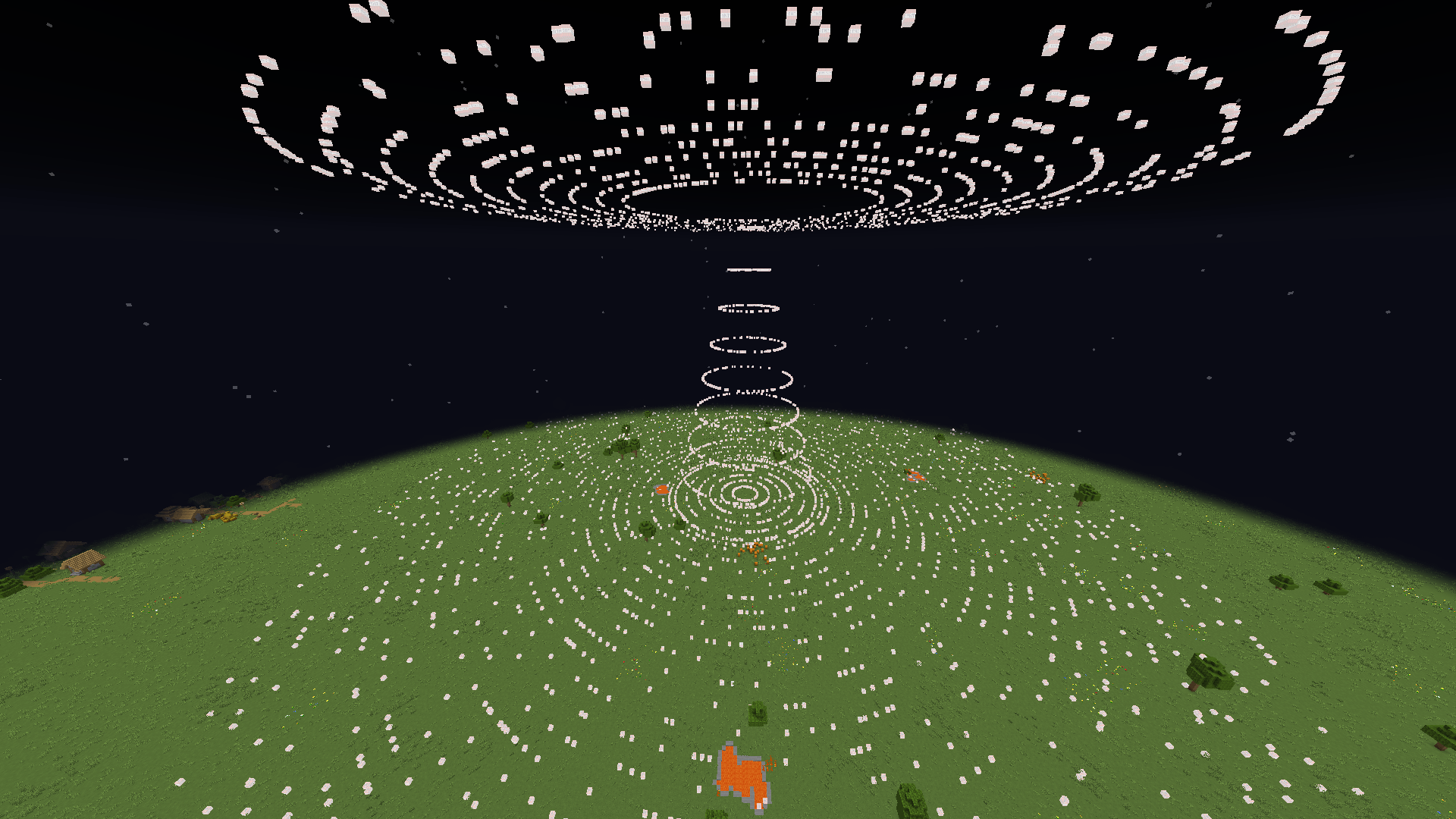
Orbital+
Orbital+ is a Minecraft mod that adds multiple orbital weapon systems controlled using fishing rods and commands.
It includes:
- Orbital Strike Cannon
- Orbital Wolf Cannon
- Stasis System
- Railgun System
All orbital actions are triggered using special fishing rods or through commands. All systems support both Vanilla Rod Mode and Unstable Rod Mode.
Systems Included
Orbital Strike Cannon (OSC)
Calls down destructive orbital attacks at the targeted location.
Modes
- Stab
- Nuke
Orbital Wolf Cannon
Summons wolves directly at the targeted location.
Stasis System
Teleports you to a saved coordinate set on the rod.
- Coordinates are saved directly onto the rod
- Each rod is tied to one location
- Stasis rods may be configured with custom coordinates or use the player's current position
Railgun System
Fires high-velocity arrows capable of one-shotting any entity.
Fishing Rod System
Orbital+ supports two rod behavior modes:
Vanilla Rod Mode
Uses the normal vanilla fishing rod system.
/oconfig rod vanilla
Unstable Rod Mode
Uses the fishing rod system from the Unstable SMP.
Features:
- Fishing bobbers persist
- Fishing bobbers are tied to the rod itself instead of the player.
- You can set up multiple mechanisms with multiple fishing rods.
- Mechanisms like stasis chambers will continue to work even if:
- You die
- Leave the server
- The server restarts
/oconfig rod unstable
Give Commands
General Format: /orbital give <player-name> <type> <amount> <fixed> Optional Argument Order: amount > fixed
- If fixed is typed before amount, the command will end.
Stab Rod
/orbital give <player-name> stab
- Gives the player a stab strike rod.
/orbital give <player-name> stab 3
- Gives 3 stab rods.
/orbital give <player-name> stab fixed
- Gives a fixed stab rod.
/orbital give <player-name> stab 3 fixed
- Gives 3 fixed stab rods.
Nuke Rod
/orbital give <player-name> nuke
- Gives a nuke strike rod.
/orbital give <player-name> nuke 3
- Gives 3 nuke rods.
/orbital give <player-name> nuke fixed
- Gives a fixed nuke rod.
/orbital give <player-name> nuke 3 fixed
- Gives 3 fixed nuke rods.
Wolf Rod
/orbital give <player-name> wolf
- Gives a wolf rod.
/orbital give <player-name> wolf 3
- Gives 3 wolf rods.
/orbital give <player-name> wolf fixed
- Gives a fixed wolf rod.
/orbital give <player-name> wolf 3 fixed
- Gives 3 fixed wolf rods.
Railgun Rod
/orbital give <player-name> railgun
- Gives a railgun rod.
/orbital give <player-name> railgun 3
- Gives 3 railgun rods.
/orbital give <player-name> railgun fixed
- Gives a fixed railgun rod.
/orbital give <player-name> railgun 3 fixed
- Gives 3 fixed railgun rods.
Stasis Rod
Strict Argument Order: coordinates > amount > fixed
/orbital give <player-name> stasis
- Gives a stasis rod bound to the player’s current position.
/orbital give <player-name> stasis <x> <y> <z>
- Gives a stasis rod bound to the specified coordinates.
/orbital give <player-name> stasis 3
- Gives 3 stasis rods bound to the player’s current position.
/orbital give <player-name> stasis fixed
- Gives a fixed stasis rod bound to the player’s current position.
/orbital give <player-name> stasis <x> <y> <z> 3 fixed
- Gives 3 fixed stasis rods bound to the specified coordinates.
If fixed is typed before coordinates or amount, the command ends.
Orbital Settings
List Current Settings
/orbital settings list
- Displays the player's currently applied Orbital+ settings such as delays, strike types, depths, sizes, and system configurations.
OSC – Nuke Settings
Nuke Activation Delay
/orbital settings systems osc nuke delay <delay>
- Sets the delay between rod activation (or command execution) and the actual orbital nuke deployment.
- Higher values increase the wait time before the strike begins.
Nuke Size
/orbital settings systems osc nuke size <size>
- Controls the size of the orbital nuke explosion.
Higher values result in larger blast radii.
- Maximum allowed size: 31
Nuke Type
/orbital settings systems osc nuke type <type>
- Changes the behavior or pattern of the nuke strike.
Supported Types:
- default
- mushroom
- compressed
- redstone
Changing the type resets the configured nuke size back to default.
OSC – Stab Settings
Stab Activation Delay
/orbital settings systems osc stab delay <delay>
- Sets the delay between rod activation (or command execution) and when the stab strike begins deployment.
Stab Depth
/orbital settings systems osc stab depth <depth>
-
Controls how deep the stab strike travels downward during deployment.
-
Higher values increase penetration depth.
-
Maximum allowed depth: 276
Stab Type
/orbital settings systems osc stab type <type>
- Changes the deployment pattern of the stab strike.
Supported Types:
- default
- square
- circle
- star
Changing the type resets the configured stab depth back to default.
Railgun Settings
Railgun Arrow Amount
/orbital settings system railgun amount <amount>
- Controls how many orbital railgun projectiles are fired per activation.
Railgun Activation Delay
/orbital settings system railgun delay <delay>
- Sets the delay between rod activation (or command execution) and when the railgun fires.
Stasis Settings
Stasis Activation Delay
/orbital settings systems stasis delay <delay>
- Sets the delay between rod activation and teleportation to the stored coordinate.
Wolf Settings
Wolf Summon Amount
/orbital settings system wolf amount <amount>
- Controls how many wolves are summoned when a wolf deployment is activated.
Wolf Summon Delay
/orbital settings system wolf delay <delay>
- Sets the delay between rod activation and wolf spawning.
Linking System
/orbital link <type>
- Links the fishing rod currently held by the player to the specified orbital system.
/orbital link stasis
- Links the held rod into a stasis rod using the player’s current position.
/orbital link stasis <x> <y> <z>
- Links the held rod into a stasis rod bound to the specified coordinates.
Strike Commands
Single Strike
/orbital strike <x> <y> <z> <type>
- Deploys a single orbital strike at the specified coordinates.
Types:
- stab
- nuke
Magazine System
Add Strike: /orbital strike magazine add <x> <y> <z> <type>
- Stores a strike in the magazine without activating it.
Remove Slot: /orbital strike magazine remove <slot>
- Removes a stored strike from the specified slot.
List Stored Strikes: /orbital strike magazine list
- Displays all stored magazine strikes.
Fire Stored Strikes: /orbital strike magazine fire all
- Fires all stored strikes simultaneously.
Fire Stored Strikes Sequentially: /orbital strike magazine fire sequence
- Fires all stored strikes one at a time in order.
Magazine Limit: 8 Stored Strikes
Other Features
Death Sound System
- Toggle custom global death sounds.
/oconfig death sound <enabled/disabled>
Proximity Message System
- Limits message visibility based on player distance.
Affects:
- Chat messages
- Join/Leave messages
- Death messages
/oconfig messages proximity <enabled/disabled>
/oconfig messages proximity range <range>
Trust/Permissions System
Control who can use Orbital Commands.
List Authorized Players
/orbital permissions list
- Displays all players trusted to use orbital commands.
Trust a Player
/orbital permissions trust <player-name>
- Allows the specified player to use orbital command systems.
- Does not grant access to permissions or config commands.
Untrust a Player
/orbital permissions untrust <player-name>
- Revokes the specified player's access to orbital command systems.
Trusted players cannot access:
- Permissions branch(they are not able to trust nor untrust players)
- Oconfig
Config File Commands
Opens the Global Orbital+ configuration system in-game.
List Config Settings
/oconfig list
- Displays all currently applied global configuration settings
Toggle Death Sound
/oconfig death sound <enabled/disabled>
- Enables or disables global death sound playback.
Toggle Proximity Messages
/oconfig messages proximity <enabled/disabled>
- Limits message visibility based on player distance when enabled.
Change Proximity Range
/oconfig messages proximity range <range>
- Sets the maximum distance a player must be within to receive:
- Chat messages
- Join messages
- Leave messages
- Death messages
Contact / Support
If you encounter any bugs or issues while using Orbital+, you can reach me directly on Discord: **jhiro2483**.
Please include:
- The Minecraft version you’re using
- A short description of the bug
This helps me fix issues faster and improve the mod for everyone.
- Edition: Minecraft Java
- File type: .jar
- Minecraft versions listed: 1.21.11, 1.21.9, 1.21.10
- How to install: Install the matching mod loader (Forge, Fabric or NeoForge) for your Minecraft version. → Download the .jar. → Put it in the .minecraft/mods folder and launch that loader profile.
- Where to get it: Opens on CurseForge — not every file is mirrored on our own servers.
Install steps are the general flow for this file type — How to install Minecraft Java mods & modpacks walks through it step by step.
- Ships as o+-fabric-1.3.0-mc1.21.11.jar — drop this file into the mods folder
- Download size: 180 KB
- Download link checked 2 Oct 2026 — working
These come from our own check of the pack file, not from the source page.