Mob Control Apocalypse
Java mod listed for Minecraft 1.20. Downloads from the MC Java Mods app on Android.
Advanced server-side mob spawning control with whitelist/blacklist, custom attributes, spawn zones, custom drops, mob persistence, and a real-time web…
⬇ Download on CurseForgeThe author built this one for Minecraft 1.20.1 on Forge. On other versions it may install and then do nothing.

🎮 Mob Control - CurseForge Description (EN)
Description longue (Full Description)
# Mob Control
**Mob Control** is a powerful server-side Forge mod for Minecraft 1.20.1 that gives server administrators complete
control over mob spawning, attributes, drops, and distribution. Whether you run a survival server, an RPG server, or a
custom adventure map, Mob Control lets you fine-tune every aspect of hostile mob behavior.
---
## Key Features
### Global Spawn Control
- **Whitelist / Blacklist mode**: Choose whether only configured mobs can spawn (whitelist) or configured mobs are
blocked (blacklist)
- **Per-player mob limit**: Cap the number of hostile mobs around each player (default: 30)
- **Global mob cap**: Set an absolute maximum of hostile mobs in the entire world (default: 200)
- **Spawn distance constraints**: Define minimum and maximum spawn distances from players
- **Force despawn**: Automatically remove mobs that wander too far from all players
- **Light level bypass**: Configured mobs can spawn regardless of light level, enabling daylight spawning
- **Passthrough system**: Completely ignore mobs from specific mods (e.g., `customnpcs:*`) so they spawn normally
### Custom Mob Attributes
Configure per-mob attributes via a simple JSON file:
- **Health range**: Random HP between min and max values
- **Movement speed**: Override vanilla speed
- **Knockback resistance**: 0.0 (none) to 1.0 (immune)
- **Aggro range**: Detection distance for players
- **Follow range**: Pursuit distance
- **Spawn chance**: 0-100% probability for each spawn attempt
- **Sun protection**: Prevent zombies, skeletons, and phantoms from burning in sunlight
### Spawn Zones
Create dedicated spawn zones with independent rules:
- **Cubic volumes**: Define zones with two corner positions in any dimension
- **Per-zone mob cap**: Limit total mobs within each zone
- **Mob groups**: Configure multiple mob types per zone, each with its own cooldown, max count, spawn ring distance,
and custom attributes
- **Entry boost**: Temporarily multiply spawn rates when a player first enters a zone (e.g., 4x faster spawns for 5
seconds)
- **Mob balancing**: Automatically redistribute mobs so no single player gets overwhelmed
- **Sun protection**: Zone-wide sunburn prevention for undead mobs
- **XP bonus**: Award extra experience for killing zone-spawned mobs
- **Fair distribution**: Mobs spawn near the least-loaded player, ensuring balanced gameplay
- **Retry system**: Failed spawn attempts are retried on the next cycle (up to 5x multiplier)
### Mob Persistence
Zone-spawned mobs survive chunk loading/unloading:
- Mobs are saved to disk when their chunk unloads
- Restored with their exact health and position when the chunk reloads
- Alive counts stay accurate across chunk cycles
### Custom Drops
Replace or supplement vanilla loot tables:
- Per-mob drop tables in JSON
- Variable item counts (min/max)
- Drop chance percentage (0-100%)
- Option to disable all vanilla drops
- Option to disable XP orb drops
- Zone XP bonus stacks on top of custom drops
### Real-Time Web Dashboard
A built-in web server provides a live monitoring dashboard:
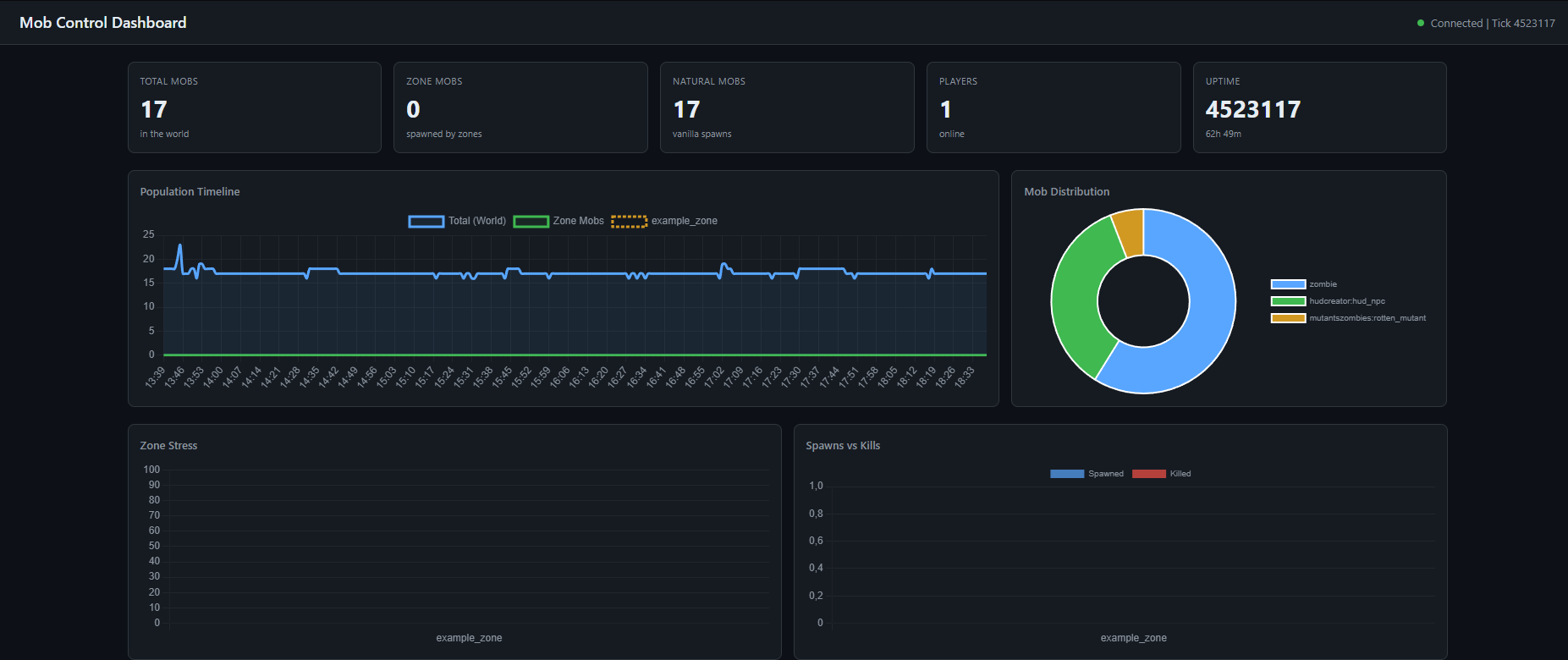
- **Population timeline**: 5-minute rolling graph of total, zone, and natural mob counts
- **Mob distribution**: Doughnut chart of mob types
- **Zone stress**: Bar chart showing how full each zone is
- **Spawns vs Kills**: Track spawn and death rates per zone
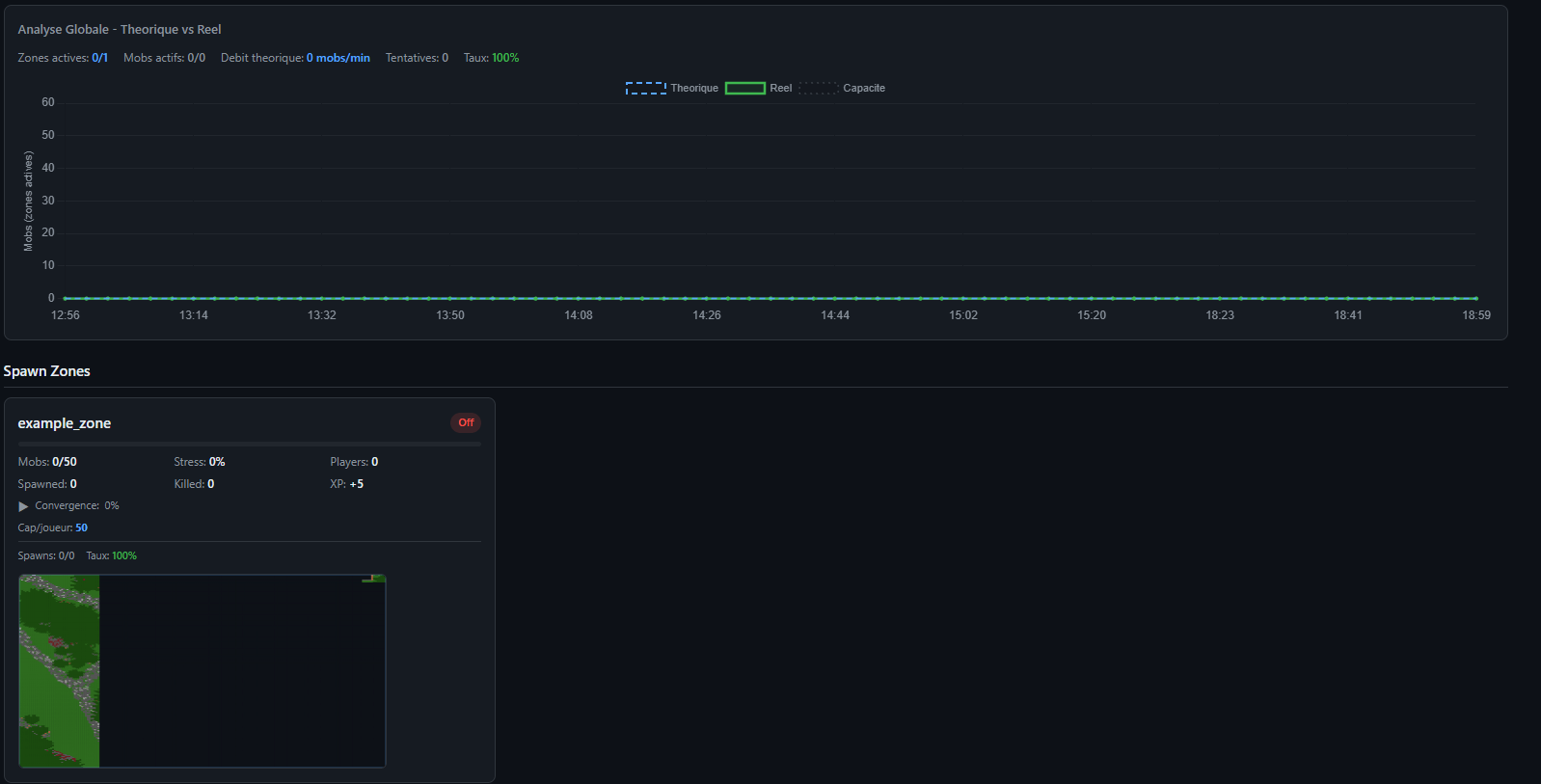
- **Global analysis**: Theoretical vs actual mob counts with efficiency tracking
- **Zone cards**: Click any zone for detailed stats, mob group breakdown, radar view, and analysis
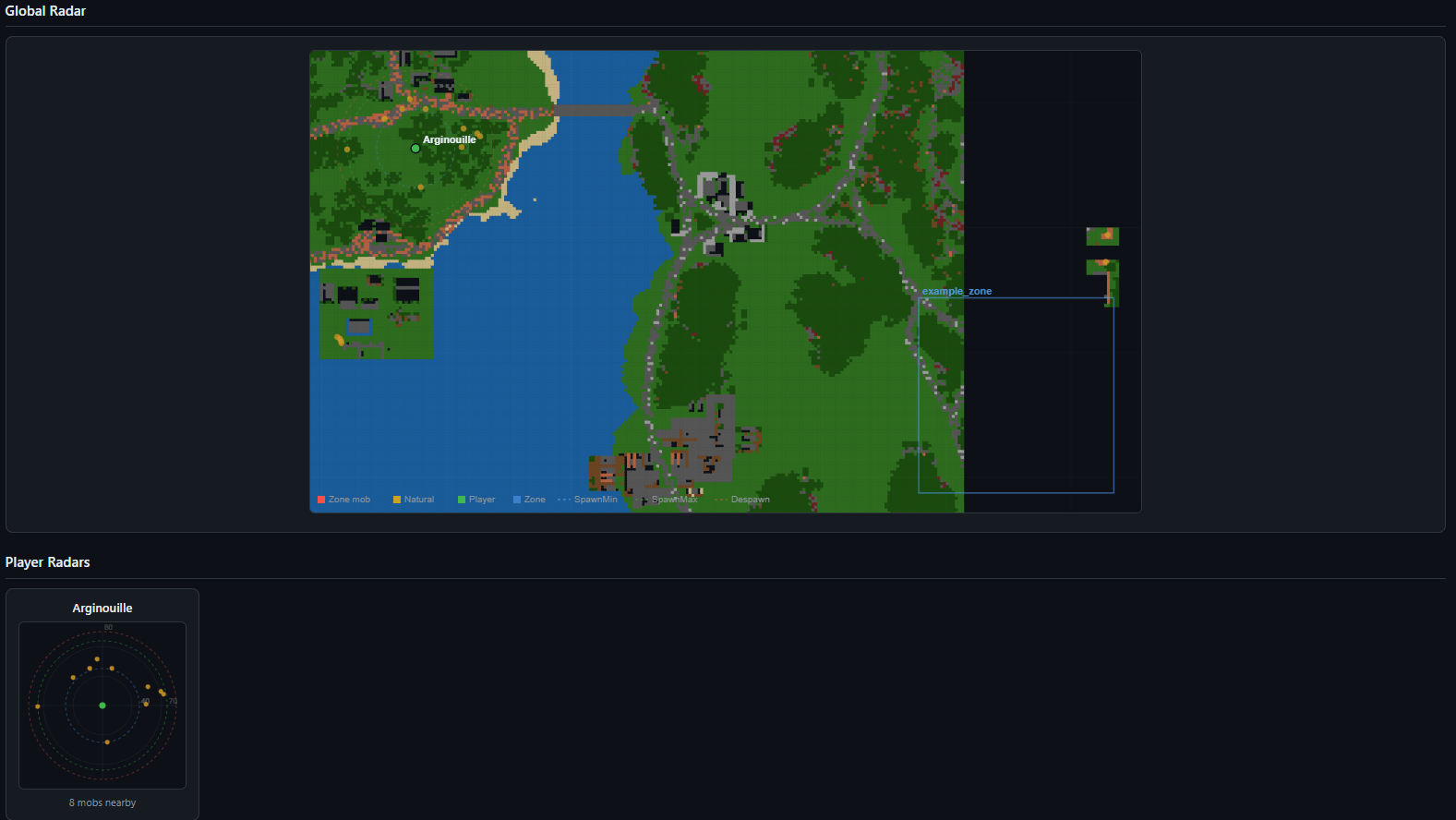
- **Entity radar**: Global map showing all mobs, players, zone boundaries, spawn rings, and despawn rings with terrain
overlay
- **Player radars**: Per-player mini-radars showing nearby mobs with distance rings
- **Player table**: Position, dimension, nearby mob count, and current zone for each player
- **Terrain mapping**: Automatic heightmap scanning with color-coded terrain types
- **Configuration view**: See all active settings at a glance
---
## Commands
| Command | Permission | Description |
|---------|-----------|-------------|
| `/mobcontrol reload` | OP level 2 | Reloads all configuration files (mobs, drops, zones). Refreshes passthrough
patterns, resets zone counters, and restarts the web server if settings changed. |
---
## Configuration Files
All configuration is done through files in the `config/` folder. No in-game GUI needed.
### mobcontrol-common.toml
General spawn control settings:
```toml
[general]
whitelistMode = true # true = whitelist, false = blacklist
controlAllMobs = true # Control all mob types, not just monsters
mobLimitPerPlayer = 30 # Max mobs around each player
mobCheckRadius = 64 # Radius to count nearby mobs
globalMobCap = 200 # Max hostile mobs in the world
spawnMinDistance = 24 # Min blocks from player to spawn
spawnMaxDistance = 128 # Max blocks from player to spawn
despawnDistance = 128 # Force despawn beyond this distance
passthroughMods = ["customnpcs:*"] # Mods to ignore completely
debugSpawner = false # Verbose spawn logging
mobcontrol-mobs.json
Per-mob configuration with attributes:
{
"minecraft:zombie": {
"spawnChance": 80,
"minHealth": 20,
"maxHealth": 40,
"speed": 0.23,
"knockbackResistance": 0.0,
"aggroRange": 35,
"followRange": 40,
"sunProof": true
},
"minecraft:skeleton": {
"spawnChance": 70,
"minHealth": 20,
"maxHealth": 30,
"speed": 0.25,
"knockbackResistance": 0.0,
"aggroRange": 16,
"followRange": 24,
"sunProof": true
}
}
Set any attribute to -1 to keep the vanilla default. Comes pre-configured with 30+ vanilla mobs.
mobcontrol-drops.json
Custom drop tables:
{
"minecraft:zombie": {
"drops": [
{ "item": "minecraft:rotten_flesh", "min": 1, "max": 3, "chance": 100 },
{ "item": "minecraft:iron_ingot", "min": 1, "max": 1, "chance": 5 }
]
}
}
mobcontrol-drops.toml
[drops]
disableVanillaDrops = false # Replace vanilla drops entirely
disableXPDrops = false # Disable XP orb drops
mobcontrol-zones.toml
Zone system settings:
[zones]
zonesEnabled = false # Enable/disable the zone system
webEnabled = false # Enable/disable web dashboard
webPort = 8080 # Web dashboard port
persistenceEnabled = true # Save/restore mobs on chunk unload
defaultDespawnDistance = 70 # Default zone despawn distance
defaultSpawnMinDistance = 16 # Default zone min spawn distance
defaultSpawnMaxDistance = 40 # Default zone max spawn distance
mobcontrol-zones.json
Zone definitions:
{
"my_zone": {
"enabled": true,
"dimension": "minecraft:overworld",
"corner1": { "x": 100, "y": 60, "z": 200 },
"corner2": { "x": 300, "y": 120, "z": 400 },
"maxMobs": 50,
"despawnDistance": 80,
"xpReward": 5,
"sunProof": true,
"entryBoost": {
"enabled": true,
"multiplier": 4.0,
"durationTicks": 100
},
"balance": {
"enabled": true,
"threshold": 30,
"maxDespawnPerCycle": 5
},
"mobGroups": [
{
"entityId": "minecraft:zombie",
"cooldownTicks": 60,
"maxAlive": 15,
"spawnMinDistance": 16,
"spawnMaxDistance": 40,
"attributes": {
"healthMin": 30,
"healthMax": 50,
"speed": 0.26,
"knockbackResistance": 0.0,
"followRange": 40
}
}
]
}
}
---
Web Dashboard
Access the dashboard at http://your-server-ip:8080 (default port).
Dashboard Sections
Overview Cards - Total mobs, zone mobs, natural mobs, player count, server uptime
Charts:
- Population Timeline (5-minute rolling history)
- Mob Type Distribution (top 12 types)
- Zone Stress (% capacity per zone)
- Spawns vs Kills (per zone)
- Global Analysis (theoretical vs actual population curves with efficiency %)
Zone Cards - Each zone displays:
- Current mob count / max capacity with stress bar
- Active boost indicator (pulsing orange badge)
- Convergence rate and ETA to full capacity
- Per-player mob distribution
- Spawn success rate with failure breakdown
- Mini entity radar with terrain overlay
Zone Detail Modal (click a zone card):
- Stats tab: Dimensions, bounds, boost status, balance settings, player distribution
- Groups tab: Per mob-group alive count, cooldown, spawn attempts/successes/failures, retry stats
- Radar tab: Large radar view with terrain, entities, spawn rings, and player positions
- Analyse tab: Detailed metrics comparing configured vs actual values (cooldown, spawn rate, saturation, death rate,
fill time), per-group theoretical vs real population curves
Global Radar - World map showing all zone boundaries, entities (red = zone mob, yellow = natural), players (green)
with spawn distance rings (cyan = min, green = max, red = despawn)
Player Radars - Individual mini-radars centered on each player showing nearby entities and distance rings
Player Table - Name, position, dimension, nearby mob count, current zone
Configuration - Live view of all active settings
Terrain Legend
┌──────┬───────────────────────────┐
│ Code │ Terrain │
├──────┼───────────────────────────┤
│ G │ Grass / Podzol / Mycelium │
├──────┼───────────────────────────┤
│ D │ Desert Sand │
├──────┼───────────────────────────┤
│ W │ Water │
├──────┼───────────────────────────┤
│ L │ Lava │
├──────┼───────────────────────────┤
│ N │ Snow / Ice │
├──────┼───────────────────────────┤
│ T │ Tree Leaves │
├──────┼───────────────────────────┤
│ B │ Dirt / Wood │
├──────┼───────────────────────────┤
│ S │ Stone / Rock │
├──────┼───────────────────────────┤
│ R │ Nether Blocks │
├──────┼───────────────────────────┤
│ E │ End Stone │
├──────┼───────────────────────────┤
│ V │ Gravel │
├──────┼───────────────────────────┤
│ C │ Clay / Terracotta │
└──────┴───────────────────────────┘
API Endpoint
GET /api/data returns a complete JSON snapshot of all statistics, updated every 3 seconds. Useful for building custom
monitoring tools or Discord bots.
---
How Spawn Control Works
1. A mob attempts to spawn naturally
2. Passthrough check: If the mob matches a passthrough pattern, it spawns normally
3. Whitelist/Blacklist check: Is the mob in the config? Allowed or blocked based on mode
4. Spawn chance: Roll the configured percentage (e.g., 80% for zombies)
5. Per-player limit: Count mobs around the nearest player. Block if over limit
6. Global cap: Check total world hostile mobs. Block if over cap
7. Distance check: Block if too close or too far from any player
8. Attribute application: Apply custom health, speed, knockback resistance, aggro range, follow range, and sun
protection
Zone mobs bypass all global checks and follow their own independent rules.
---
How Zones Work
1. Every server tick, active zones check for players inside their bounds
2. For each mob group, if the cooldown has elapsed and the group isn't full:
- Select the player with the fewest nearby zone mobs (fair distribution)
- Find a safe spawn location within the spawn ring (min/max distance from player)
- Spawn the mob with zone-specific attributes
- If spawning fails, queue a retry for the next cycle (up to 5x multiplier)
3. Every 3 seconds: despawn mobs beyond the zone's despawn distance
4. Every 5 seconds: balance mobs if any player has too many
5. Entry boost: When a player enters a zone, cooldowns are divided by the boost multiplier for the configured duration
---
Compatibility
- Minecraft: 1.20.1
- Mod Loader: Forge (47+)
- Side: Server-side only (clients don't need the mod)
- Modded mobs: Fully supported. Add any modded mob ID to the JSON configs
- Passthrough: Use modid:* to let entire mods bypass spawn control (essential for NPC mods, quest mobs, etc.)
---
Quick Start
1. Install the mod on your server
2. Start the server once to generate default config files
3. Edit config/mobcontrol-common.toml for global settings
4. Edit config/mobcontrol-mobs.json to configure mob attributes and spawn chances
5. (Optional) Edit config/mobcontrol-drops.json for custom drops
6. (Optional) Enable zones in config/mobcontrol-zones.toml and define zones in config/mobcontrol-zones.json
7. (Optional) Enable the web dashboard for real-time monitoring
8. Use /mobcontrol reload to apply changes without restarting
---
- Edition: Minecraft Java
- File type: .jar
- Minecraft version listed: 1.20.1
- How to install: Install the matching mod loader (Forge, Fabric or NeoForge) for your Minecraft version. → Download the .jar. → Put it in the .minecraft/mods folder and launch that loader profile.
- Where to get it: Opens on CurseForge — not every file is mirrored on our own servers.
Install steps are the general flow for this file type — How to install Minecraft Java mods & modpacks walks through it step by step.
- Ships as mobcontrol-2.0.0.jar — drop this file into the mods folder
- Download size: 108 KB
- Download link checked 2 Oct 2026 — working
These come from our own check of the pack file, not from the source page.
Related Java mods

Realistic Minecraft Backrooms

Create: Animal Kingdom

ragnarok-packs

EliteMobs

Quests EPIC