ModsJava
Armor Warning
Java mod listed for Minecraft 1.20. Downloads from the MC Java Mods app on Android.
⬇ Download on CurseForgeThe author built this one for Minecraft 1.20.1 on Forge. On other versions it may install and then do nothing.
🛡️ Armor Warning
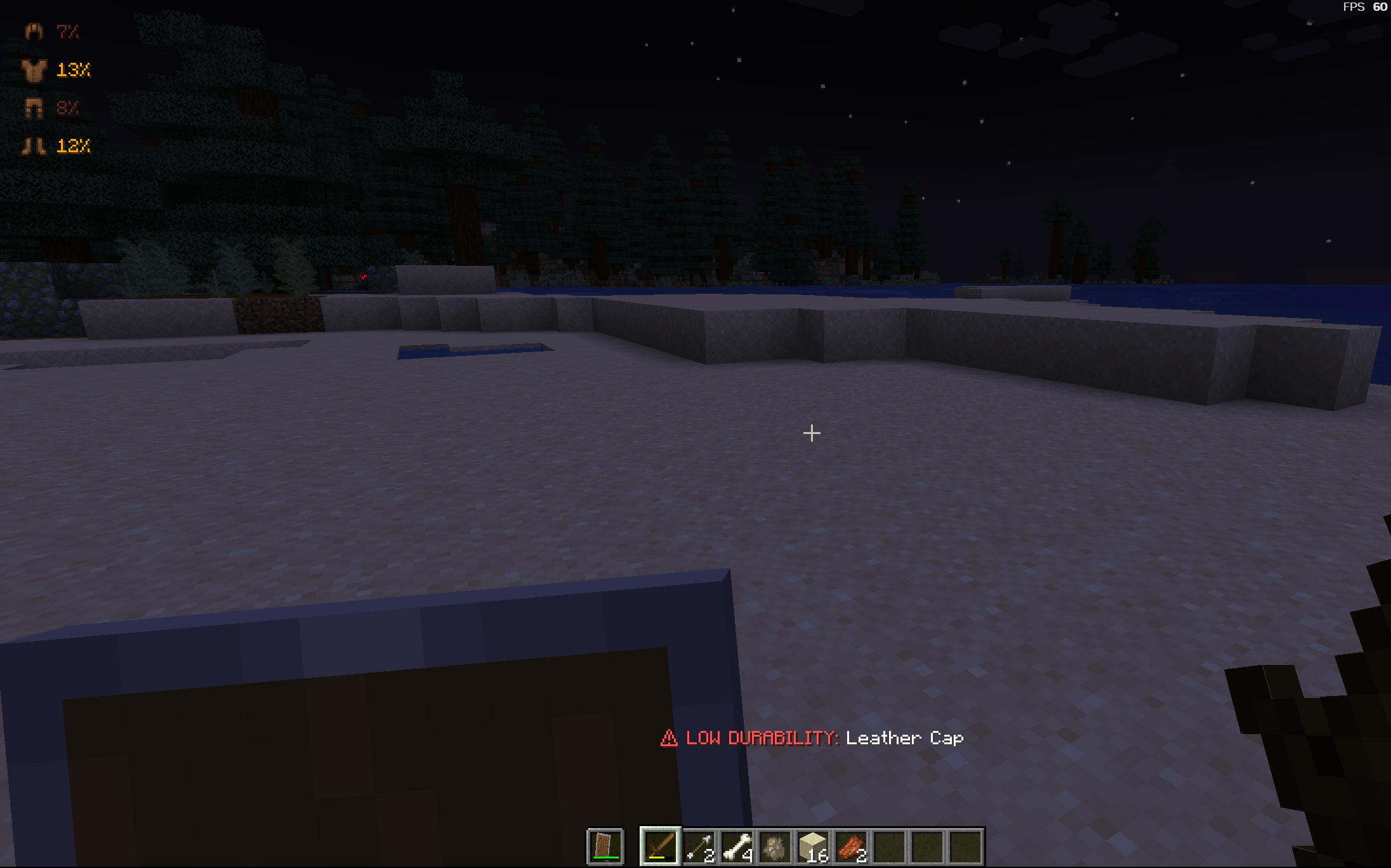
Never break your expensive armor or Elytras again! Armor Warning is a lightweight, client-side utility mod designed to save your gear from accidental destruction. It stays hidden when your armor is healthy and only alerts you when it's time for a repair.✨ Key Features
- Smart HUD Visibility: The HUD is hidden by default to keep your screen clean. It only appears when a piece of armor drops below the warning threshold (default: 30%).
- Dynamic Color Coding: The durability percentage changes color as it gets more dangerous:
- 🟡 Yellow/Gold: Initial Warning (30% - 21%).
- 🟠 Orange: Moderate Danger (20% - 11%).
- 🔴 Red: Critical Level (≤10%).
- Breathing Animation: When durability is Critical (10% or less), the text performs a smooth "breathing" fade-in/out effect to ensure you notice the danger during intense combat.
- Audio Alerts: A subtle chime sounds the moment a piece hits the warning threshold. Includes a 60-second cooldown per slot to avoid annoying sound loops.
- Fully Configurable: Customize the 30% threshold and toggle sounds/animations in the config file.
🔧 Technical Details
- Client-Side Only: This mod does not need to be installed on the server. Works on Vanilla, Realms, and Forge servers.
- Compatibility: Designed for Minecraft 1.20.1 (Forge).
- Modpack Friendly: You are free to include this mod in any modpack!
Quick facts
- Edition: Minecraft Java
- File type: .jar
- Minecraft version listed: 1.20.1
- How to install: Install the matching mod loader (Forge, Fabric or NeoForge) for your Minecraft version. → Download the .jar. → Put it in the .minecraft/mods folder and launch that loader profile.
- Where to get it: Opens on CurseForge — not every file is mirrored on our own servers.
Install steps are the general flow for this file type — How to install Minecraft Java mods & modpacks walks through it step by step.
File checked by MCModsHub
- Ships as armorwarning-1.0.0.jar — drop this file into the mods folder
- Download size: 836 KB
- Download link checked 2 Oct 2026 — working
These come from our own check of the pack file, not from the source page.