
Satisfactory Planner
Java mod listed for Minecraft 1.20–1.21. Downloads from the MC Java Mods app on Android.
A client-side utility mod that adds a fully interactive, Satisfactory-style project planner. See a complete crafting tree, track required resources…
I don't know my version or loader
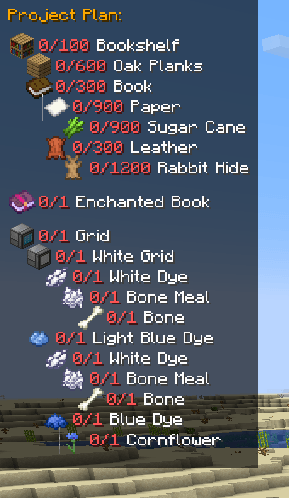
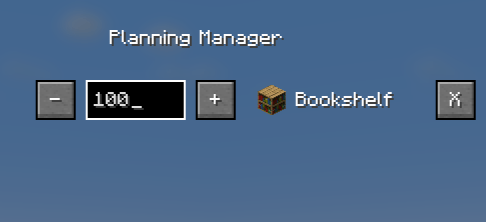
Tired of alt-tabbing to a wiki or scribbling notes for complex recipes from your favorite tech mods? Satisfactory Planner brings the powerful and intuitive project management UI from Satisfactory directly into Minecraft!
This is a client-side mod that adds a dynamic, on-screen HUD to help you plan, track, and execute your crafting projects, from a single piston to an entire factory.
## ✨ Features
* **Dynamic Crafting Tree HUD:** An elegant, on-screen display shows you a complete, multi-level tree of all ingredients required for your chosen item.
* **Real-Time Tracking:** The HUD automatically checks your inventory and updates in real-time, showing you exactly what you have and what you still need (`11/64 Cobblestone`). Completed items are marked with a green check!
* **Interactive Planning Manager:** Press a key (`K` by default) to open a dedicated screen where you can:
* Change the target amount of items to craft using `[+]` and `[-]` buttons.
* Manually type in the exact number you need (e.g., `1024`).
* Remove projects you no longer need.
* **Seamless EMI Integration:** Simply hover over any item in the EMI item list and press `P` to add it to your plan. It also works with items in your inventory!
* **Persistence:** Your project list is automatically saved when you close the game and reloaded when you join a world.
* **Broad Recipe Support:** Supports standard crafting table recipes as well as Furnace, Blast Furnace, and Smoker recipes.
## 🎮 How to Use
* **Adding a Recipe:** Hover over an item in your inventory or the EMI list and press **P**.
* **Managing Your List:** Press **K** to open the Planning Manager. Here you can change amounts or delete projects.
* **Clearing the List:** Press **O** to remove all active projects from the HUD.
## ⚙️ Dependencies
* **Required:** **NeoForge** for Minecraft 1.21.1.
* **Highly Recommended:** **EMI** (to add recipes directly from the item list).
---
*This mod was created with the help of an AI assistant. It's a journey from a simple idea to a fully functional tool. We hope you find it useful!*
- Edition: Minecraft Java
- File type: .jar
- Minecraft versions listed: 1.20.1, 1.21.1
- How to install: Install the matching mod loader (Forge, Fabric or NeoForge) for your Minecraft version. → Download the .jar. → Put it in the .minecraft/mods folder and launch that loader profile.
- Where to get it: Opens on CurseForge — not every file is mirrored on our own servers.
Install steps are the general flow for this file type — How to install Minecraft Java mods & modpacks walks through it step by step.
- Ships as satisfactoryplanner-1.0.0.jar — drop this file into the mods folder
- Download size: 20 KB
- Download link checked 2 Oct 2026 — working
These come from our own check of the pack file, not from the source page.