Pixelmon Utility PokeRadar
Java mod listed for Minecraft 1.16–1.21. Downloads from the MC Java Mods app on Android.
I don't know my version or loader
I'm sorry for the inactivity... I'm currently working on a big project at my real-life job... so this project will be on hold and I won't be working on it until I have more free time... thanks for understanding! :)
Pixelmon Utility
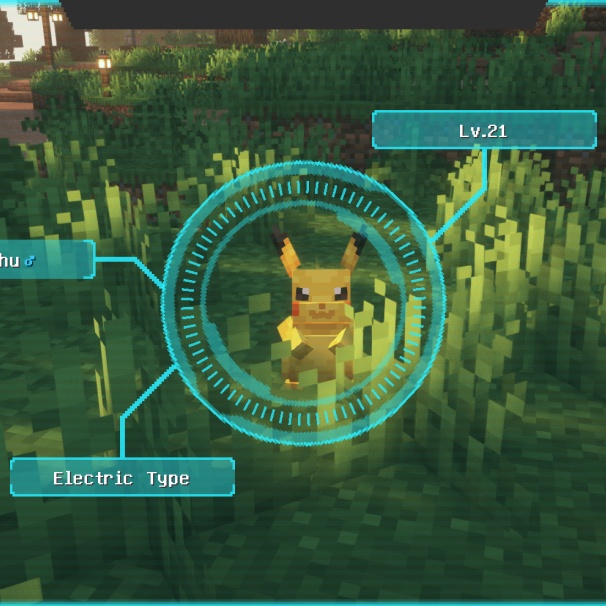
A comprehensive utility mod for Pixelmon that enhances your gameplay with Pokemon detection, battle assistance, and quality-of-life features.
🎮 Features
🔍 Pokemon Finder
Search for any Pokemon in your world!
- Press DELETE to open the search screen
- Draws yellow lines to matching Pokemon
- Filter by size:
pikachu(size:runt) - Filter by gender:
eevee(gen:f) - Combine filters:
charizard(size:huge)(gen:m)
Available sizes: runt, small, ordinary, large, huge, ginormous, enormous, microscopic, pygmy
⚡ Legendary Detection
Never miss a legendary spawn again!
- Automatic detection of nearby legendaries
- Red lines drawn to legendary Pokemon
- Alarm sound notification
- On-screen display with level and distance
- Toggle in settings
👑 Boss Detection
Spot boss Pokemon instantly!
- Blue lines drawn to boss Pokemon
- Shows boss tier (Epic/Legendary/Ultimate)
- Toggle in settings
⚔️ Battle HUDs
Gain tactical advantage in battles!
Weakness HUD (Pink border):
- Shows opponent's type weaknesses (2x/4x damage)
- Shows resistances (0.5x/0.25x damage)
- Shows immunities (0x damage)
- Draggable - click and drag to reposition!
Move Effectiveness HUD (Cyan border):
- Shows effectiveness of YOUR moves vs opponent
- x2 = Super effective, x1 = Normal, x0.5 = Not effective
- Draggable - click and drag to reposition!
🤖 Auto-Bot
Automate repetitive commands!
- Configure commands in settings
- Set interval between executions
- On-screen countdown timer
- Press INSERT to toggle on/off
- Alarm stops automatically when in battle
📦 Inventory Sorting
Keep your inventory organized!
- Middle-click in inventory or chests to sort
- Automatically stacks partial stacks
- Sorts by item type then name
🕊️ Creative Fly
Fly without creative mode!
- Double-tap SPACE to toggle
- SPACE = up, SHIFT = down, WASD = horizontal
- Enable feature in settings first
⌨️ Keybinds
| Key | Action |
|---|---|
| DELETE | Open Pokemon Finder |
| INSERT | Toggle Auto-Bot |
| CTRL+INSERT | Open Settings |
| HOME | Open Help Screen |
| Middle Mouse | Sort Inventory |
| Double-tap SPACE | Toggle Fly Mode |
All keybinds can be changed in Minecraft Controls settings
📋 Requirements
- Minecraft: 1.16.5
- Forge: 36.2.0+
- Pixelmon: 9.0.0+
- Java: 17+
📥 Installation
- Download the latest
pixelmonutility-x.x.x.jar - Place in your
modsfolder - Launch Minecraft with Forge
- Configure settings with CTRL+INSERT
💡 Tips
- Battle HUDs are draggable - click and drag to your preferred position!
- Positions are saved automatically
- Combine size and gender filters for precise searches
- Enable notifications in settings for legendary/boss alerts
📝 Support
If you encounter any issues or have suggestions, please report them! If you appreciate my spare-time work, a donation would be very much welcome ❤️
paypal.me/freshbuzz1996
Made for the Pixelmon community ❤️
- Edition: Minecraft Java
- File type: .jar
- Minecraft versions listed: 1.16.5, 1.21.1
- How to install: Install the matching mod loader (Forge, Fabric or NeoForge) for your Minecraft version. → Download the .jar. → Put it in the .minecraft/mods folder and launch that loader profile.
- Where to get it: Opens on CurseForge — not every file is mirrored on our own servers.
Install steps are the general flow for this file type — How to install Minecraft Java mods & modpacks walks through it step by step.
- Ships as pixelmon_pokeradar-1.0.7.jar — drop this file into the mods folder
- Download size: 20 KB
- Download link checked 2 Oct 2026 — working
These come from our own check of the pack file, not from the source page.