
APOEX - Apotheosis EX
Java mod listed for Minecraft 1.20. Downloads from the MC Java Mods app on Android.
APOEX is an addon mod for Apotheosis designed to enhance gameplay by improving compatibility and integration with other mods. It provides Affix…
⬇ Download on CurseForgeThe author built this one for Minecraft 1.20.1 on Forge. On other versions it may install and then do nothing.
APOEX - Apotheosis EX
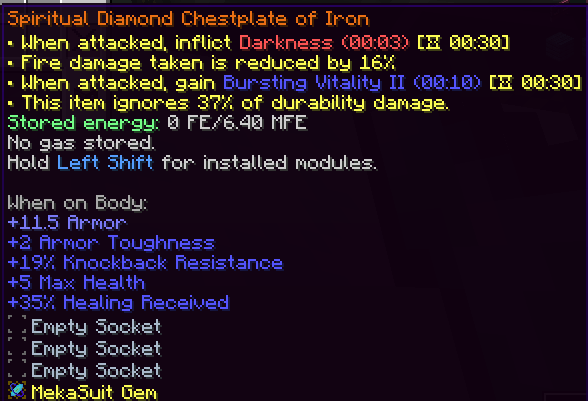
APOEX is an addon mod for Apotheosis designed to enhance gameplay by improving compatibility and integration with other mods. It provides Affix rebalancing, bug fixes, and introduces new features like custom gems and sockets.
Requirements Mod Loader and Version
- Forge 1.20.1
Required Mods:
- Apotheosis 7.4.8
- addonAPI 2.0.0-SNAPSHOT
Supported / Integrated Mods
- Apotheotic Additions
- Esoteric Reforging
- Mekanism
- Evolved Mekanism
- Evolved Mekanism Extras
- Mekanism Extras
APOEX Core Content
- EX Socket System & EX Gem System: Introduction of new socketing mechanics and specialized gems.
- New Affix Additions: Implementation of various new affixes to enhance equipment.
Mekanism Compat
- Machine Affixes: New affixes that can be applied to Mekanism machines.
- MekaSuit EX Gems: Specialized EX Gems designed to be compatible with the MekaSuit.
Apotheotic Additions Compat
- Rarity & Stat Scaling: Addition of stat values and attribute configurations for the rarities introduced by Apotheotic Additions.
Esoteric Reforging Compat
- Recipes: Additional recipe support for the Esoteric Reforging Table.
How to Use EX Sockets & Gems Use a Smithing Table for all operations. Place items in the following order (Left to Right)
1, Applying the EX Socket
- Netherite Upgrade Smithing Template
- Target Item
- EX Socket Key
2, Inserting an EX Gem**
- Netherite Upgrade Smithing Template
- Item with EX Socket applied
- EX Gem
Note
None
- Edition: Minecraft Java
- File type: .jar
- Minecraft version listed: 1.20.1
- How to install: Install the matching mod loader (Forge, Fabric or NeoForge) for your Minecraft version. → Download the .jar. → Put it in the .minecraft/mods folder and launch that loader profile.
- Where to get it: Opens on CurseForge — not every file is mirrored on our own servers.
Install steps are the general flow for this file type — How to install Minecraft Java mods & modpacks walks through it step by step.
- Ships as apoex-0.0.6-alpha.jar — drop this file into the mods folder
- Download size: 253 KB
- Download link checked 2 Oct 2026 — working
These come from our own check of the pack file, not from the source page.