MC Money
Java mod listed for Minecraft 1.21. Downloads from the MC Java Mods app on Android.
A currency mod that adds coins, a personal bank for secure storage, and a configurable shop with 200+ items for buying and selling.
I don't know my version or loader
Minecraft Money
A NeoForge mod for Minecraft 1.21.1 that adds a complete currency system with coins, a personal bank, and a configurable shop.
Screens
Features
💰 Coins
Four tiers of coins with different values that can be picked up, deposited, and traded:
| Coin | Value | Description |
|---|---|---|
| Copper Coin | 1 | Basic currency unit |
| Silver Coin | 10 | Worth 10 copper coins |
| Gold Coin | 100 | Worth 100 copper coins |
| Platinum Coin | 1000 | Worth 1000 copper coins |
- Right-click any coin to deposit it into your wallet
- Coins stack up to 64
- On death, your wallet balance drops as coins
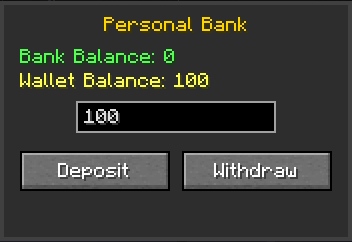
🏦 Personal Bank
A secure block where you can store currency separately from your wallet.
- Deposit from wallet to bank for safekeeping
- Withdraw from bank back to wallet
- Bank balance persists and is separate from your wallet
- Shift-click for bulk transfers
🏪 Shop
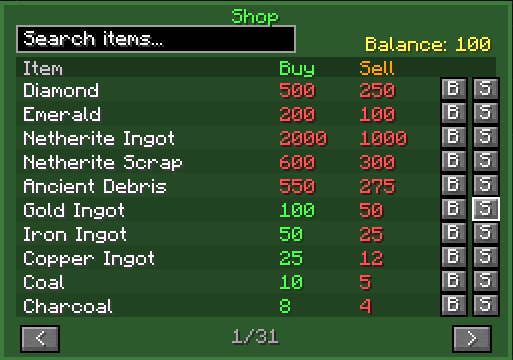
A configurable shop block for buying and selling items.
- 350+ items available by default (ATM10 modpack template included)
- Buy items using your wallet balance
- Sell items back at 50% of buy price
- Search bar to quickly find items
- @mod search - Type
@modidto filter by mod (e.g.,@mekanism) - Item validation - Invalid items are automatically skipped with warnings
- Shift-click to buy/sell 64 at once
- Prices shown in green (affordable) or red (too expensive)
- Sell prices shown in orange (have item) or red (don't have item)
- 10 items per page with navigation
Commands
Player Commands
| Command | Description |
|---|---|
| /currency | Check your current wallet balance |
| /currency pay <player> <amount> | Send currency to another player |
| /currency withdraw <amount> | Convert wallet balance to coins |
Admin Commands (Permission Level 2+)
| Command | Description |
|---|---|
| /currency balance <player> | Check another player's balance |
| /currency add <player> <amount> | Add currency to a player |
| /currency remove <player> <amount> | Remove currency from a player |
| /currency set <player> <amount> | Set a player's balance to a specific amount |
Crafting Recipes
Personal Bank
┌─────────┬─────────┬─────────┐
│  Iron   │  Gold   │  Iron   │
│  Ingot  │  Ingot  │  Ingot  │
├─────────┼─────────┼─────────┤
│  Iron   │         │  Iron   │
│  Ingot  │  Chest  │  Ingot  │
├─────────┼─────────┼─────────┤
│  Iron   │  Iron   │  Iron   │
│  Ingot  │  Ingot  │  Ingot  │
└─────────┴─────────┴─────────┘- 7 Iron Ingots + 1 Gold Ingot + 1 Chest
Shop
┌─────────┬─────────┬─────────┐
│         │         │         │
│ Emerald │ Emerald │ Emerald │
├─────────┼─────────┼─────────┤
│         │         │         │
│ Planks  │  Chest  │ Planks  │
├─────────┼─────────┼─────────┤
│         │         │         │
│ Planks  │ Planks  │ Planks  │
└─────────┴─────────┴─────────┘- 3 Emeralds + 5 Planks (any wood type) + 1 Chest
Configuration
The shop is fully configurable via config/minecraftmoney-shop.toml:
# Sell price multiplier (0.5 = 50% of buy price)
sellPriceMultiplier = 0.5

# Shop items format: "modid:item_id,price,Display Name"
shopItems = [
    "minecraft:diamond,500,Diamond",
    "minecraft:netherite_ingot,2000,Netherite Ingot",
    # ... more items
]
Adding Custom Items
Add entries to the shopItems array:
shopItems = [
    "minecraft:diamond,500,Diamond",
    "mymod:custom_item,100,Custom Item"
]
ATM10 Modpack Template
An atm10-shop-template.toml file is on github with 350+ items from popular mods including:
- Mekanism, Applied Energistics 2, Thermal Series
- Ars Nouveau, Botania, Create
- And many more!
Copy the contents to your shop config to use it.
Requirements
- Minecraft 1.21.1
- NeoForge 21.1.77+
- Edition: Minecraft Java
- File type: .jar
- Minecraft versions listed: 1.21.8, 1.21.5, 1.21.4
- How to install: Install the matching mod loader (Forge, Fabric or NeoForge) for your Minecraft version. → Download the .jar. → Put it in the .minecraft/mods folder and launch that loader profile.
- Where to get it: Opens on CurseForge — not every file is mirrored on our own servers.
Install steps are the general flow for this file type — How to install Minecraft Java mods & modpacks walks through it step by step.
- Ships as minecraftmoney-1.1.0.jar — drop this file into the mods folder
- Download size: 162 KB
- Download link checked 23 Oct 2026 — working
These come from our own check of the pack file, not from the source page.