Archery Things
Java mod listed for Minecraft 1.21. Downloads from the MC Java Mods app on Android.
I don't know my version or loader
Archery Things improves Minecraft archery by introducing a practical quiver system that makes managing multiple arrow types simple and intuitive.
The quiver stores different arrow types and allows you to select which arrow is active. When arrows are present in the selected slot, bows will automatically fire that arrow, removing the need to manually swap arrows in your inventory.
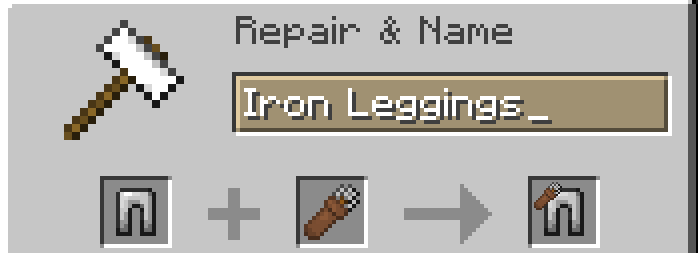
For added convenience, a quiver can be bound to a chestplate/leggings. When wearing a quiver or a chestplate/leggings with a bound quiver, you can open the quiver interface anywhere using a configurable hotkey (default: R).
If both chestplate and leggings are bound with a quiver, the mod will always select from chestplate first.
The mod is lightweight, easy to use, and designed to feel natural alongside vanilla mechanics.
Features
- Store multiple arrow types in a single quiver
- Select which arrow type your bow will use
- Automatic arrow usage when a quiver slot is selected
- Bind a quiver to a chestplate for easy access
- Open the quiver menu via hotkey (default: R, configurable)
- Vanilla-friendly and lightweight design
- Smash quiver-armor with Anvil to unbound them
How to Use
- Craft and equip a quiver.
- Place arrows into the quiver and select an active slot by pressing number key 1-9 or scrolling.
- Shoot a bow — it will automatically use the selected arrow.
- (Optional) Bind the quiver to a chestplate using Anvil and equip it.
- Press R (Default keybind) to open the quiver menu while equipped.
Unbind Quiver from Armor
- Drop the armor with quiver
- Place an Anvil on top of it
- Anvil fall
- Done!
- Edition: Minecraft Java
- File type: .jar
- Minecraft versions listed: 1.21.10, 1.21.11
- How to install: Install the matching mod loader (Forge, Fabric or NeoForge) for your Minecraft version. → Download the .jar. → Put it in the .minecraft/mods folder and launch that loader profile.
- Where to get it: Opens on CurseForge — not every file is mirrored on our own servers.
Install steps are the general flow for this file type — How to install Minecraft Java mods & modpacks walks through it step by step.
- Ships as archerythings-1.1.1+mc26.1-snapshot-7-neoforge.jar — drop this file into the mods folder
- Download size: 56 KB
- Download link checked 2 Oct 2026 — working
These come from our own check of the pack file, not from the source page.