
StatTweaks
Java mod listed for Minecraft 1.21. Downloads from the MC Java Mods app on Android.
A mod that dynamically modifies vanilla item attributes. Fully compatible with other mods, it lets you easily adjust damage, speed, durability, armor, and…
I don't know my version or loader


StatTweaks
Balance your game. Your rules.
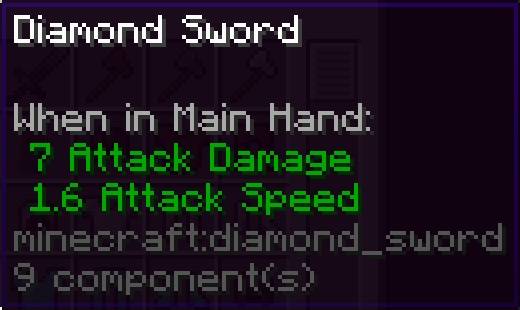
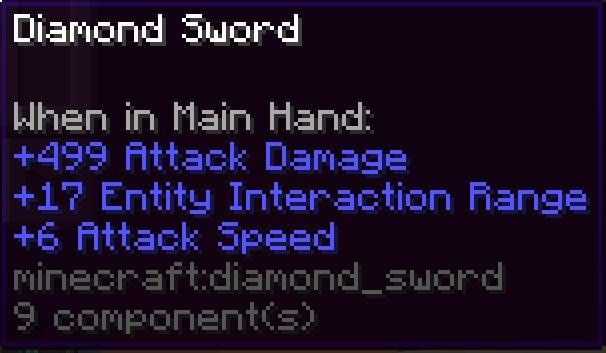
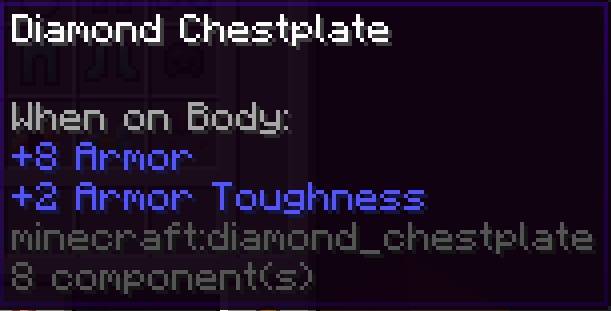
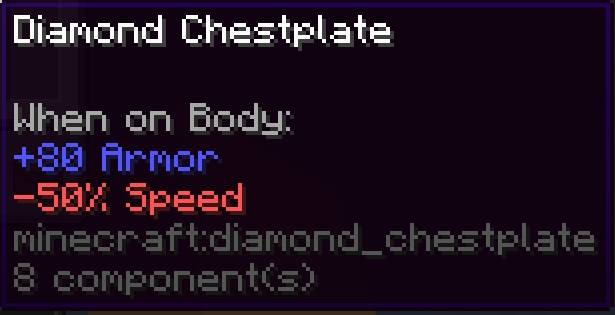
StatTweaks is a powerful and flexible mod that lets you fully customize items and entities using a simple JSON config file.
Whether you're building a modpack or fine-tuning gameplay, StatTweaks gives you complete control over attributes, mechanics, and behavior — all without writing a single line of code.
✨ What You Can Do
🔹 Rebalance any item Modify stats like damage, speed, armor, durability, stack size, and more.
🔹 Modify entities Adjust base stats like health, attack damage, and movement speed.
🔹 Use modern Data Components Directly control internal item behavior using Minecraft’s component system.
🔹 Conditional modifiers Create dynamic bonuses depending on conditions (e.g. dimension).
🧩 Supported Attributes (Items & Entities)
StatTweaks supports ANY attribute registered in the game (vanilla or modded).
Below are common examples (not limited to):
| Attribute ID | Effect in-game |
|---|---|
minecraft:generic.attack_damage |
Increases the damage dealt to entities when attacking. |
minecraft:generic.attack_speed |
Controls how fast the player can attack (higher = faster hits). |
minecraft:generic.max_health |
Changes total health (mainly used for entities). |
minecraft:generic.movement_speed |
Affects walking/running speed. |
minecraft:generic.armor |
Reduces incoming damage when worn. |
minecraft:generic.armor_toughness |
Reduces effectiveness of high-damage attacks. |
minecraft:generic.knockback_resistance |
Reduces how far entities are pushed when hit. |
minecraft:generic.attack_knockback |
Increases knockback dealt to enemies. |
⭐ Special StatTweaks Attributes
| Attribute | Effect |
|---|---|
stattweaks:durability |
Sets item durability (number of uses before breaking). |
stattweaks:efficiency |
Modifies tool mining speed and behavior. |
🧪 Data Components (Advanced Customization)
StatTweaks supports ANY registered Data Component, including modded ones.
Below are common examples:
| Component ID | Effect in-game |
|---|---|
minecraft:max_stack_size |
Changes how many items can stack in one slot. |
minecraft:max_damage |
Defines durability for damageable items. |
minecraft:rarity |
Changes item name color (common, rare, epic, etc.). |
minecraft:food |
Turns item into food with hunger/saturation effects. |
minecraft:enchantments |
Applies enchantments directly to the item. |
minecraft:stored_enchantments |
Used for enchanted books. |
minecraft:unbreakable |
Prevents item from losing durability. |
minecraft:tool |
Defines tool mining rules and effectiveness. |
minecraft:weapon |
Defines weapon behavior internally. |
minecraft:damage |
Tracks current durability damage. |
minecraft:use_cooldown |
Adds delay between uses. |
minecraft:use_remainder |
Defines item left after use. |
minecraft:tooltip_style |
Controls tooltip appearance. |
minecraft:tooltip_display |
Controls how stats are shown in tooltips. |
⚠️ StatTweaks does not limit components — any valid component can be used as long as the JSON matches its codec.
🧬 Entity Customization
Modify entity base attributes:
- Health (
max_health) - Damage (
attack_damage) - Speed (
movement_speed)
✔ Works with vanilla and modded entities ⚠️ Does not modify AI or behaviors
⚙️ Simple Configuration
All changes are made in:
config/CPT_StatTweaks_Config.jsonStructure:
{
  "tooltip_mode": "relative",
  "items": { ... },
  "entities": { ... }
}
Tooltip Modes
"relative"→ shows modifiers (e.g.+5 Damage)"base"→ shows final values
🎯 Perfect For
✔ Modpack creators ✔ Game balance adjustments ✔ Progression tuning ✔ Cross-mod compatibility fixes ✔ Custom gameplay experiences
⚠️ Good to Know
- Some changes (like durability or stack size) may require a game restart
- In certain versions, you may need to leave and re-enter the world (or fully restart the game) for changes to apply correctly
- Use full IDs like
minecraft:generic.attack_damage - Invalid component formats may not apply correctly
- For more details, examples, and updates, check the project’s GitHub repository
- Edition: Minecraft Java
- File type: .jar
- Minecraft versions listed: 1.21.9, 1.21.1
- How to install: Install the matching mod loader (Forge, Fabric or NeoForge) for your Minecraft version. → Download the .jar. → Put it in the .minecraft/mods folder and launch that loader profile.
- Where to get it: Opens on CurseForge — not every file is mirrored on our own servers.
Install steps are the general flow for this file type — How to install Minecraft Java mods & modpacks walks through it step by step.
- Ships as stattweaks v1.0.0+1.21.1.jar — drop this file into the mods folder
- Download size: 18 KB
- Download link checked 2 Oct 2026 — working
These come from our own check of the pack file, not from the source page.