Auto Connect Remote
Java mod listed for Minecraft 1.21. Downloads from the MC Java Mods app on Android.
Automatically reconnects you to servers with remote control notifications using ntfy or Discord. And Much more like auto command on rejoin!
I don't know my version or loader



Auto Connect Remote
Auto Connect Remote is a client-side reconnect and remote alert mod for Minecraft.
It can:
- automatically reconnect after disconnects
- send ntfy alerts when something goes wrong
- let you remotely stop or trigger reconnects
- send Discord webhook notifications
- track queue position and ETA on supported queue servers
- notify you when you finally get in
v2.4.0 adds Queue Intelligence: setup wizard, queue tracking, queue ETA support, queue alerts, and queue-aware recovery.
Client-side only. No server plugin. No account required.
Discord and feature requests: https://discord.gg/nVWDdZBp
What’s New in v2.4.0
Setup Wizard
- New first-run setup flow
- Helps configure ntfy, setup profiles, and queue alerts faster
- Can be reopened any time with
/autoreconnect wizard
Queue Intelligence
- Tracks queue position on supported servers
- Uses server-provided queue ETA when available
- Falls back to local estimation when enough movement exists
- Supports queue status/history commands
- Adds queue-aware ntfy and Discord notifications
Queue Alerts
- Notify when queue tracking starts
- Notify on milestones
- Notify on ETA thresholds
- Notify when the queue appears stalled
- Notify when you finally join
Queue-Aware Recovery
- Supports reconnect + post-join recovery flows
- Useful for AFK, lobby, and queue-heavy servers
New Commands
/autoreconnect wizard/autoreconnect preset list/autoreconnect preset preview <id>/autoreconnect preset apply <id>/autoreconnect queue_status/autoreconnect queue_history/autoreconnect queue_reset
Core Features
Smart Reconnect
- Automatic reconnect countdown
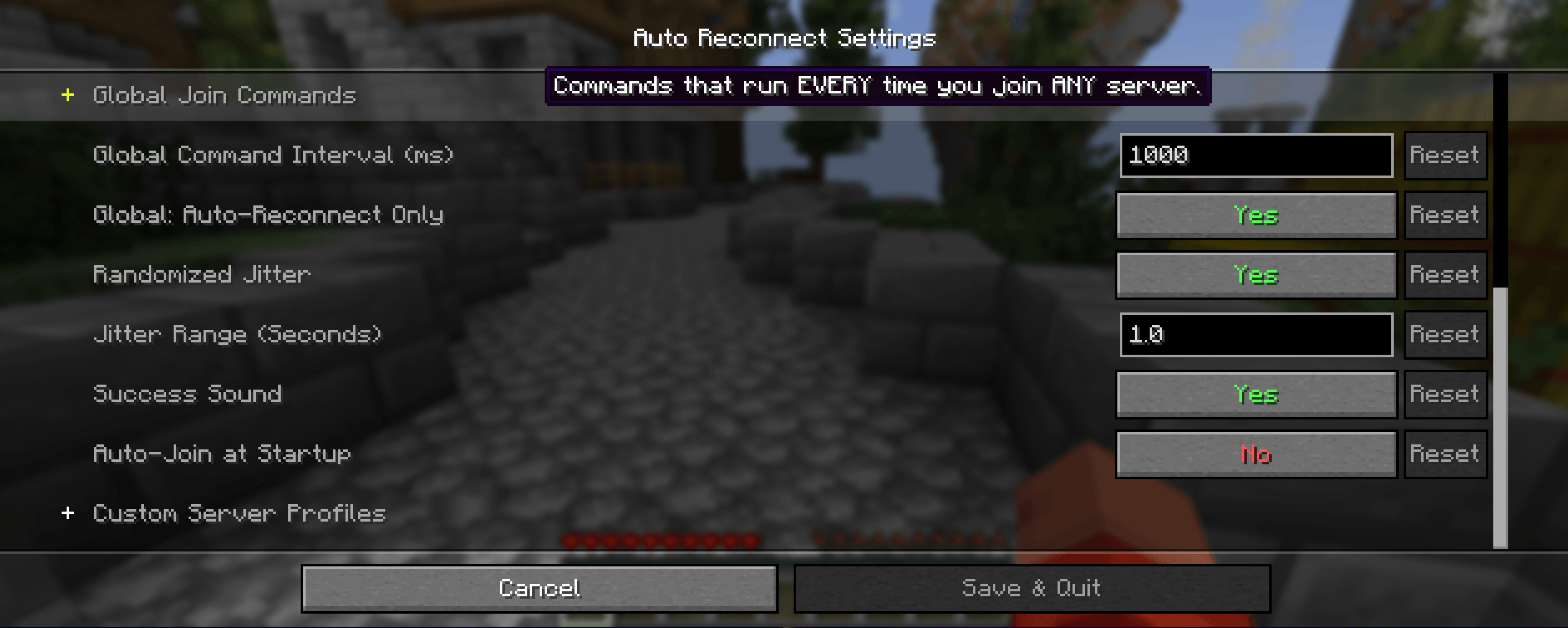
- Optional reconnect jitter
- Non-recoverable disconnect filtering
- Max-attempt safety cap
- Reconnect backoff
- Manual override on the disconnect screen
ntfy Remote Alerts and Control
- Notify when disconnected
- Remote stop phrase to cancel reconnect countdown
- Remote reconnect phrase to trigger reconnect
- Queue alerts for supported servers
Discord Webhooks
- Outbound only
- No bot token
- No inbound Discord control
- Supports disconnect, reconnect, queue, and reliability events
- Privacy-safe defaults for address/reason visibility
Queue Tracking
- Queue position tracking from supported in-game queue text
- Queue ETA display
- Queue history and queue status commands
- Join alerts when you finally get in
Automation and Recovery
- Global auto-commands
- Per-server profiles
- AFK-oriented repeat command loops
- Hub/lobby detection
- Post-queue recovery support
Setup Wizard
The new Setup Wizard helps you get started faster.
It can help you:
- choose a setup profile
- enter an ntfy topic or generate one
- enable optional queue milestone notifications
- test your ntfy setup
Open it any time with:
/autoreconnect wizard
Quick Start
- Install dependencies:
Fabric APIorNeoForge,Cloth Config,Mod Menu - Open Mod Menu or run
/autoreconnect wizard - Enter an ntfy topic or press
Generate Topic - Pick a setup profile
- Optional: configure a Discord webhook URL and test it
- Trigger a disconnect or join a supported queue server to verify alerts
Commands
ntfy
/autoreconnect topic <name>/autoreconnect reconnect_phrase <phrase>/autoreconnect stop_phrase <phrase>
wizard and queue
/autoreconnect wizard/autoreconnect preset list/autoreconnect preset preview <id>/autoreconnect preset apply <id>/autoreconnect queue_status/autoreconnect queue_history/autoreconnect queue_reset
Discord
/autoreconnect discord_webhook <url>/autoreconnect discord_enabled <true|false>/autoreconnect discord_test [message]/autoreconnect discord_status
reliability
/autoreconnect reliability_status/autoreconnect reliability_reset/autoreconnect block_phrase_add <phrase>/autoreconnect block_phrase_remove <phrase>/autoreconnect block_phrase_list
debug and hub setup
/autoreconnect debug_disconnect/autoreconnect debug_hub_detect/autoreconnect debug_trigger_hub/autoreconnect set_hub_world <name>/autoreconnect hub_from_current
Compatibility
- Minecraft Java Edition
1.21.1-1.21.11 - Fabric or NeoForge
- Client-side only
License
CC0-1.0
- Edition: Minecraft Java
- File type: .jar
- Minecraft versions listed: 1.21.8, 1.21.5, 1.21.4
- How to install: Install the matching mod loader (Forge, Fabric or NeoForge) for your Minecraft version. → Download the .jar. → Put it in the .minecraft/mods folder and launch that loader profile.
- Where to get it: Opens on CurseForge — not every file is mirrored on our own servers.
Install steps are the general flow for this file type — How to install Minecraft Java mods & modpacks walks through it step by step.
- Ships as autoreconnect-neoforge-2.4.0.jar — drop this file into the mods folder
- Download size: 679 KB
- Download link checked 23 Oct 2026 — working
These come from our own check of the pack file, not from the source page.