Change Name
Java mod listed for Minecraft 26.x. Downloads from the MC Java Mods app on Android.
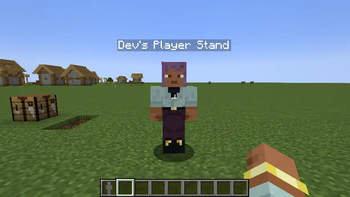
Roleplay-friendly player nicknames shown above players, in chat, and in the tab list—without changing real Minecraft account identities.
⬇ Download on Modrinth
Name Changer
Name Changer adds simple, immersive player nicknames designed especially for roleplay servers.
Let players use their character names instead of their real Minecraft account names. This helps preserve immersion, keeps conversations in character, and prevents real usernames from disrupting the roleplay experience.
Nicknames are stored persistently and synchronized across overhead name tags, the player list, and chat—without modifying the player's actual GameProfile identity.
✨ Features
- Players can set their own character name
- Nicknames appear above players, in chat, and in the player list
- Players can return to their real account name at any time
- Operators can hide all floating player names server-wide
- Hold U to temporarily reveal real names while hide mode is active
- Nicknames persist after restarting the server
- Maximum nickname length of 32 characters
⌨️ Commands
| Command | Description | Permission |
|---|---|---|
/nick <name> |
Set your nickname | Everyone |
/nick name <name> |
Set your nickname | Everyone |
/nick reset |
Reset your nickname to your real name | Everyone |
/nick hide on |
Hide all floating player names | Operator only |
/nick hide off |
Show floating player names again | Operator only |
If a nickname is empty or longer than 32 characters, it will not be applied and the player will receive a warning.
📥 Installation
Name Changer must be installed on both the server and every connecting client.
Fabric
- Install Fabric Loader.
- Install Fabric API.
- Install Architectury API.
- Place the matching
name-changer-...-fabric-...jarfile in themodsfolder.
NeoForge
- Install NeoForge for the supported Minecraft version.
- Install Architectury API.
- Place the matching
name-changer-...-neoforge-...jarfile in themodsfolder.
For Minecraft 26.2, the current NeoForge build targets NeoForge
26.2.0.1-betabecause newer beta builds are not yet compatible with Architectury API 21.0.5.
ℹ️ Notes
- Hide mode removes floating player labels completely.
- While hide mode is enabled, hold U to reveal real names temporarily.
- Name Changer does not modify GameProfiles, authentication identities, skins, or permission-system usernames.
- Minecraft 26.1.x and 26.2 require Java 25.
📜 Credits and license
This is a Minecraft 26.x port of the original CatLab Design Name Changer. The project is licensed under GPL-3.0-or-later.
- Edition: Minecraft Java
- File type: .jar
- Minecraft version listed: 26.2
- How to install: Install the matching mod loader (Forge, Fabric or NeoForge) for your Minecraft version. → Download the .jar. → Put it in the .minecraft/mods folder and launch that loader profile.
- Where to get it: Opens on Modrinth — not every file is mirrored on our own servers.
Install steps are the general flow for this file type — How to install Minecraft Java mods & modpacks walks through it step by step.
- Ships as name-changer-26.2-fabric-3.0.0+26.2.jar — drop this file into the mods folder
- Download size: 106 KB
- Download link checked 2 Oct 2026 — working
These come from our own check of the pack file, not from the source page.