
Cooling Boots
Java mod listed for Minecraft 1.20–1.21. Downloads from the MC Java Mods app on Android.
Adds the Cooling Boots, allowing players to walk on water/lava by creating ice/obsidian beneath their feet. New modes: Off/ Melt/ Permanent
I don't know my version or loader
❄️COOLING BOOTS -V4.0.3❄️
With these boots equipped, you can safely walk on water/lava as it instantly turns into blue ice/obsidian beneath your feet. Just walk like it’s solid ground.

🧊 Features
-Walk on water/lava by creating a blue ice/obsidian path under your feet
-Full fire and lava immunity while wearing the boots
-Jump height and movement speed increased (×1.33) when wearing the boots
-Negate fall damages when jumping from high in water/lava (or on blue ice/obsidian)
-Added 3 modes when boots are equipped:
-OFF: Liquids are not transformed (you got fire immunity)
-MELT: The blocks will melt into 15sc
-PERMANENT: The blocks will stay solid
-Use "V" key to switch modes, configurable in options>command
-ADMIN : You can block permanent mode on your server; Use /coolingboots permanent allowed true/false
-Return to MELT mode for all players on PERMANENT if this command was used
-Added some sound effects
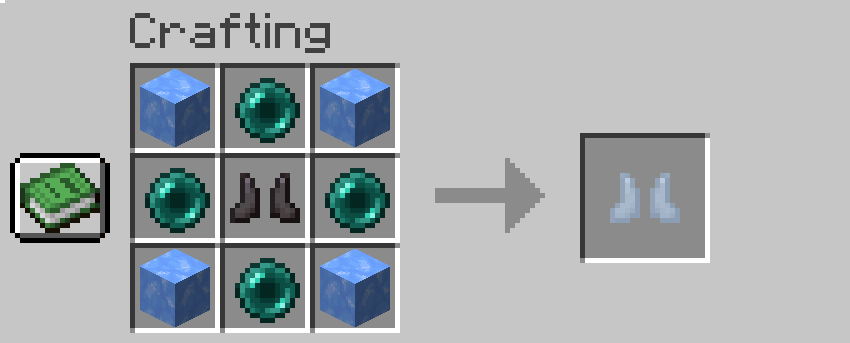
🛠 Crafting & Configuration
-1 netherite boots, 4 ender pearl, 4 blue ice
-The recipe is configurable in the instance /mods folder and directly inside coolingboots-xx-xx-xx.jar
-Edit the recipe file at data/coolingboots/recipe(s)/cooling_boots.json (7-Zip, WinRAR, etc.)
-Follow easy pattern explained in the code, LETTERS 3x3 are your crafting table
-Use only item ID's, and don't forget to save your change! (need save on notepad + confirm save with the pop up on 7zip)
Note:
-⚠️ Some functions may vary slightly depending on the version.
-⚠️ Use /recipe give @p coolingboots:cooling_boots if you did not obtain any résult on the crafting table.
Whether you’re exploring the Nether or just tired of dying in stupid lava accidents, Cooling Boots add a practical and fun gameplay mechanic without breaking multiplayer or protection systems.
- Edition: Minecraft Java
- File type: .jar
- Minecraft versions listed: 1.21.11, 1.21.1, 1.20.1
- How to install: Install the matching mod loader (Forge, Fabric or NeoForge) for your Minecraft version. → Download the .jar. → Put it in the .minecraft/mods folder and launch that loader profile.
- Where to get it: Opens on CurseForge — not every file is mirrored on our own servers.
Install steps are the general flow for this file type — How to install Minecraft Java mods & modpacks walks through it step by step.
- Ships as coolingboots-4.0.3-fabric-26.2.jar — drop this file into the mods folder
- Download size: 73 KB
- Download link checked 3 Oct 2026 — working
These come from our own check of the pack file, not from the source page.