ModsJava
Open In Inventory
Java mod listed for Minecraft 1.19–1.21. Downloads from the MC Java Mods app on Android.
I don't know my version or loader
Open the Minecraft launcher and look at the profile you play on — it names both, like fabric-loader-1.21.4. The version also shows in the bottom-right corner of the game's main menu.
No loader in the profile name? Then it's plain Minecraft, and these mods won't run — you need Fabric or NeoForge installed first.
Open In Inventory
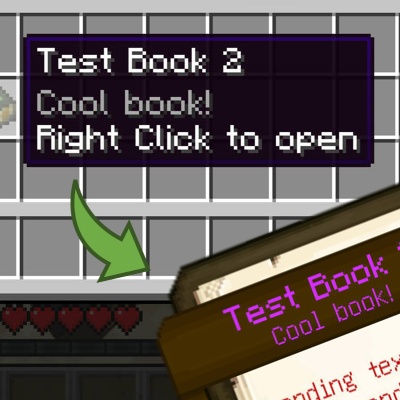
Open guidebooks, backpacks, handhelds and more with a single click in inventory.
Before:
- Locate the item
- Transfer item to hotbar
- Close GUI
- Scroll you mouse wheel to select the item, and finally
- Open it.
After:
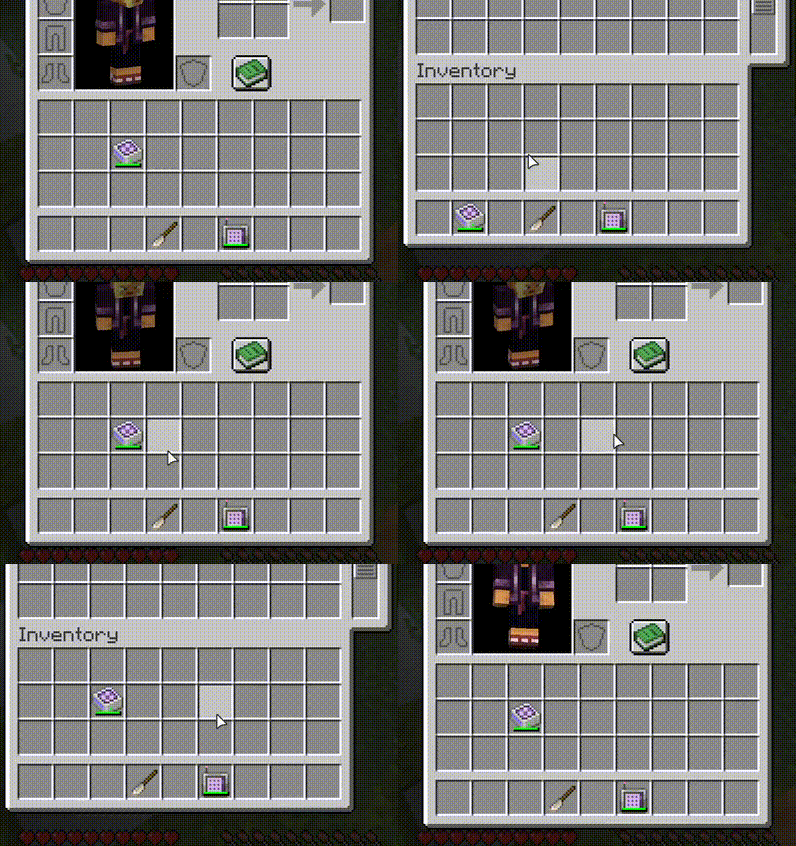
- (configurable) Ensure your main hand is empty
- Locate the item, and
- Right click it to open.
To make it even more convinent, Open In Inventory will automatically swap the stack back to the original position once you exit its GUI.
Features
- Easy to use: just right click
- Tooltip indication for supported item
- Builtin support for Patchouli books, AE2, and Refined Storage
- Support for both Right Click and Shift + Right Click
- Add your favourite interactable item to support list via configuration
- Integration with KubeJS and CraftTweaker
- Builtin safety measure that can automatically skip clicking handling when expected action is impossible or might cause issue
- Localizable config comments to help user understand config more easily
Quick facts
- Edition: Minecraft Java
- File type: .jar
- Minecraft versions listed: 1.21.1, 1.20.1, 1.19.2
- How to install: Install the matching mod loader (Forge, Fabric or NeoForge) for your Minecraft version. → Download the .jar. → Put it in the .minecraft/mods folder and launch that loader profile.
- Where to get it: Opens on CurseForge — not every file is mirrored on our own servers.
Install steps are the general flow for this file type — How to install Minecraft Java mods & modpacks walks through it step by step.
File checked by MCModsHub
- Ships as open_in_inventory-fabric-2.0.2+1.21.1.jar — drop this file into the mods folder
- Download size: 71 KB
- Download link checked 3 Oct 2026 — working
These come from our own check of the pack file, not from the source page.