
Creative Fly Speed Control
CFSC adds simple ALT + mouse wheel controls to fine-tune creative and spectator fly speed, with quick reset and clear action-bar feedback about the…
⬇ Download on CurseForgeThe author built this one for Minecraft 1.20.1 on Forge. On other versions it may install and then do nothing.

CFSC (Creative Fly Speed Control) gives you fast, precise control over movement speed in Creative and Spectator mode. Hold LEFT ALT and use the mouse wheel to adjust fly speed while flying or spectating, and walk speed while on the ground. Press LEFT ALT + middle click to reset back to the default speed.
Fly/walk speed adjustment only works while the player is in Creative mode.
An action‑bar readout shows your current speed, including fine 0.1 steps at very low speeds and a clear “Default” indicator.
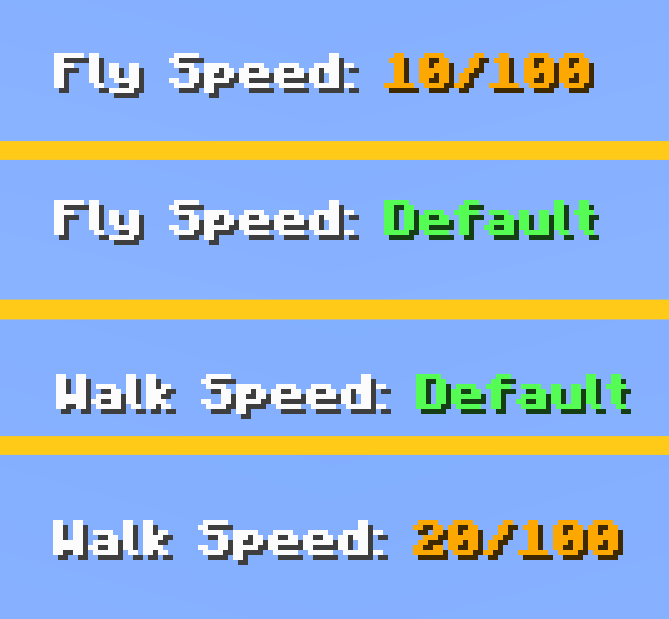
Features:
- ALT + wheel (up, down or middle click) to change speed
- Fly speed in Creative + Spectator
- Walk speed in Creative when not flying
- ALT + middle click reset
- Action‑bar message with a current fly/walk speed
- Edition: Minecraft Java
- File type: .jar
- Minecraft version listed: 1.20.1
- How to install: Install the matching mod loader (Forge, Fabric or NeoForge) for your Minecraft version. → Download the .jar. → Put it in the .minecraft/mods folder and launch that loader profile.
- Where to get it: Opens on CurseForge — not every file is mirrored on our own servers.
Install steps are the general flow for this file type — How to install Minecraft Java mods & modpacks walks through it step by step.
- Ships as Creative_fly_speed_control-1.0.jar — drop this file into the mods folder
- Download size: 244 KB
- Download link checked 13 Sept 2026 — working
These come from our own check of the pack file, not from the source page.