
Network Analyzer
Java mod listed for Minecraft 1.20. Downloads from the MC Java Mods app on Android.
⬇ Download on CurseForgeThe author built this one for Minecraft 1.20.1 on Forge. On other versions it may install and then do nothing.
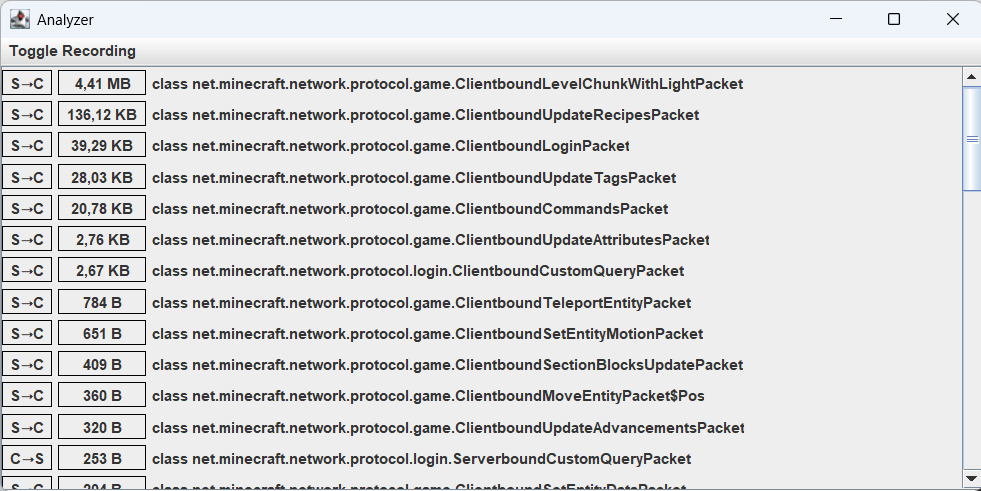
This client-side mod adds a window that, when enabled, monitors the size of packets transferred between the server and the client. Recommended for those who swear that it's not their internet that's making their ping bad.
How to use:
- Check/Change the keybind (default: Numpad 0).
- Press the key to activete the window.
- Click Toggle Recording and then enable C→S or S→C or both. (C→S means Client To Server, S→C means Server To Client)
- Join a singleplayer/multiplayer world.
How to read:
Example packet: S→C | 10 B | class net.minecraft.network.protocol.game.Clientbound.CustomPayloadPacket→somemod:channel[0]
- Direction is Server To Client: S→C
- Size is 10 bytes: 10 B
- Vanilla packet: net.minecraft.network.protocol.game.Clientbound.CustomPayloadPacket
- Custom network channel registered by a mod: somemod:channel
- Packet id of 0: [0]
Technical information/limitations:
- The mod does not store the packet data, only the size of its content (empty packets are shown as 0 B).
- The content of the packet cannot be viewed with this mod.
- The units go up to Terrabytes.
- 1000 bytes = 1 kilobyte, 1000 kilobytes = 1 megabyte, ...
- The content size is stored as a long → upper limit = 9,223,372,036,854,775,807 bytes.
- The window is written in Swing, may cause problems on other platforms.
- Mixins are at a low-level, this may cause instability with other mods that try to modify network traffic.
- Edition: Minecraft Java
- File type: .jar
- Minecraft version listed: 1.20.1
- How to install: Install the matching mod loader (Forge, Fabric or NeoForge) for your Minecraft version. → Download the .jar. → Put it in the .minecraft/mods folder and launch that loader profile.
- Where to get it: Opens on CurseForge — not every file is mirrored on our own servers.
Install steps are the general flow for this file type — How to install Minecraft Java mods & modpacks walks through it step by step.
- Ships as network_analyzer-1.0.jar — drop this file into the mods folder
- Download size: 14 KB
- Download link checked 24 Oct 2026 — working
These come from our own check of the pack file, not from the source page.