
Resource Pack Pruner
Java mod listed for Minecraft 1.21. Downloads from the MC Java Mods app on Android.
Accelerates boot times and reduces RAM by automatically pruning unused assets from mods and resource packs. Fixes silent bloat for a faster, lighter game.
I don't know my version or loader
Resource Pack Pruner (RPR)
Detect. Prune. Accelerate.
Resource Pack Pruner is a lightweight, Multi-Loader (Fabric, Forge, NeoForge) optimization mod designed for modpacks. It acts as a garbage collector for your RAM during the boot process.
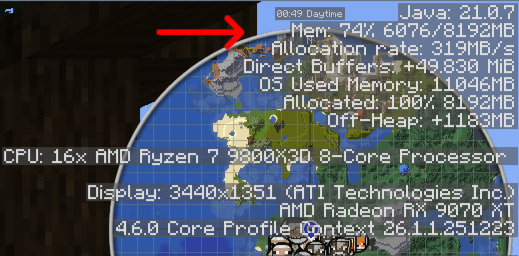
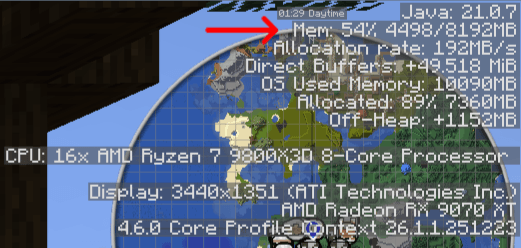
Tested on All The Mods 10 (ATM10) with 8GB RAM Allocated:
-
⏱️ Boot Time: On average reduced from
61.2sto51.8s(~15% Faster) -
🧠 RAM Usage: On average reduced from
74%to54%in-game (~20% Less RAM Used)-
That is nearly 1.6 GB of RAM freed up just by installing the mod!
-
- With Out The Mod ATM10

- With The Mod ATM10

*Results may vary depending on the system, and whether or not unused assets have been manually pruned prior to mod installation.
🛑 The Problem
Modern mods and modpacks are heavy.
-
Internal Bloat: Many mods contain thousands of assets (textures, blockstates, models) for compatibility with other mods you might not even have installed.
-
Resource Pack Errors: Using large resource packs often causes the game to log thousands of errors if they reference mods that are missing.
The game engine wastes time and RAM processing these "orphaned" files, even if they are never used.
✅ The Solution
RPR intercepts the resource loading process before files reach the game engine. It creates a Smart Filter that distinguishes between used and unused assets.
-
Prunes Orphaned Assets: If a texture, model, or blockstate belongs to a namespace (Mod ID) that is not currently loaded, RPR deletes it from memory immediately.
-
Fixes "Silent" Lag: By removing thousands of unused JSONs and PNGs from the load queue, the Model Bakery has less work to do, resulting in faster start times.
-
Safety First: Data Files (Recipes/Tags) are preserved to prevent "Safe Mode" world crashes.
🧹 What It Cleans Up (The "Silent Bloat")
You might not see these errors in your chat, but your game log is often screaming them hundreds of times during startup. RPR silences these by removing the cause.
Common scenarios RPR fixes automatically:
-
🚫 The "Missing Mod" Texture:
-
Scenario: A furniture mod adds a "Twilight Forest Oak Table" but you don't have Twilight Forest installed.
-
Without RPR: The game tries to load the model, realizes the texture is missing, and logs an error for every single variant (inventory, placed, particles, etc.).
-
With RPR: The model is removed from memory before the game even tries to load it.
-
-
👻 Orphaned Blockstates:
-
Scenario: A mod includes support for
biomesoplentyin its blockstates file, but you are playing vanilla. -
Result: The Model Bakery wastes time trying to link these states to blocks that don't exist. RPR detects the missing dependency and strips the file.
-
-
❌ Broken Resource Packs:
-
Scenario: You download a 512x resource pack that supports 50 mods you don't use.
-
Result: Usually, this burns RAM loading useless high-res textures. RPR discards the textures for the missing mods, saving you huge amounts of VRAM.
-
⚠️ Scope & Limitations (What it doesn't do... yet)
-
Current Focus: This mod currently focuses on Assets (Textures/Models). It resolves errors related to missing resources.
-
What remains: You may still see console errors regarding Recipes, Tags, or Config issues (e.g., Moonlight or Recipe Condition errors).
⚙️ Configuration
RPR uses a simple JSON configuration file: config/resourcepackpruner.json
-
safe_namespaces: A whitelist of Mod IDs that should never be pruned.-
Useful for KubeJS scripts that "borrow" textures from unloaded mods.
-
-
safe_folder_names: A list of folder names inside asset directories that are ignored.-
Default includes: "gui", "jei", "curios", "emi".
-
-
debug_mode: Set totrueto see exactly which files are being stripped.
🔮 Roadmap & Future Plans
We are constantly improving the pruning algorithm.
-
Upcoming in v1.0.3 (Logic Rework): I am currently rewriting the core logic to be even faster. Instead of scanning individual files, RPR will switch to a top-level folder check (O(1) complexity). This whitelisting approach will make the pruning process nearly instant.
-
Model Bakery Optimization: Future updates will target error suppression for the Model Bakery to further clean up the console log.
🐛 Issues & Support
Found a bug, a compatibility issue, or have a feature request? Please click the Issues tab at the top of the page to report it on GitHub. Your feedback helps make the mod better! There are example logs on GitHub.
- Edition: Minecraft Java
- File type: .jar
- Minecraft version listed: 1.21.1
- How to install: Install the matching mod loader (Forge, Fabric or NeoForge) for your Minecraft version. → Download the .jar. → Put it in the .minecraft/mods folder and launch that loader profile.
- Where to get it: Opens on CurseForge — not every file is mirrored on our own servers.
Install steps are the general flow for this file type — How to install Minecraft Java mods & modpacks walks through it step by step.
- Ships as resourcepackpruner-fabric-1.21.1-1.0.2.jar — drop this file into the mods folder
- Download size: 58 KB
- Download link checked 24 Oct 2026 — working
These come from our own check of the pack file, not from the source page.