
QuickInvMove
Java mod listed for Minecraft 1.20. Downloads from the MC Java Mods app on Android.
I don't know my version or loader
QuickInvMove


Overview
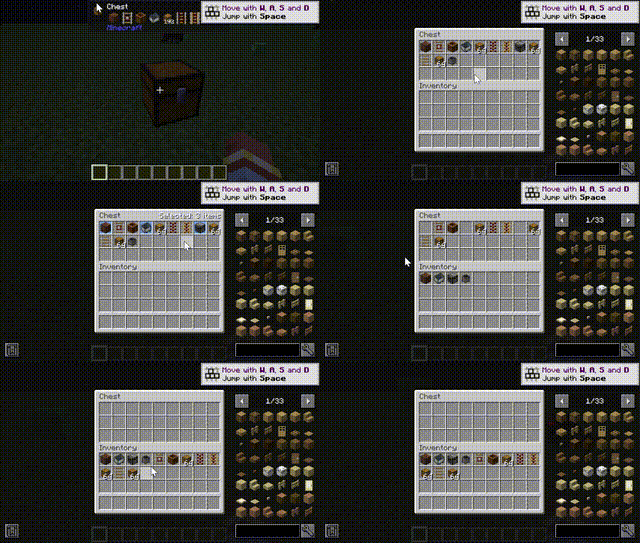
QuickInvMove is a Minecraft Forge 1.20.1 mod that provides powerful cross-container item moving functionality. Through intuitive mouse operations, it makes batch moving items between various containers in the game more convenient and efficient.
Features
📦 Basic Operations
| Action | Function |
|---|---|
Ctrl + Left Click |
Select/deselect a single slot |
Right Click + Drag |
Box-select a rectangular range of slots |
Left Click + Drag Selected |
Batch move selected items |
O Key |
Clear all selection |
🎯 Box Selection Mode
Right-click drag supports two selection modes:
- Replace Mode (Default): New box selection replaces current selection
- Add Mode: New box selection is added to current selection
Hold
Shiftto temporarily invert the box selection mode
🛡️ Smart Protection
- Auto-skip: Empty slots, output slots (like furnace output), unpickable slots
- Overflow Protection: Items return to original slot or drop as items when target is full
- Safe Movement: Ensures items are never lost or damaged
⚙️ Slot Selection Rules Engine
Built-in intelligent slot filtering rules automatically identify non-operable slot types:
- Blacklist Mechanism: Full class name and simple class name dual filtering
- Keyword Filtering: Automatically identifies keywords like "result", "output"
- Whitelist Fallback: Ensures special containers work properly
📊 UI Hints
- Real-time display of selected item count in the top-left corner of container UI
- Selected items are highlighted
- Preview box shows movement target position
🔧 Configuration Options
| Option | Default | Description |
|---|---|---|
defaultBoxSelectAdd |
false | Default box select mode (false=replace, true=add) |
extraBlockedSlotClassNames |
[] | Extra blocked slot full class names |
extraBlockedSlotSimpleNames |
[] | Extra blocked slot simple class names |
extraAllowedSlotClassNames |
[] | Extra allowed slot full class names |
extraAllowedSlotSimpleNames |
[] | Extra allowed slot simple class names |
extraBlockedSlotNameKeywords |
[] | Extra blocked slot name keywords |
🔌 Mod Compatibility
- Recipe Viewers: JEI, REI, EMI compatible
- Hover Tips: Waila, Jade, TOP compatible
- Mouse Tweaks: Compatible
Installation
- Ensure Minecraft Forge 1.20.1 is installed
- Download the latest JAR file of this mod
- Place the JAR file into
.minecraft/modsfolder - Launch the game and verify the mod is loaded in the mod list
License
This project is open-sourced under the MIT License. See LICENSE file for details.
Author
- cnlimiter - Initial development
Contributing
Issue reports and Pull Requests are welcome to help improve this mod!
Acknowledgments
- Minecraft Forge - Mod loading framework
- NeoForge - Community-maintained Forge fork
- ParchmentMC - Minecraft mapping service
- Edition: Minecraft Java
- File type: .jar
- Minecraft versions listed: 1.20.2, 1.20.5, 1.20.1
- How to install: Install the matching mod loader (Forge, Fabric or NeoForge) for your Minecraft version. → Download the .jar. → Put it in the .minecraft/mods folder and launch that loader profile.
- Where to get it: Opens on CurseForge — not every file is mirrored on our own servers.
Install steps are the general flow for this file type — How to install Minecraft Java mods & modpacks walks through it step by step.
- Ships as QuickInvMove-forge-1.20.1-1.0.0-release.jar — drop this file into the mods folder
- Download size: 22 KB
- Download link checked 3 Oct 2026 — working
These come from our own check of the pack file, not from the source page.