
BaubleVault
"BaubleVault extends Baubles with configurable extra slots, unlock-based progression (multiple listener), armor-to-bauble conversion with nature ability…
⬇ Download on CurseForge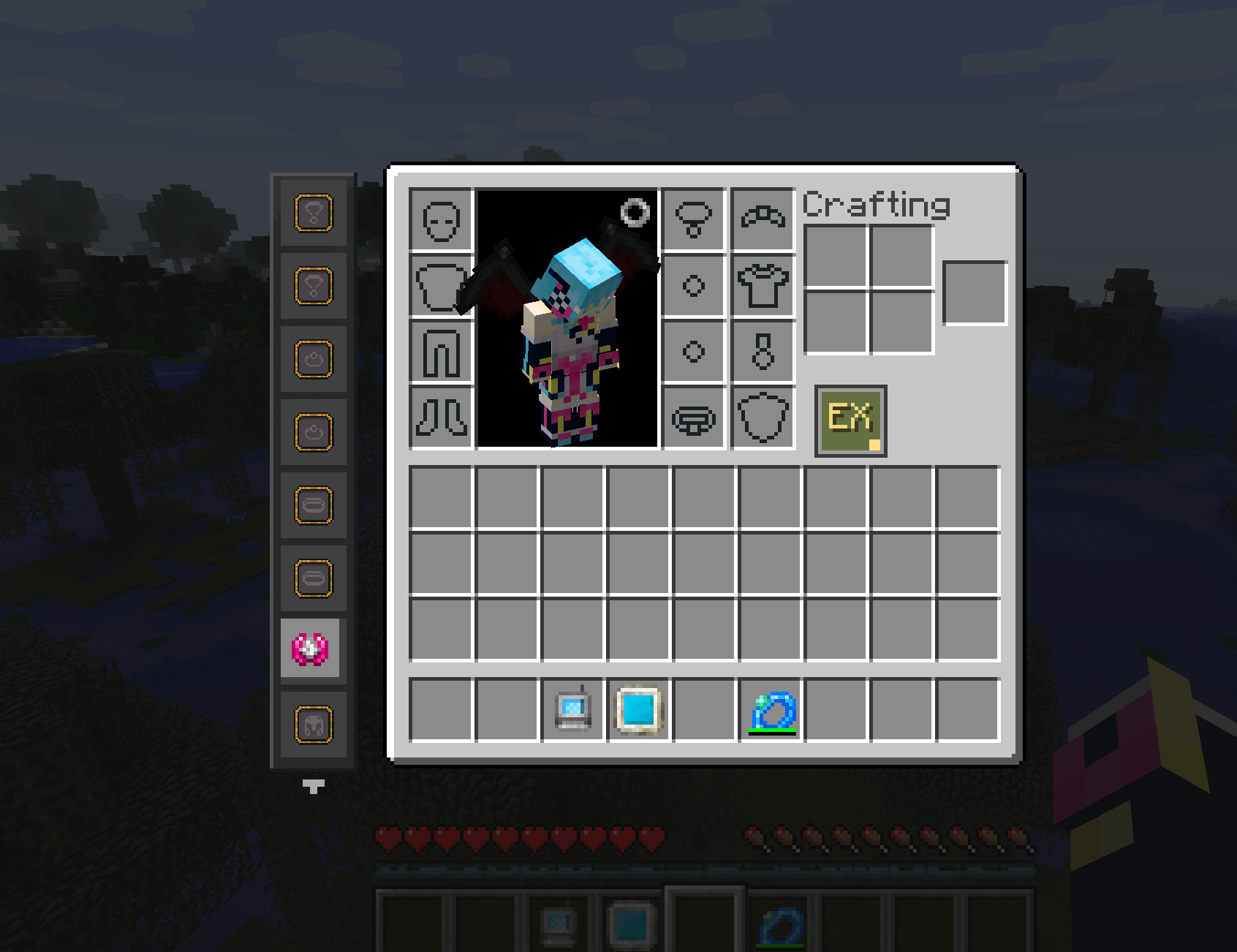
📦 BaubleVault
The ultimate Baubles expansion for Minecraft 1.12.2
BaubleVault extends the Baubles mod with up to 100 additional bauble slots, an unlock-based progression system, armor-as-baubles support( actually everything you want as well), and customizable icon themes — all fully configurable.
✨ Features
🔓 Unlockable Extra Slots (Amulet, Ring, Belt, Head, Body, Charm, Trinket). Slots can be locked by default and unlocked through configurable rules — consume items, kill mobs, reach advancements, or use Wearing special equipment or other baubles (temperally).
🛡️ Armor as Baubles Place any armor piece into bauble slots. Armor attributes, durability, tick effects, most of the event driven ability, @set bonuses,@reskillable(ex. golden osmosis works when golden armor in bauble slot),@Quality all supportted as bauble ability and overlay on body as armor just comes along naturally, all carry over seamlessly. Fully configurable via
#armor_baubles.json — whitelist specific items or enable for all armor globally.
🎨 Themed Slot Icons Choose from multiple icon themes to match your modpack's aesthetic:
-
— Classic individual PNG iconsdefault -
— Vibrant colorful pixel artstyle1 -
— Elegant bright goldgolden_alt -
— Retro low-respixel
⚙️ Highly Configurable Everything is adjustable from the config:
- Slot counts per type
- Unlock rules and conditions
- GUI layout and positioning
- Icon themes
- Armor-bauble behavior
📋 Requirements
- Minecraft 1.12.2
- Forge 14.23.5.2860+
- Baubles (required)
- FermiumBooter (required)
🤝 Compatibility
- ✅ SetBonus
- ✅ PotionFingers
📁 Configuration
All config files are stored in
config/unlockablebauble/:
-
extra_baubles.cfg — Main mod settings
-
armor_baubles.json — Armor-to-bauble whitelist
Bug reports and feedback are welcome.
source:https://github.com/CFP106020087/BaubleVault
- Edition: Minecraft Java
- File type: .jar
- How to install: Install the matching mod loader (Forge, Fabric or NeoForge) for your Minecraft version. → Download the .jar. → Put it in the .minecraft/mods folder and launch that loader profile.
- Where to get it: Opens on CurseForge — not every file is mirrored on our own servers.
Install steps are the general flow for this file type — How to install Minecraft Java mods & modpacks walks through it step by step.
- Ships as BaubleVault-1.2.0.jar — drop this file into the mods folder
- Download size: 248 KB
- Download link checked 23 Aug 2026 — working
These come from our own check of the pack file, not from the source page.